Question

How can I resolve "No module named arcgisscripting" resulting from a Shutdown Python Script in a workspace?

  • September 18, 2017
  • 2 replies
  • 107 views

Forum|alt.badge.img

My PYTHONPATH system variable is set to the following and python.exe and pythonw.exe are both in the D:\\apps\\Python\\ArcGIS10.5 folder. This script works fine in the Python window in ArcMAP.

D:\\apps\\Python\\ArcGIS10.5; D:\\apps\\ArcGIS\\Desktop10.5\\bin

This post is closed to further activity.
It may be an old question, an answered question, an implemented idea, or a notification-only post.
Please check post dates before relying on any information in a question or answer.
For follow-up or related questions, please post a new question or idea.
If there is a genuine update to be made, please contact us and request that the post is reopened.

2 replies

jdh
Contributor
Forum|alt.badge.img+40
  • Contributor
  • September 18, 2017

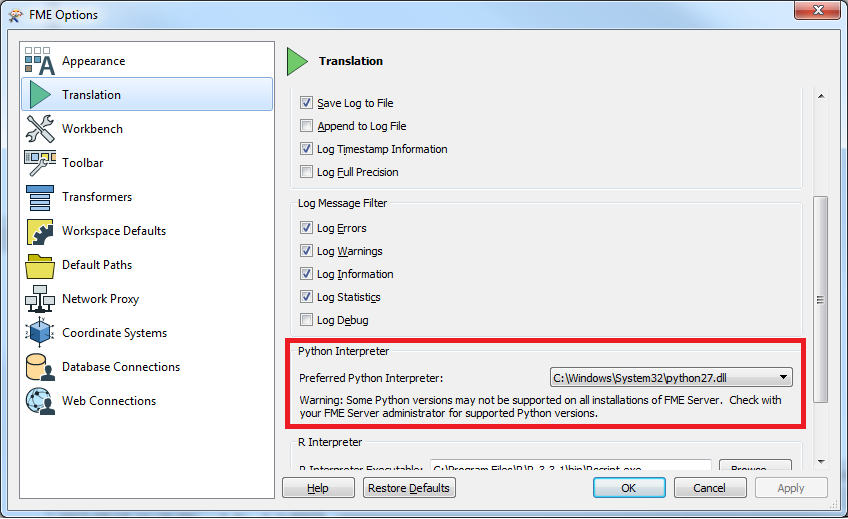
Have you tried explicitly pointing the python interpreter to the arcgis dll?


courtney_m
Contributor
Forum|alt.badge.img+22
  • Contributor
  • September 18, 2017

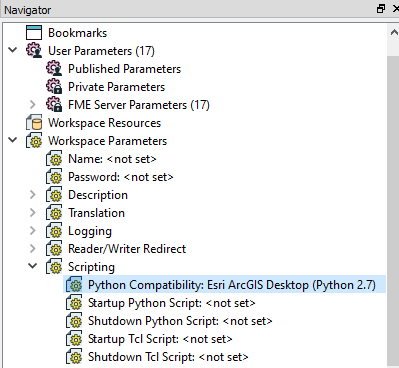
Do you have the Python Compatibility workspace parameter set to ESRI ArcGIS Desktop, as shown in the following screenshot?

Also, make sure that your script begins with import arcpy.