Question

filter files in folder based on input

  • May 21, 2018
  • 2 replies
  • 103 views

Forum|alt.badge.img

Hello,

I have as an input parameter a list of ids separated by "|".

For example: 1|2|4

Next I have a directory with some zip files:

1.zip, 2.zip, 3,zip., 4,zip, 5,zip

As a result I would like to get only files which have names that are in the input list and have it all zipped to the result.zip file:

result.zip


---


|


|_1.zip

|_2.zip

|_4.zip

I came to the point where I used attribute splitter and I have a list of those Ids but I have no idea what to do next. Can you please help me with that?

Thanks!

This post is closed to further activity.
It may be an old question, an answered question, an implemented idea, or a notification-only post.
Please check post dates before relying on any information in a question or answer.
For follow-up or related questions, please post a new question or idea.
If there is a genuine update to be made, please contact us and request that the post is reopened.

2 replies

erik_jan
Contributor
Forum|alt.badge.img+26
  • Contributor
  • May 21, 2018

I would take this approach:

Unpack parameter: AttributeSplitter

Create features from list: ListExploder

Create filenames: StringConcatenator

Copy files to different location: SystemCaller (Copy command).

Zip files: SystemCaller (Zip command).

Hope this helps.


takashi
Celebrity
  • May 21, 2018

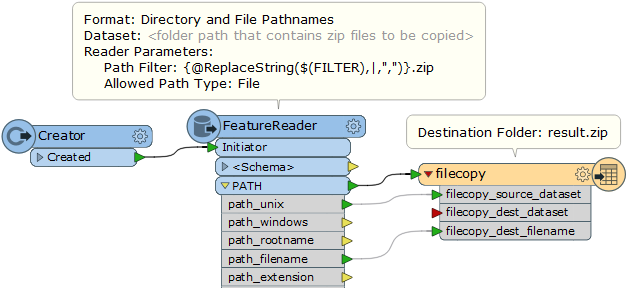
Hi @witos, the Directory and File Pathnames (PATH) reader and the File Copy writer might help you. For example, assuming the filter string (pipe-separated target file names) is given via a user parameter called "FILTER":

See these links to learn about the Path Filter parameter configuration.