Best Answer

Fanning out a feature based groups of a set number

  • August 10, 2018
  • 4 replies
  • 206 views

Forum|alt.badge.img

Hi there,

I've been trying to find answers all over the internet, but no results.

In short, I'm generating a CSV output where my input is an unknown amount of entries (workbench will be run several times and input varies each time), but I want to generate a separate CSV for a maximum of 500 entries found.

So as some examples, based on hypothetical inputs, this is the output I want:

350 entries - 1 output sheet

1700 entries - 4 sheets (3 with 500 each and one with 200)

502 entries - 2 sheets (one with 500, another with 2)

I'm not particularly concerned about the order of these features. I tried the ModuloCounter, but instead of splitting up my input per 500, it splits up my input into 500 equally sized groups, which won't do.

Thanks in advance,

Best answer by ebygomm

If count your attributes then you can create a group in the AttributeCreator with the following formula

@Evaluate(@floor(@Value(_count)/500))
This post is closed to further activity.
It may be an old question, an answered question, an implemented idea, or a notification-only post.
Please check post dates before relying on any information in a question or answer.
For follow-up or related questions, please post a new question or idea.
If there is a genuine update to be made, please contact us and request that the post is reopened.

4 replies

ebygomm
Influencer
Forum|alt.badge.img+46
  • Influencer
  • Best Answer
  • August 10, 2018

If count your attributes then you can create a group in the AttributeCreator with the following formula

@Evaluate(@floor(@Value(_count)/500))

Forum|alt.badge.img

@egomm,

Works perfectly, thanks a million!

Best regards,


robotix
Contributor
Forum|alt.badge.img+10
  • Contributor
  • March 11, 2019

I'm trying to figure out how to split a list into smaller segments. I assume this would work the same but I don't understand how you are using the formula. Do you have a visual?

thanks


ebygomm
Influencer
Forum|alt.badge.img+46
  • Influencer
  • March 11, 2019

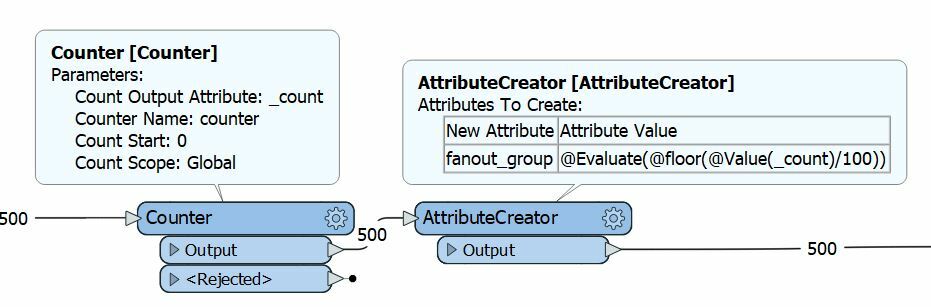
I'm trying to figure out how to split a list into smaller segments. I assume this would work the same but I don't understand how you are using the formula. Do you have a visual?

thanks

This assigns a common attribute to features so that each group contains a specified number of features (in this case 100) . The common attribute can then be used in a fanout

The workflow to split a list into smaller segments would be quite different.