


Question

Document PDF Styler - Option for vertical transposed table

  • September 18, 2025
  • 1 reply
  • 121 views

kylied
Contributor
Forum|alt.badge.img+1

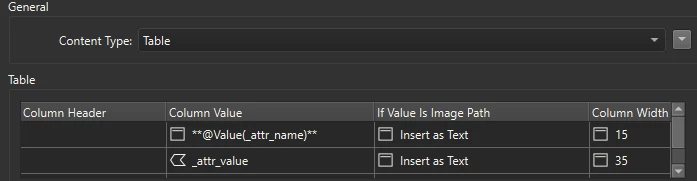
I am currently working with the new DocumentPDFStyler to create a individual feature reports.  Instead of the table reading across the page, I am creating a vertical transposed table with the attribute exploder.
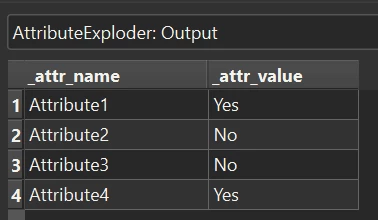
Table input


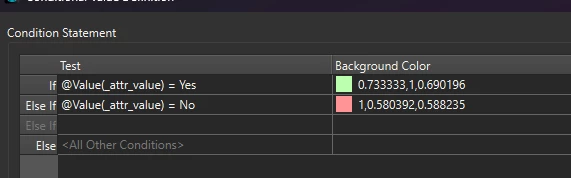
However this seems to have limits with the styling as both fields are in the ‘column value’ so any styling done, including conditional options, are performed on the entire table instead of just the second value column.
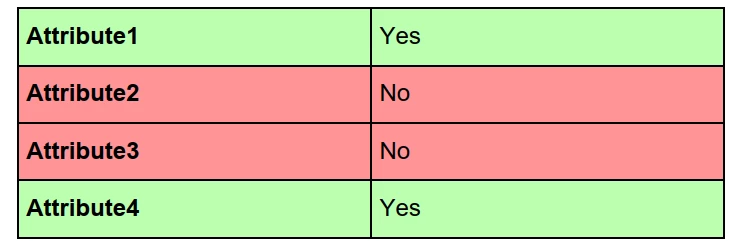
 

Output PDF

Is there a different way to do this or is it possible to have an other documentPDFStyler element for vertical tables?


 

1 reply

donalmateer
Safer
Forum|alt.badge.img+11
  • Safer
  • June 16, 2026

Hi ​@kylied 

You're on the right track with the AttributeExploder approach. That's actually the recommended way to create a vertical/transposed table in the DocumentPDFStyler.

The limitation you're hitting is a current one: the DocumentPDFStyler's Table element applies styling at the row level, meaning the same styling rules apply to all cells in a row. There's no option to target individual columns (like the value column only) with separate conditional formatting within a single table instance.

On the conditional styling piece specifically, conditional support for Table Row cells (the Column Header and Column Value fields) was intentionally removed in version 0.1.38 of the Document PDF package because it wasn't functioning correctly. If you're still seeing conditional options for table rows, updating the package via the FME Hub should resolve that: https://hub.safe.com/publishers/safe/packages/documentpdf

As for a dedicated vertical table element, that's not currently available in the DocumentPDFStyler. If this is something that would be useful for your workflows, I'd encourage you to submit an idea so others can vote on it and our product team can consider it: https://community.safe.com/ideas

Let us know if you have any other questions!