




Question

ChangeDetector not identifying moved points

  • April 11, 2026
  • 6 replies
  • 99 views

vxn43
Enthusiast
Forum|alt.badge.img+20

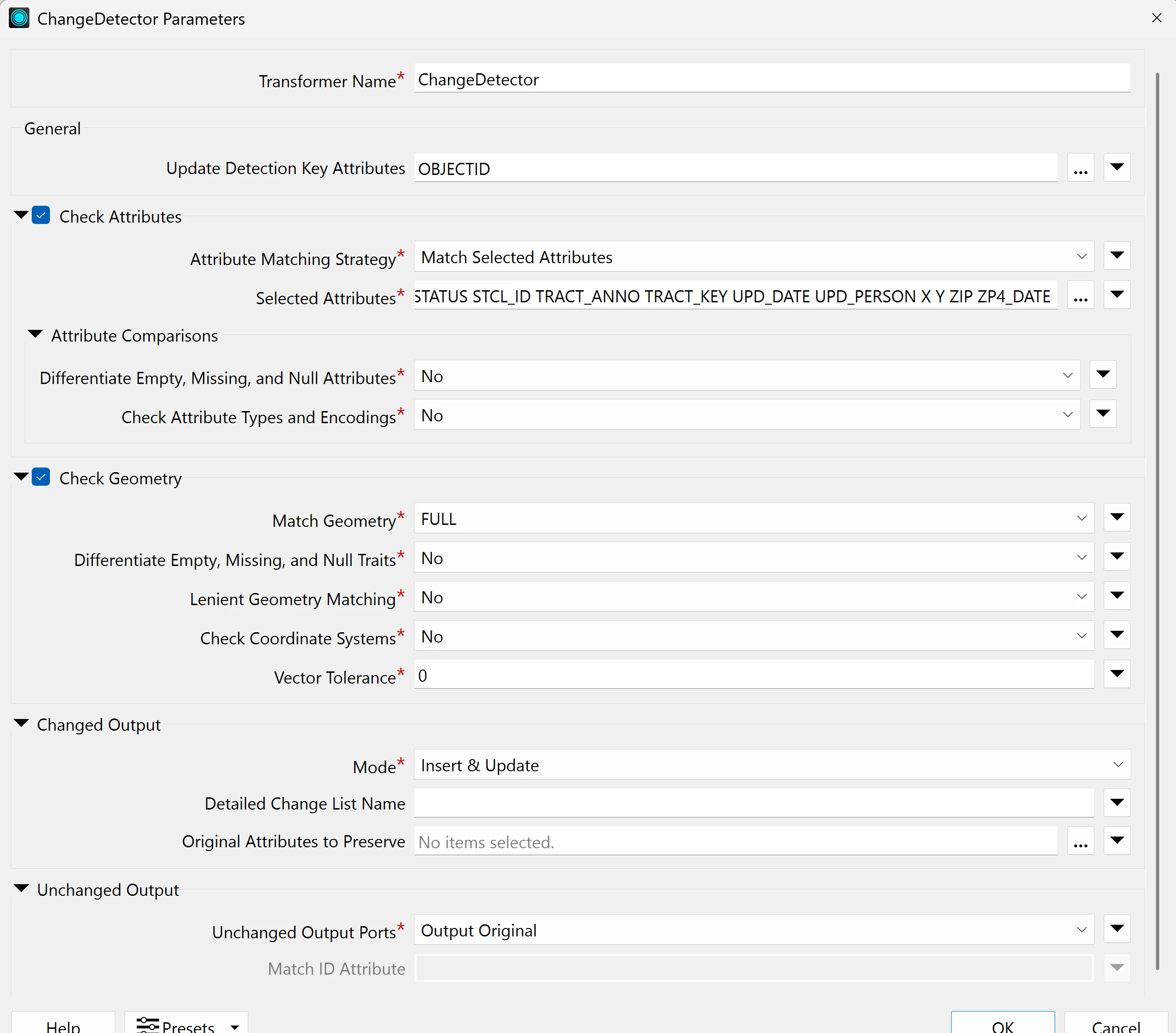
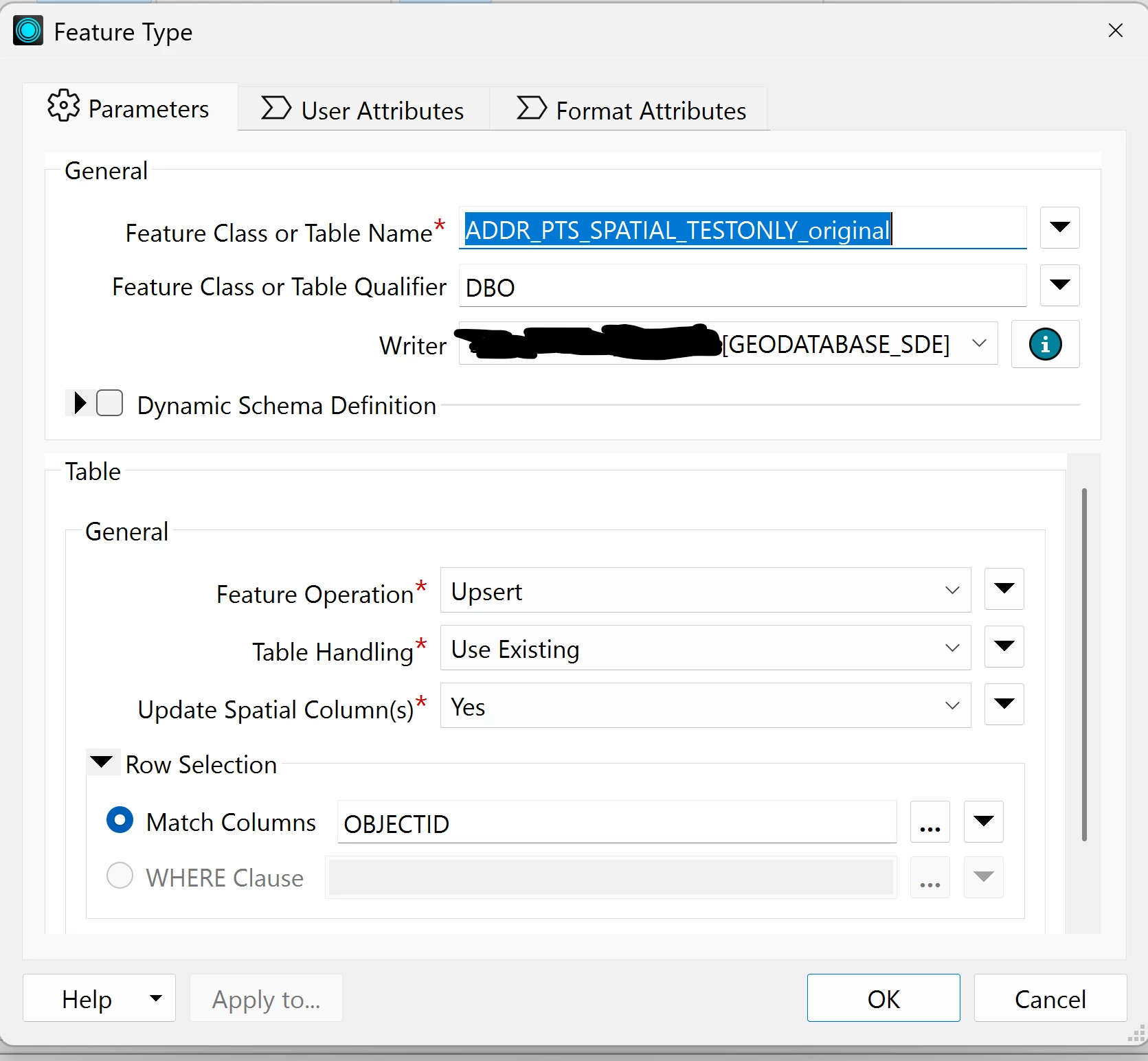
I am using FME Form 2026.1. Using ChangeDetector. I have one point feature class (Reader name ends in _revised) where I moved a point to a different location but did not change any of the attributes. I output to the Writer and the change in the point location is not shown. I have Check Geometry checked in the ChangeDetector. I did not insert any new records, the only update was I moved a point. Any ideas as to why the point moved to the new location is not being written to the Writer? I have some screenshots from my workspace:

ChangeDetector parameters:
 

The Writer parameters:
 

6 replies

j.botterill
Influencer
Forum|alt.badge.img+58
  • Influencer
  • April 13, 2026

Under the ‘Changed Output’ parameter section, add a list called Changes

Then out of the “Updated” port of the ChangeDetector, add a ListExploder and inspect the attribute output values. There should be an attribute name called Geometry something… and you can see the original vs the revised


s.jager
Influencer
Forum|alt.badge.img+24
  • Influencer
  • April 13, 2026

In your list of Selected Attributes for matching, I see at least 2 attributes that I suspect have changed because you changed the geometry or something else. Based on that, the Change Detector decides that there are 5 features deleted, and 5 features inserted. That indicates to me that the attribute-comparison you selected is way too strict.

Try to select fewer attributes (I’d deselect the UPD_DATE and UPD_PERSON, because I suspect that those are filled by triggers on the database - and especially if UPD_DATE is actually a datetime, that will be too finegrained), and also make sure that the ObjectID’s are exactly the same, that should basically be your primary key. I agree with botterill: add a name for the detailed changes list, and check what the ChangeDetector sees. It can be tricky getting the right results from it, if you select too many attributes.


ebygomm
Evangelist
Forum|alt.badge.img+48
  • Evangelist
  • April 13, 2026

Nothing is coming out the changed port so adding a list isn’t going to help here. I suspect the OBJECTID isn’t actually a key field, it’s picking up 5 inserts and 5 deletes which I think are probably really edits, but the objectids don’t align so the change detector isn’t picking them up as updates.


vxn43
Enthusiast
Forum|alt.badge.img+20
  • Author
  • Enthusiast
  • April 13, 2026

I found the problem. The ChangeDetector Output Port was set to Output Original. I changed it to Output Revised and the changes were upserted into the Writer of the original dataset. Now, my original dataset has the changes. 


s.jager
Influencer
Forum|alt.badge.img+24
  • Influencer
  • April 13, 2026

With respect to your original question: that does not make sense to me. I also suspect that the end results will be wrong, since you insert the features that ChangeDetector considers new, but you do not delete the features that ChangeDetector considers deleted. One could image not deleting a ‘Deleted’ feature, instead setting an attribute like ‘EndDate’ or ‘IsActive’ or some such validation-attribute, but that also does not seem to happen in your screenshot. And your ChangeDetector has Mode=’Insert & Update’, but your Writer has Mode=’Upsert’. So I am not sure you will get the results you want, but if you are happy with the results...


vxn43
Enthusiast
Forum|alt.badge.img+20
  • Author
  • Enthusiast
  • April 13, 2026

With respect to your original question: that does not make sense to me. I also suspect that the end results will be wrong, since you insert the features that ChangeDetector considers new, but you do not delete the features that ChangeDetector considers deleted. One could image not deleting a ‘Deleted’ feature, instead setting an attribute like ‘EndDate’ or ‘IsActive’ or some such validation-attribute, but that also does not seem to happen in your screenshot. And your ChangeDetector has Mode=’Insert & Update’, but your Writer has Mode=’Upsert’. So I am not sure you will get the results you want, but if you are happy with the results...

Thanks for pointing this out. I will take a look later today and post what I find here.









