Best Answer

Can new attribute indexes be defined on output Feature Class using Workbench?

  • June 26, 2017
  • 8 replies
  • 312 views

Best answer by gpoehacker

I am pretty sure, you want believe me :-)

But try this:

The writer is for a

Esri Geodatabase (File Geodb)

FME 2017 Build 17650

CREATE INDEX I_IDX ON FeatureClass1 (Test)

CREATE Indexname ON Featureclass (Attribute)

OR

CREATE Indexname ON Featureclass (Attribute1,Attribute2,....)
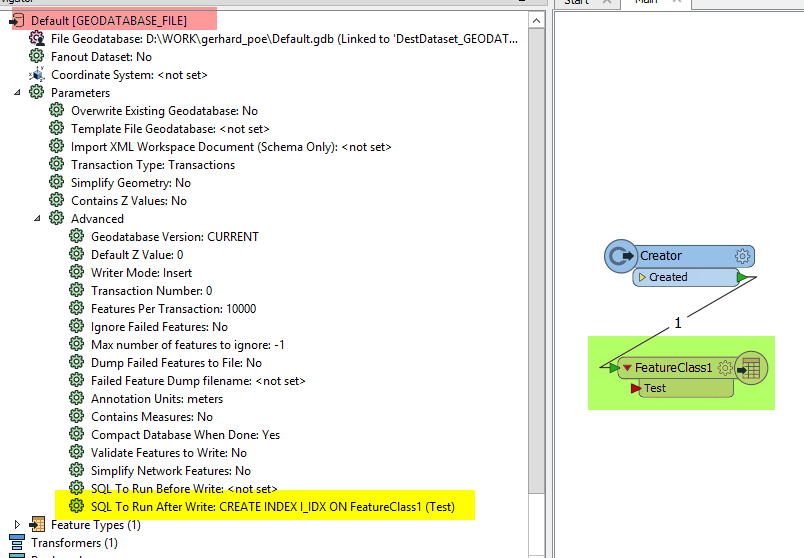
Result:
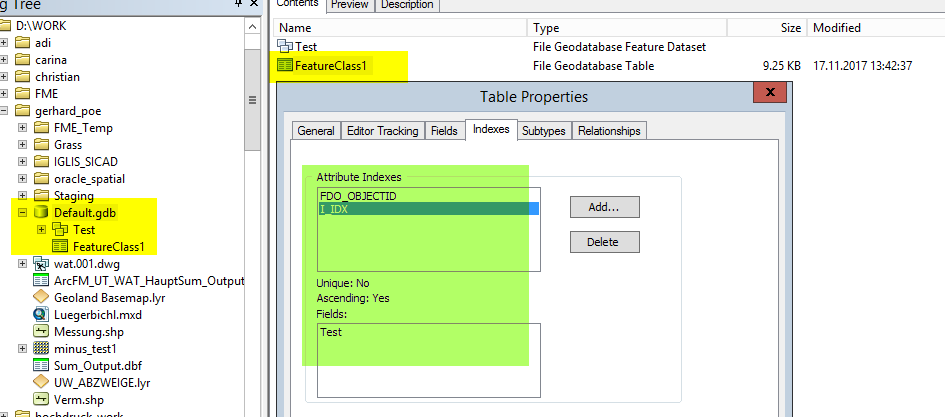
I don’t know how or why it works…….

But it works!

This post is closed to further activity.
It may be an old question, an answered question, an implemented idea, or a notification-only post.
Please check post dates before relying on any information in a question or answer.
For follow-up or related questions, please post a new question or idea.
If there is a genuine update to be made, please contact us and request that the post is reopened.


8 replies

david_r
Celebrity
  • June 27, 2017

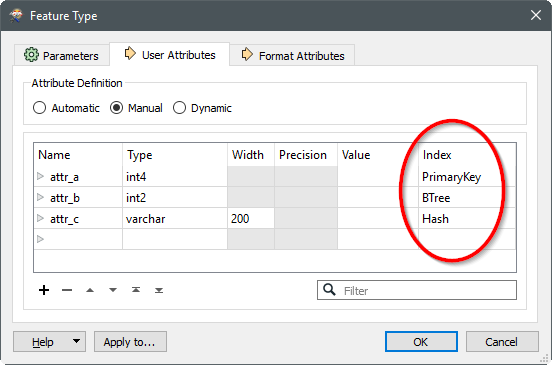
Some writer formats do indeed have an index column where you can define attribute indexes, but you'll have to do it manually (you can not do it e.g. using an attribute or a published parameter). Here's an example from the PostGIS writer:


Thanks David_r for your reply, though maybe I should have been a bit clearer. I want to be able to define attribute indexes specifically on an ESRI File Geodatabase Feature Class that is being generated using an FME Writer.


david_r
Celebrity
  • June 29, 2017

If you use the "Esri Geodatabase (File Geodb API)" writer you'll have that option.

It doesn't look like the "Esri Geodatabase (File Geodb ArcObjects)" allows you to define indexes the same way, but hopefully someone can prove me wrong.


mark2atsafe
Safer
Forum|alt.badge.img+59

If you use the "Esri Geodatabase (File Geodb API)" writer you'll have that option.

It doesn't look like the "Esri Geodatabase (File Geodb ArcObjects)" allows you to define indexes the same way, but hopefully someone can prove me wrong.

Sadly I don't think you are wrong. The ability to write attribute indexes with the ArcObjects writer is filed as an enhancement as PR#22674. There are a number of cases and a high priority, but there's no definite target date yet.


david_r
Celebrity
  • June 29, 2017
Sadly I don't think you are wrong. The ability to write attribute indexes with the ArcObjects writer is filed as an enhancement as PR#22674. There are a number of cases and a high priority, but there's no definite target date yet.


Thanks, good to know. For what it's worth, feel free to add my name to the PR, I've needed it on several occasions but didn't bother contacting support about it ;-)

  • Best Answer
  • November 17, 2017

I am pretty sure, you want believe me :-)

But try this:

The writer is for a

Esri Geodatabase (File Geodb)

FME 2017 Build 17650

CREATE INDEX I_IDX ON FeatureClass1 (Test)

CREATE Indexname ON Featureclass (Attribute)

OR

CREATE Indexname ON Featureclass (Attribute1,Attribute2,....)

Result:

I don’t know how or why it works…….

But it works!


bwn
Evangelist
Forum|alt.badge.img+26
  • Evangelist
  • February 26, 2020

I am pretty sure, you want believe me :-)

But try this:

The writer is for a

Esri Geodatabase (File Geodb)

FME 2017 Build 17650

CREATE INDEX I_IDX ON FeatureClass1 (Test)

CREATE Indexname ON Featureclass (Attribute)

OR

CREATE Indexname ON Featureclass (Attribute1,Attribute2,....)

Result:

I don’t know how or why it works…….

But it works!

Just to add a comment here. This solution posted here is now my Default solution to Creating FGDB indices. It is weird that an SQL command like "CREATE INDEX" works, but that will be in part because the FGDB API supports a subset of SQL commands.

As it creates the index AFTER writing the features, this is by far the fastest way to write to the Geodatabase. All other methods create the index before writing the features and with FGDBs this slows writing/updating down considerably.

Unfortunately it doesn't appear that "DROP INDEX" is supported in the API however.


david_r
Celebrity
  • February 26, 2020

Just to add a comment here. This solution posted here is now my Default solution to Creating FGDB indices. It is weird that an SQL command like "CREATE INDEX" works, but that will be in part because the FGDB API supports a subset of SQL commands.

As it creates the index AFTER writing the features, this is by far the fastest way to write to the Geodatabase. All other methods create the index before writing the features and with FGDBs this slows writing/updating down considerably.

Unfortunately it doesn't appear that "DROP INDEX" is supported in the API however.

Thanks for the bump and for confirming that it works, I've flagged the answer accordingly.