
I am try to use Clipper function in Python API for Raster.
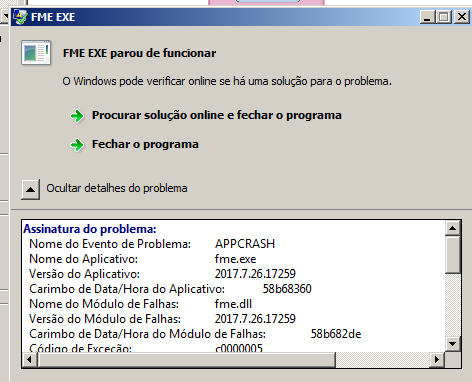
When i run my Workspace a crash is happen:
Attached my Workspace.
Thanks in Advance,

This post is closed to further activity.
It may be an old question, an answered question, an implemented idea, or a notification-only post.
Please check post dates before relying on any information in a question or answer.
For follow-up or related questions, please post a new question or idea.
If there is a genuine update to be made, please contact us and request that the post is reopened.
Hi @danilo_inovacao, the FME Objects API doesn't have any capability to read and create an FMERaster object from a raster file path, except a case where you read a raster feature from a file using an FMEUniversalReader object.
If the input feature has a raster geometry, this script works to clip the raster held by the input feature and update (overwrite) the geometry of the feature with the clipped raster.
# PythonCaller Script Example: Clip a Raster # Assuming that the input feature always has a raster geometry. import fmeobjects
class FMERasterTools(object): def input(self, feature): # Clipper's extents. # Modify these values appropriately according to the requirement. xMin, yMin = -97.6864, 30.3571 xMax, yMax = -97.6802, 30.3509
# Retrieve the geometry (FMERaster object) from the input feature. raster = feature.getGeometry()
# Create an FMERasterTools object. rasterTools = fmeobjects.FMERasterTools()
# Clip the original raster by the specified extents. # The FMERasterTools.clip() method returns a clipped raster. newRaster = rasterTools.clip(xMin, yMin, xMax, yMax, raster)
# Set the clipped raster to the feature. feature.setGeometry(newRaster)
# Output the feature containing the clipped raster. self.pyoutput(feature)
See also the FME Objects Python API Documentation.
Hi @danilo_inovacao, the FME Objects API doesn't have any capability to read and create an FMERaster object from a raster file path, except a case where you read a raster feature from a file using an FMEUniversalReader object.
If the input feature has a raster geometry, this script works to clip the raster held by the input feature and update (overwrite) the geometry of the feature with the clipped raster.
# PythonCaller Script Example: Clip a Raster # Assuming that the input feature always has a raster geometry. import fmeobjects
class FMERasterTools(object): def input(self, feature): # Clipper's extents. # Modify these values appropriately according to the requirement. xMin, yMin = -97.6864, 30.3571 xMax, yMax = -97.6802, 30.3509
# Retrieve the geometry (FMERaster object) from the input feature. raster = feature.getGeometry()
# Create an FMERasterTools object. rasterTools = fmeobjects.FMERasterTools()
# Clip the original raster by the specified extents. # The FMERasterTools.clip() method returns a clipped raster. newRaster = rasterTools.clip(xMin, yMin, xMax, yMax, raster)
# Set the clipped raster to the feature. feature.setGeometry(newRaster)
# Output the feature containing the clipped raster. self.pyoutput(feature)
See also the FME Objects Python API Documentation.



