


Question

SSO Flow issues under high CPU load after FME upgrade

  • April 20, 2026
  • 2 replies
  • 58 views

ecx
Supporter
Forum|alt.badge.img+6

I’ve noticed a few issues since upgrading FME Form & Flow (FME Flow 2026.1 Build 26103 - win64) that seem to show up when I’m also developing in FME Form while remoted into our FME test VM.

This is how I usually work, mainly because some jobs take a while to run and if I do them locally my PC can go to sleep after 5 minutes and the jobs fail. This setup has never had an issue in the past.
 

Since the upgrade though, running Form this way can cause problems with FME Flow on the same VM. When I’m running heavier workbenches and CPU hits 100%, Flow can become unresponsive or look like it’s soft‑locked. This never happened before the upgrade.

One thing I’ve noticed is that this seems to mostly affect SSO sessions. My theory is that when CPU is maxed out, Flow struggles to grab required info for SSO before it expires. Just a guess.

 

I am also concerned that FME flow may soft lock itsself if it is running 100% cpu and the user cannot log in via SSO (yet to be tested)


It also feels like the newer version of FME Form uses more resources than it used to, which makes it easier to hit this situation when Form and Flow are sharing the same VM.


Has anyone else had issues with fme form/flow using more resources and that causing issues with flow responsiveness?
 

Thanks

2 replies

mmorgan0110
Contributor
Forum|alt.badge.img+2
  • Contributor
  • April 24, 2026

FME Form 2026 will completely lag/lock up two different computers I have (both high end cpu/RAM) and the only way out of it is to restart the whole computer. I have a ticket open and was given the typical boiler plate response. I am trying to diagnose on my end but from what I am experiencing I know Its the 2026 version as previous versions of FME Form do not behave like this on the exact same workbenches.


steveatsafe
Safer
Forum|alt.badge.img+15

@ecx Please log a support ticket if you haven’t already.  We’d like know more details about what is causing this.  


@mmorgan0110 - I’m assuming your response means you are still not satifisfed with teh ‘typical boiler plate response.  Has this progressed for you? 


For both, the next time you are seeing this behaviour… consider the following:

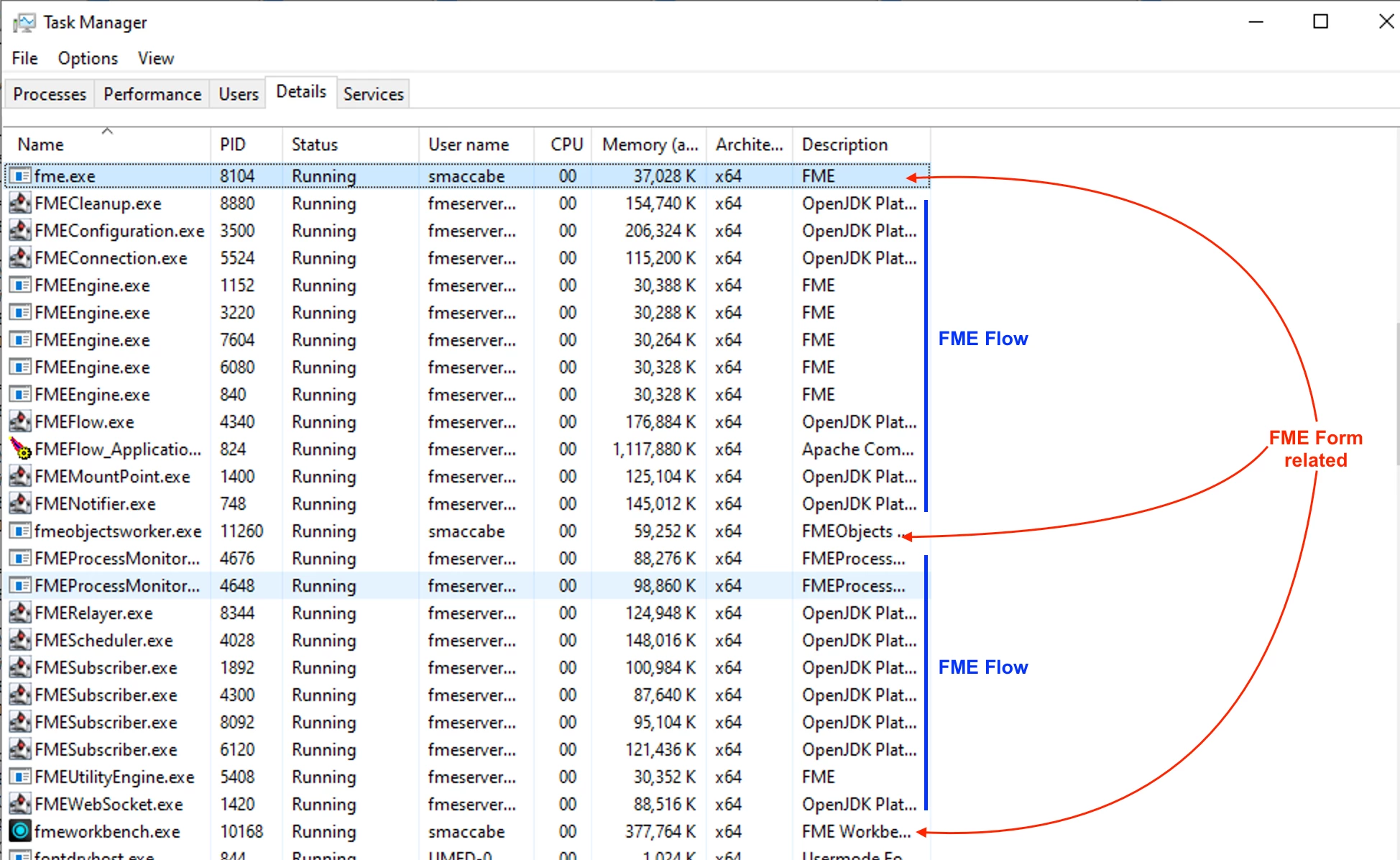
  1. Please open Windows Task Manager > and the Details tab.
  2. Sort by “name” column and review the RAM and CPU usage of any process that starts with FME*.exe.  (see screengrab below) 
  3. We would be looking for something other than FMEEngine.exe or fme.exe taking up a lot of RAM or using high % of CPU on your environment.  
  4. FMEEngine.exe and fme.exe are the engine processes of FME Flow and Form respectively and would be normal for those processes to be consuming RAM and CPU… however, if they are using extreme amounts of RAM - that could also be a flag.   As long as your system has multiple vCPUs you should be OK with such a configuration where Form and FME Flow are on the system - and decent modern CPUs.
  5. An indication of the type of workspaces you are running would be helpful to.
  6. Feel free to expand on any of this in a support ticket (if you have one or plan to create one).

http://www.safe.com/support

Cheers,
Steve