
Question

Using a global or static variable in TCLCaller

  • May 6, 2014
  • 1 reply
  • 63 views

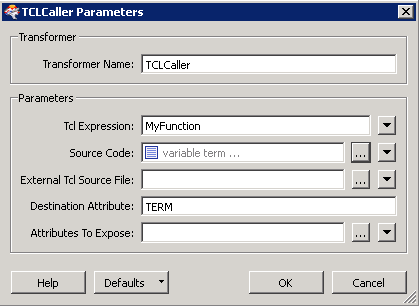
I haven't seen a simple answer to this elsewhere, so documenting this here.  I know very little TCL but this works.


You need to declare the global variables BEFORE the function definition within the TCLCaller, then declare the variable as 'global' within the function.


eg.


-----------------------------------------------------------------------------------------


variable term


set term 1


proc MyFunction {} {


  global term


  FME_LogMessage fme_inform "term = $term"


  set term [ expr $term + 1 ]


  # Set NEW attribute like this ..


  return $term


}


This post is closed to further activity.
It may be an old question, an answered question, an implemented idea, or a notification-only post.
Please check post dates before relying on any information in a question or answer.
For follow-up or related questions, please post a new question or idea.
If there is a genuine update to be made, please contact us and request that the post is reopened.

1 reply

takashi
Celebrity
  • May 6, 2014
Hi,


Thank you for sharing the tips. I confirmed it works as a global variable which is common to multiple TclCallers in a workspace. But it's not common to Startup and Shutdown Tcl scripts. This point is different from Python scripts.


Takashi


