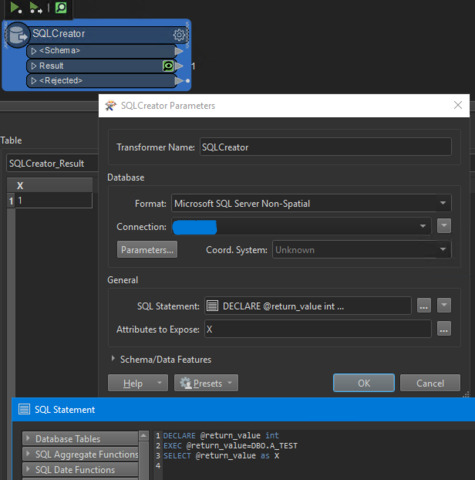
How do I re-assign @return_value to e.g. an attribute or a variable?

This post is closed to further activity.
It may be an old question, an answered question, an implemented idea, or a notification-only post.
Please check post dates before relying on any information in a question or answer.
For follow-up or related questions, please post a new question or idea.
If there is a genuine update to be made, please contact us and request that the post is reopened.
I believe in order to return a value from a Stored Procedure you would need the following:
1. Needs to ensure the procedure has return values or OUT parameters.
2. expose the attributes you are expecting on the SQLExecutor using the Attributes to Expose setting. You can type in the name of the value to be returned.
A similar question can be seen here, aside from using an Oracle database: https://knowledge.safe.com/questions/4782/results-from-oracle-stored-procedure.html
I believe in order to return a value from a Stored Procedure you would need the following:
1. Needs to ensure the procedure has return values or OUT parameters.
2. expose the attributes you are expecting on the SQLExecutor using the Attributes to Expose setting. You can type in the name of the value to be returned.
A similar question can be seen here, aside from using an Oracle database: https://knowledge.safe.com/questions/4782/results-from-oracle-stored-procedure.html
The attribute is only exposed in the result, not the Initiator, which is used when exec runs. I am looking for a way to do something similar to @Value(_returnValue) = @return_value
Where _returnValue would be an attribute. I'd be happy if I could feed it into a variable, too
@trentatsafe With Exec, it appears it's the initiator outlet only, but the attribute that is exposed is only available from result, which is not used....
Well, a little late in answering this, but hopefully it might be useful to someone along the way.
I do the following when running MS SQL Server stored procedures:
DECLARE @return_value int
EXEC @return_value=DBO.A_TEST
SELECT @return_value as X
This results in X having a value of zero when the procedure executes without any errors. If there is an error in your code or within the stored procedure then it will show X with a value of NULL under "<Rejected>".
Also, if you want different results depending on what happens in the procedure then you can use a variable in your procedure and return that as your last value.
Example:
ALTER PROCEDURE dbo.A_TEST
AS
BEGIN
DECLARE @Return_Value INT;
-- SET NOCOUNT ON added to prevent extra result sets from
-- interfering with SELECT statements.
SET NOCOUNT ON;
SET @Return_Value = 1
-- Return the value as last statement of stored procedure.