




Question

SQL To Run after Wrtite -Incorrect Syntax - Provider error `(-2147217900). Adding a named constraint primary key

  • June 17, 2020
  • 1 reply
  • 140 views

moraalejandra93
Participant
Forum|alt.badge.img

Hi guys, I'm trying to add a named constraint primary key into a large number of SQL Server tables joined in one reader with this code in the 'SQL to Run after Write' part:
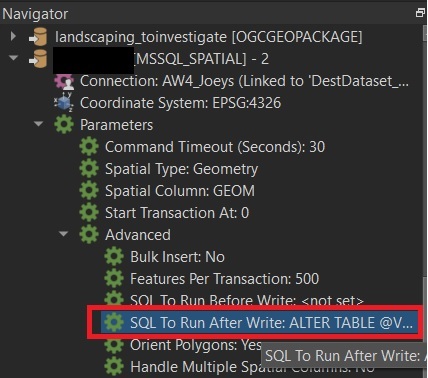
0684Q00000ArAh2QAF.jpg


FME_SQL_DELIMITER ;

ALTER TABLE @Value(fme_basename)
ADD CONSTRAINT PK_@Value(fme_basename) PRIMARY KEY (id1)

But I got this error:

Microsoft SQL Server Spatial Writer: Query failed, possibly due to a malformed statement.  Query Text `ALTER TABLE @Value(fme_basename)

ADD CONSTRAINT PK_@Value(fme_basename) PRIMARY KEY (Id1)'. Provider error `(-2147217900) Incorrect syntax near '@Value'.'


Does anyone know what is the error? Or how can add a Primary Key for a large number of tables joined in one reader?


Thanks a lot

This post is closed to further activity.
It may be an old question, an answered question, an implemented idea, or a notification-only post.
Please check post dates before relying on any information in a question or answer.
For follow-up or related questions, please post a new question or idea.
If there is a genuine update to be made, please contact us and request that the post is reopened.

1 reply

erik_jan
Contributor
Forum|alt.badge.img+26
  • Contributor
  • June 17, 2020

Not sure you can use attributes in the After SQL statement.

A way to solve this is:

Use the FeatureWriter instead of the writer.

On the Summary output you have a list of feature types (tables) that are written to.

You can use that list (ListExploder) followed by a SQLExecutor to create the constraints.


Another thought:

fme_feature_type should be the fme attribute that contains the name of the table, not fme_basename.


Hope this helps.


