Question

Shapefilename with directory

  • March 9, 2017
  • 3 replies
  • 36 views

Hello, i have to write esri shapefiles and want to dynamically create directories. So i tried to write something like @Value(outDir)/@Value(outFilename) in the field Shapefilename of the writer. But there is no directory created, the "/" is replaced by a "_". It is the same with "\\".

Is this possible?

Thank you.

This post is closed to further activity.
It may be an old question, an answered question, an implemented idea, or a notification-only post.
Please check post dates before relying on any information in a question or answer.
For follow-up or related questions, please post a new question or idea.
If there is a genuine update to be made, please contact us and request that the post is reopened.

3 replies

david_r
Celebrity
  • March 9, 2017

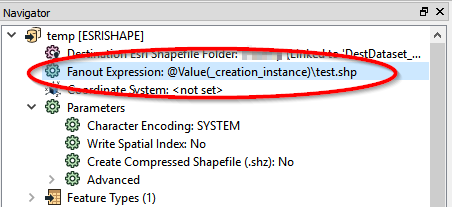
Are you using dataset fanout? Example:

The above example will create and output "test.shp" in subdirectories based on "_creation_instance".


itay
Supporter
Forum|alt.badge.img+19
  • Supporter
  • March 9, 2017

Hi @walgram,

Since a shapefile is a folder based format, the destination parameter points to a folder, the shapefile name is set in the writer feature type.

See the attached demo workspace, where you can dynamically create the destination folder and shapefile name

shapefilename-with-directory.fmw


takashi
Celebrity
  • March 11, 2017

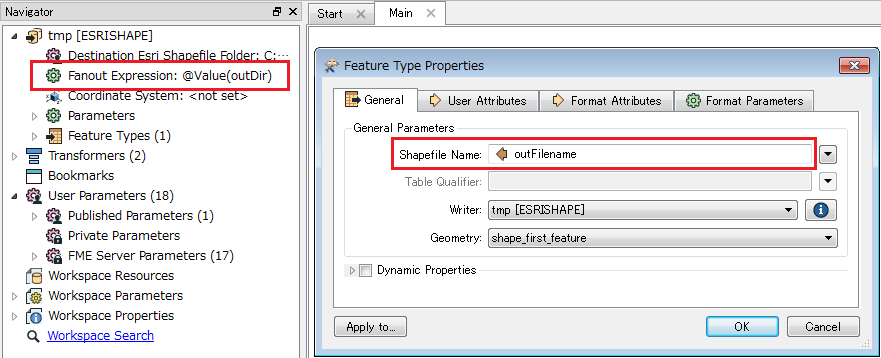
Hi @walgram, a combination of Dataset Fanout and Feature Type Fanout might help you.

Assuming that "outDir" attribute stores the destination folder name and "outFilename" attribute stores your desired Shepefile file name; set the "outDir" to the Fanout Expression parameter of the Shapefile writer, and set the "outFilename" to the Shapefile Name field in the writer feature type. e.g.

See the Workbench Help to learn more about the Fanout mechanism.

FME Workbench | Separating Output Data with Fanout