Solved

Geometry Challenge - 2Box replacer based on cross geometry

  • December 4, 2025
  • 7 replies
  • 148 views

galigis
Enthusiast
Forum|alt.badge.img+20

HI All,

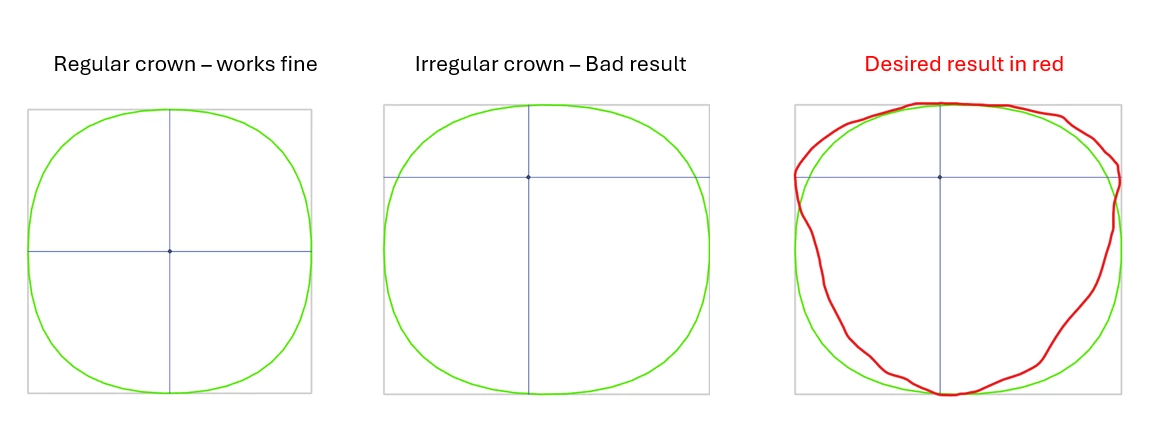
I have a bit of geometry challenge to create a rectangle (or square) polygon based on a cross geometry, some example below:
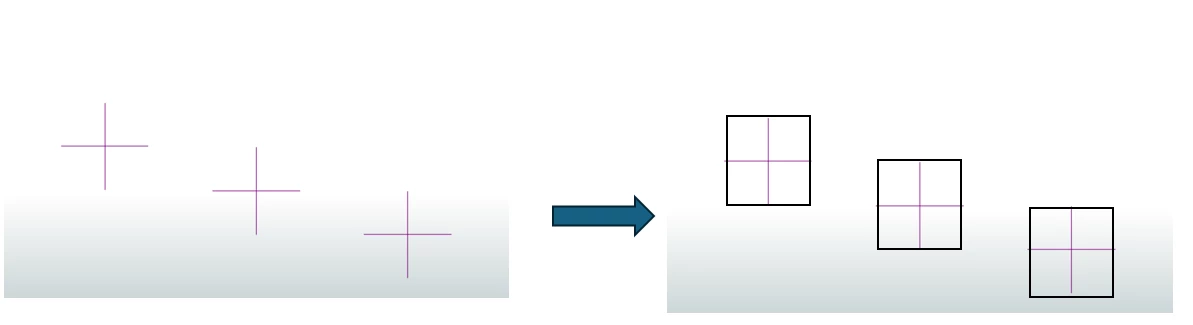
Any ideas how to achieve this?

Thanks :)

Best answer by DanAtSafe

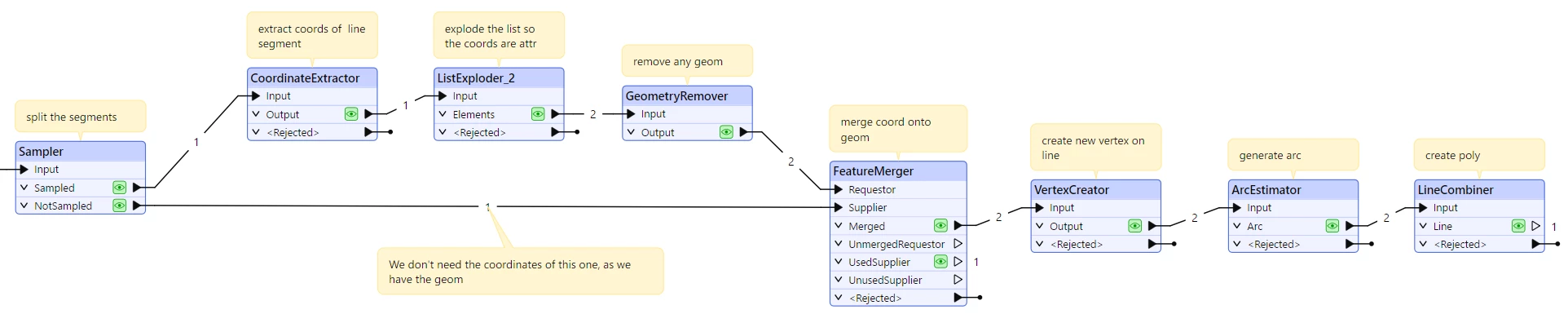
Hi ​@galigis I think you need to make a Bezier curve for each quadrant
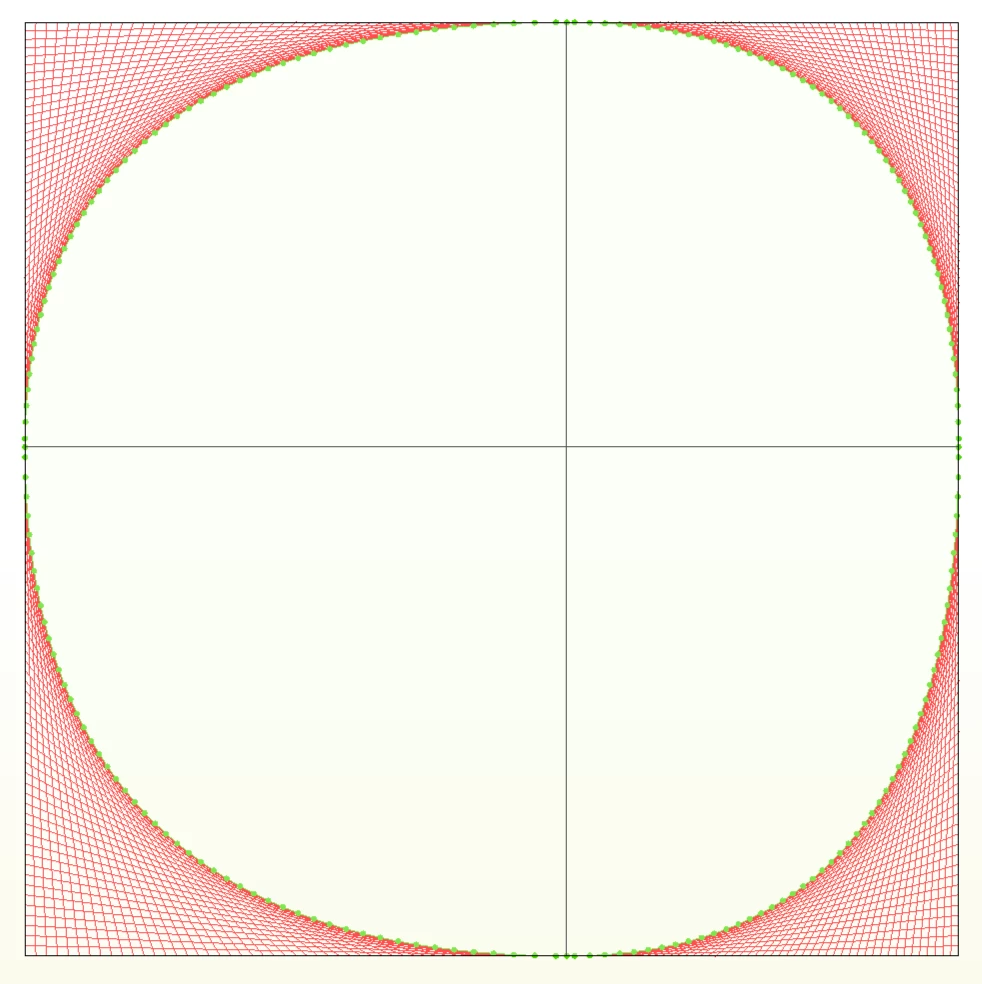
This workspace approximates that without creating actual curves or arcs.

7 replies

DanAtSafe
Safer
Forum|alt.badge.img+22
  • Safer
  • December 4, 2025

Hi ​@galigis, If the crosses are all oriented in the same way then a BoundingBoxReplacer should work.


hkingsbury
Celebrity
Forum|alt.badge.img+67
  • Celebrity
  • December 4, 2025

If they’re not orientated the same direction, then for each of the two lines that make up the cross, you could:

  1. Find the length and angle of the line it intersects
  2. Clone it, offset the line using the length and angle of the intersecting line
  3. You should now have four lines forming a box
  4. Combine the lines into a polygon

galigis
Enthusiast
Forum|alt.badge.img+20
  • Author
  • Enthusiast
  • December 4, 2025

thanks ​@hkingsbury and ​@DanAtSafe  It appears that the BoundaryBox tool only partially addresses the issue.
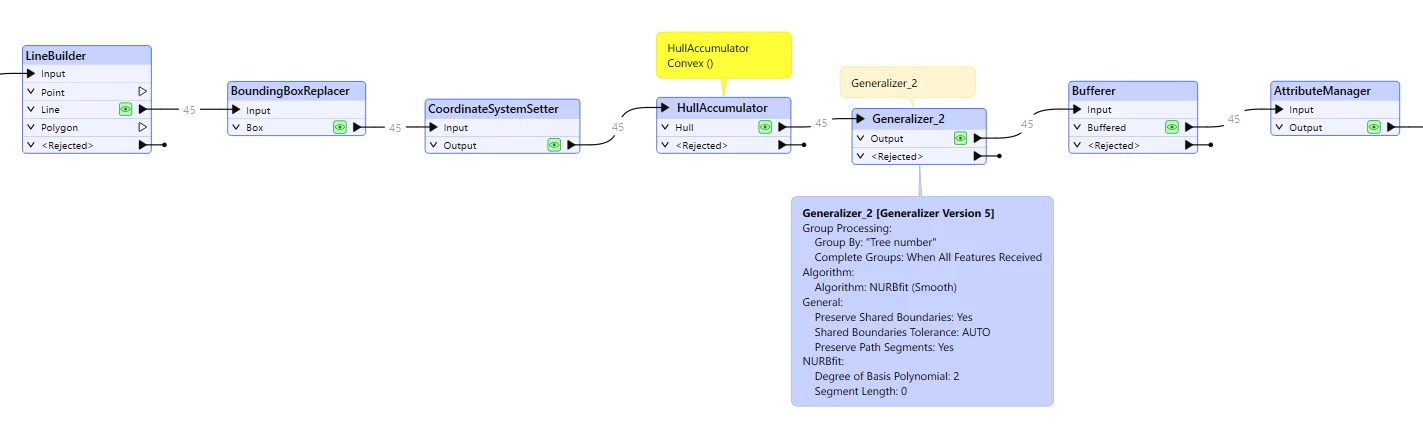
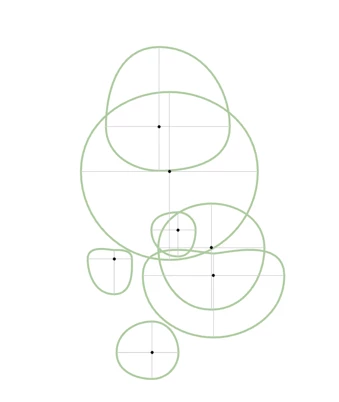
My objective is to generate tree crowns based on the North, South, East, and West measurements from the stem. I initially assumed that creating a boundary box would resolve this problem. While the tool performs adequately for crowns that are square in shape, it does not seem to handle irregular crowns effectively. A few examples are provided below:

I’m using Generalizer with NURBfit (Smooth) Algorithm

I don’t think we are far off the desired result :)

thanks


hkingsbury
Celebrity
Forum|alt.badge.img+67
  • Celebrity
  • December 5, 2025

Good problem! I’ve got a solution, but it could do with some refinement, hopefully it points you in the right direction! 


Built in 2025.1


galigis
Enthusiast
Forum|alt.badge.img+20
  • Author
  • Enthusiast
  • December 5, 2025

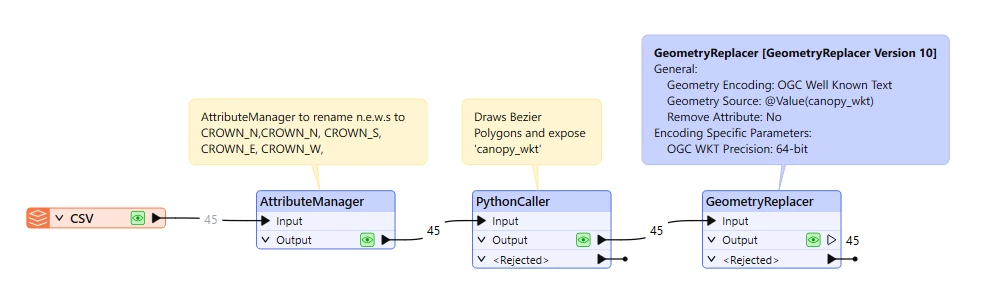
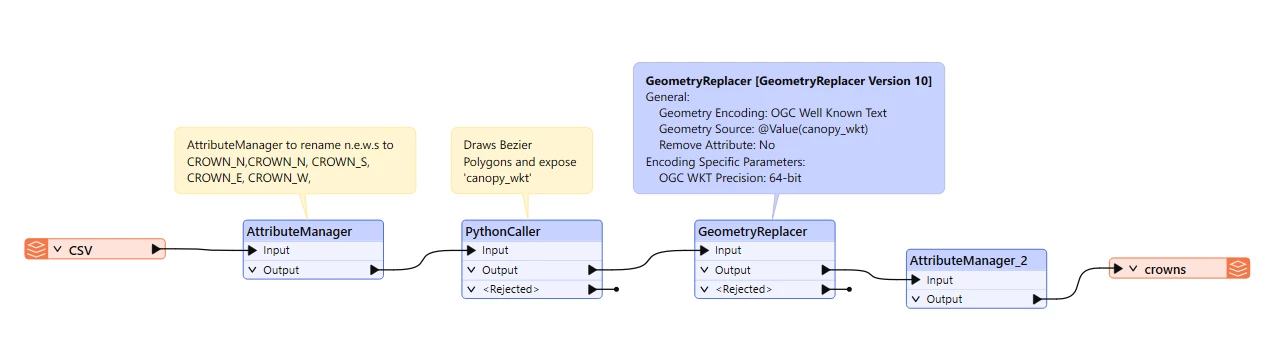
Thanks ​@hkingsbury  I have finally been able to achieve the desired shapes by using some python calculations and draw Bezier polygons. the great ​@takashi suggested here that NURBfit algorithm won’t be able to draw the shapes properly. 

Here is the workflow together:

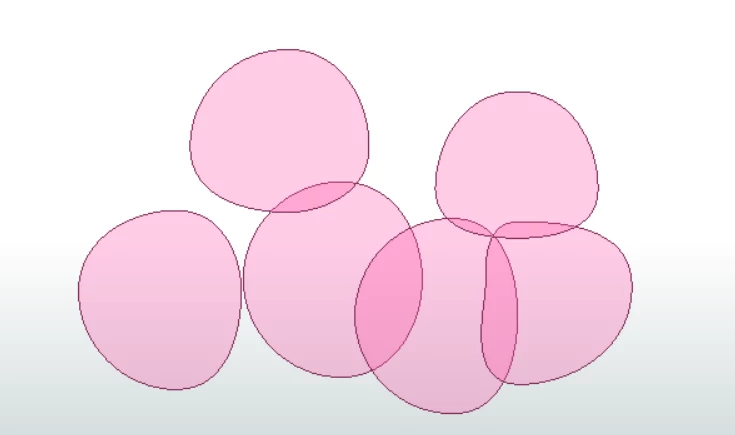
Here is the final Bezier shapes:

The following Python script should allow to create the Bezier shapes:


# PythonCaller — Build canopy polygon WKT from X/Y + CROWN_N/E/S/W
# Class: FeatureProcessor
# Strategy:
# 1) Try direct FME geometry (FMELinearRing+FMEPolygon) if available
# 2) Otherwise set attribute 'canopy_wkt' = POLYGON((...)) and let WKTGeometryReplacer build geometry

from fmeobjects import *
import math

# ---- CSV schema ----
FIELD_X = 'X'
FIELD_Y = 'Y'
ATTR_N = 'CROWN_N'
ATTR_E = 'CROWN_E'
ATTR_S = 'CROWN_S'
ATTR_W = 'CROWN_W'

# Smoothing (vertices per quadrant)
SAMPLES_PER_QUAD = 16
# Bézier kappa for circle/ellipse approximation
KAPPA = 0.5522847498307936

def _to_float(val):
if val is None:
return None
if isinstance(val, (int, float)):
return float(val)
s = str(val).strip()
if s == '' or s.lower() in ('null', 'na', 'none'):
return None
return float(s)

def _eval_cubic_bezier(p0, c1, c2, p3, t):
u = 1.0 - t
tt = t * t
uu = u * u
uuu = uu * u
ttt = tt * t
x = uuu * p0[0] + 3 * uu * t * c1[0] + 3 * u * tt * c2[0] + ttt * p3[0]
y = uuu * p0[1] + 3 * uu * t * c1[1] + 3 * u * tt * c2[1] + ttt * p3[1]
return (x, y)

def _build_coords(cx, cy, rN, rE, rS, rW):
# Cardinal anchors
P_E = (cx + rE, cy)
P_N = (cx, cy + rN)
P_W = (cx - rW, cy)
P_S = (cx, cy - rS)

# Bézier controls (orthogonal tangents scaled by local radius)
C_E_out = (P_E[0], P_E[1] + KAPPA * rE)
C_N_in = (P_N[0] + KAPPA * rN, P_N[1])

C_N_out = (P_N[0] - KAPPA * rN, P_N[1])
C_W_in = (P_W[0], P_W[1] + KAPPA * rW)

C_W_out = (P_W[0], P_W[1] - KAPPA * rW)
C_S_in = (P_S[0] - KAPPA * rS, P_S[1])

C_S_out = (P_S[0] + KAPPA * rS, P_S[1])
C_E_in = (P_E[0], P_E[1] - KAPPA * rE)

segments = [
(P_E, C_E_out, C_N_in, P_N),
(P_N, C_N_out, C_W_in, P_W),
(P_W, C_W_out, C_S_in, P_S),
(P_S, C_S_out, C_E_in, P_E)
]

coords = []
for idx, (p0, c1, c2, p3) in enumerate(segments):
t_vals = [i / float(SAMPLES_PER_QUAD) for i in range(SAMPLES_PER_QUAD + 1)]
if idx > 0:
t_vals = t_vals[1:] # avoid duplicate seam vertex
for t in t_vals:
coords.append(_eval_cubic_bezier(p0, c1, c2, p3, t))
return coords

def _coords_to_wkt(coords):
# Ensure closure
if coords and (abs(coords[0][0]-coords[-1][0]) > 1e-9 or abs(coords[0][1]-coords[-1][1]) > 1e-9):
coords = coords + [coords[0]]
# Build POLYGON WKT with decimal dot, no SRID
parts = ["{:.12f} {:.12f}".format(x, y) for (x, y) in coords]
return "POLYGON(({}))".format(", ".join(parts))

class FeatureProcessor(object):
def __init__(self):
pass

def input(self, feature):
# Read stem X/Y
cx = _to_float(feature.getAttribute(FIELD_X))
cy = _to_float(feature.getAttribute(FIELD_Y))
if cx is None or cy is None:
self.pyoutput(feature)
return

# Read spreads
rN = _to_float(feature.getAttribute(ATTR_N))
rE = _to_float(feature.getAttribute(ATTR_E))
rS = _to_float(feature.getAttribute(ATTR_S))
rW = _to_float(feature.getAttribute(ATTR_W))
if None in (rN, rE, rS, rW) or min(rN, rE, rS, rW) <= 0:
self.pyoutput(feature)
return

# Build vertex list
coords = _build_coords(cx, cy, rN, rE, rS, rW)

# ---- Attempt direct geometry (if classes exist) ----
try:
ring = FMELinearRing()
last = None
for x, y in coords:
if last is None or (abs(x-last[0]) > 1e-9 or abs(y-last[1]) > 1e-9):
ring.appendCoordinate(FMECoordinate(x, y))
last = (x, y)
# close ring
if coords and (abs(coords[0][0]-coords[-1][0]) > 1e-9 or abs(coords[0][1]-coords[-1][1]) > 1e-9):
ring.appendCoordinate(FMECoordinate(coords[0][0], coords[0][1]))
poly = FMEPolygon(ring)
feature.setGeometry(poly)
except Exception:
# ---- Fallback: emit WKT and let a transformer build the geometry ----
wkt = _coords_to_wkt(coords)
feature.setAttribute('canopy_wkt', wkt)
# Keep the old geometry (or none) for now; transformer will replace it

# QC attributes
feature.setAttribute('canopy_vertices', len(coords))
feature.setAttribute('canopy_centre_x', cx)
feature.setAttribute('canopy_centre_y', cy)

self.pyoutput(feature)

def close(self):
pass

I hope this can help someone :)

cheers


DanAtSafe
Safer
Forum|alt.badge.img+22
  • Safer
  • Best Answer
  • December 9, 2025

Hi ​@galigis I think you need to make a Bezier curve for each quadrant

This workspace approximates that without creating actual curves or arcs.


galigis
Enthusiast
Forum|alt.badge.img+20
  • Author
  • Enthusiast
  • December 9, 2025

Thanks ​@DanAtSafe - this is brilliant. I was also able to achieve the same by using a PythonCaller + GeometryReplacer:

 Some outputs below:


I hope this also helps :)