Question

Cannot export the right folder structure through fanout

  • August 11, 2023
  • 7 replies
  • 52 views

Forum|alt.badge.img

Dear Sir/Madam,


I would like to export fbx to cesium tiles.


My FBX model structures are follow

11-NE-12A\\BXXXXXX

11-NE-17A\\BXXXXXX


I would like to export at the same folder structure in Cesium tiles.

It gives me an error when I use the fanout expression. And now, I only able to create the following folder structure.


11-NE-12A\\BXXXXXX\\BXXXXXX

11-NE-17A\\BXXXXXX\\BXXXXXX

May I know how to fix it?


I have attached my sample data and fmw in this email. And I hope some experts can give me a hand.


Thank you

7 replies

Forum|alt.badge.img

Anybody could give me a hand? I am really appreciated it.


tomfriedl
Contributor
Forum|alt.badge.img+13
  • Contributor
  • August 14, 2023

Output is going to:

[fanout] + [feature-type from writer]


In your version:

@Value(path) + @Value(fme_basename)

11-NE-12A\\B391712021101063A0 + B391712021101063A0


better is:

$(DestDataset_CESIUM3DTILES)\\@Value(_tilename) + @Value(fme_basename)

[your Outputpath] + 11-NE-12A + B391712021101063A0


Forum|alt.badge.img

Output is going to:

[fanout] + [feature-type from writer]


In your version:

@Value(path) + @Value(fme_basename)

11-NE-12A\\B391712021101063A0 + B391712021101063A0


better is:

$(DestDataset_CESIUM3DTILES)\\@Value(_tilename) + @Value(fme_basename)

[your Outputpath] + 11-NE-12A + B391712021101063A0

Thank you for your assistant, Tom. I am really appreciated it.


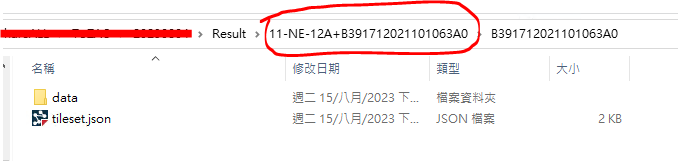
However, if I do it your way "$(DestDataset_CESIUM3DTILES)\\@Value(_tilename) + @Value(fme_basename)"

It is gonna be like this.

image.png 

However, I would like the folder structure to be like this. "11-NE-12A\\Bxxxxx".

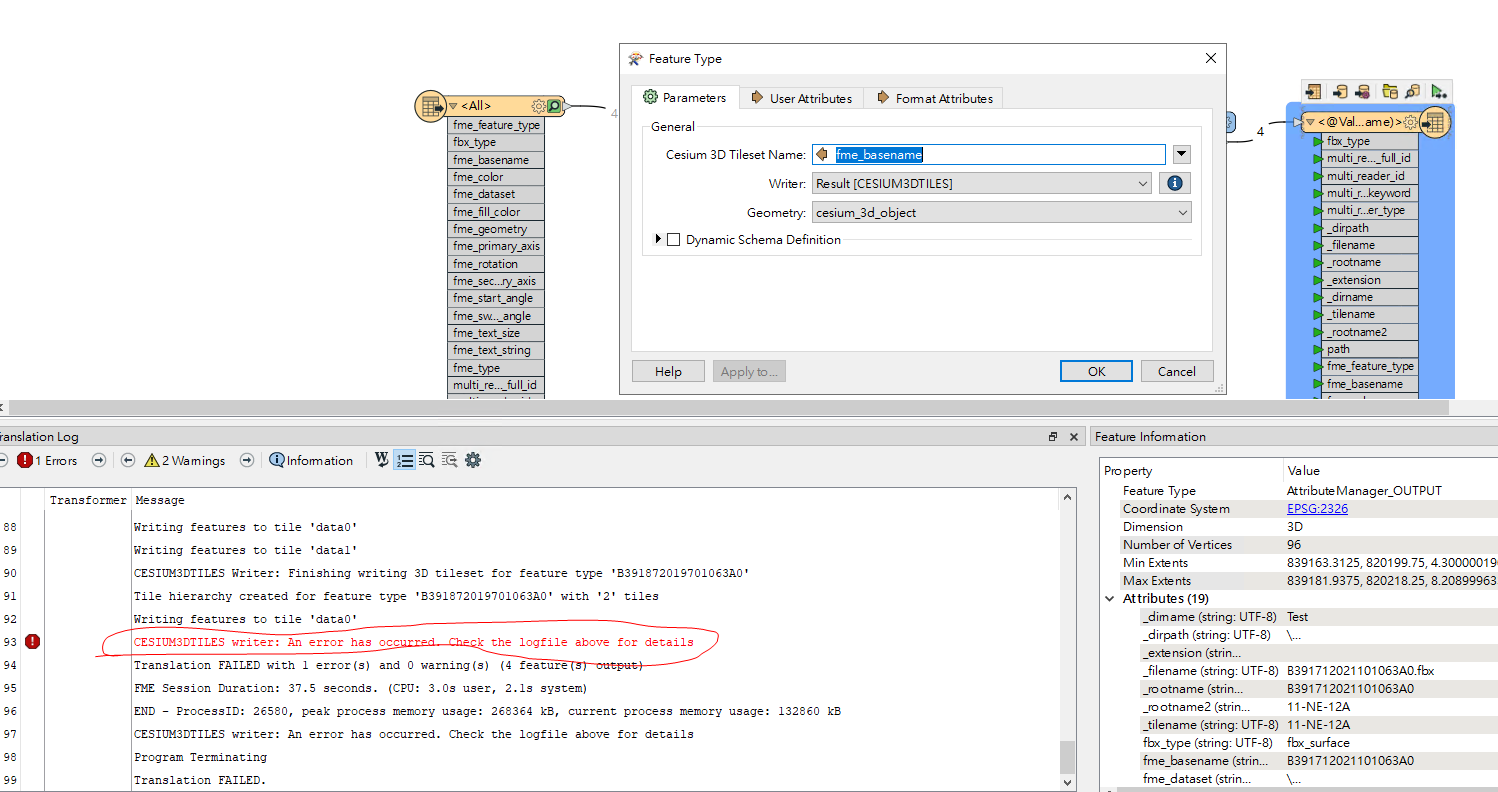
I tried to use "$(DestDataset_CESIUM3DTILES)\\@Value(_tilename)". It shows an error for some reason. Do you have any idea how to fix it?

image.png 

Thank you very much.


tomfriedl
Contributor
Forum|alt.badge.img+13
  • Contributor
  • August 15, 2023

You read my post wrong :-)


try:

[fanout] = $(DestDataset_CESIUM3DTILES)\\@Value(_tilename)

[feature-type from writer] = @Value(fme_basename)


Forum|alt.badge.img

You read my post wrong :-)


try:

[fanout] = $(DestDataset_CESIUM3DTILES)\\@Value(_tilename)

[feature-type from writer] = @Value(fme_basename)

Sorry for the misunderstanding.

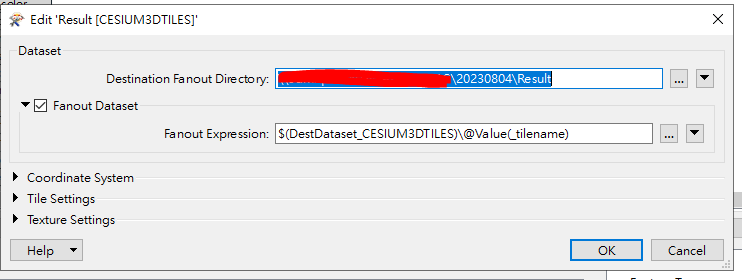
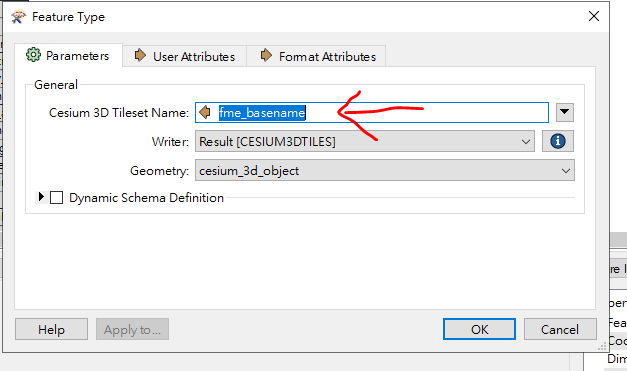
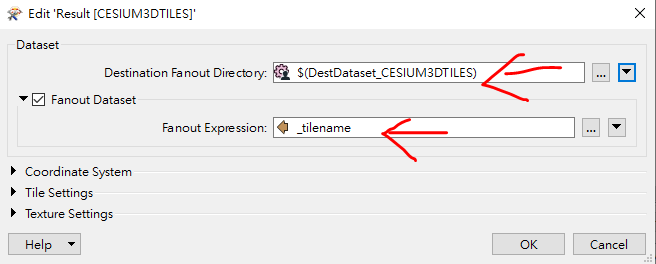
Is this how I should set for "feature-type from writer"? I am not sure why I got this error though. image.pngimage.pngThank you and sorry for all the questions.

tomfriedl
Contributor
Forum|alt.badge.img+13
  • Contributor
  • August 15, 2023

Sorry, restart:

[Destination Fanout Directory] = $(DestDataset_CESIUM3DTILES)

[fanout] = @Value(_tilename)

[feature-type from writer / Cesium 3D Tileset Name] = @Value(fme_basename)


Forum|alt.badge.img

Sorry, restart:

[Destination Fanout Directory] = $(DestDataset_CESIUM3DTILES)

[fanout] = @Value(_tilename)

[feature-type from writer / Cesium 3D Tileset Name] = @Value(fme_basename)

Hi Tom,


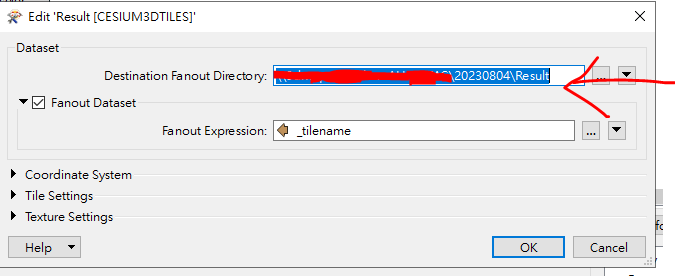
So this is what my setting looks like

image.pngimage.png 

It is really interesting that after I set "[Destination Fanout Directory] = $(DestDataset_CESIUM3DTILES)"

It will automatically switch my path to this. And the error "CESIUM3DTILES writer: An error has occurred. Check the logfile above for details" pop up.


image.pngSorry about that.