Question

write text into PDF

  • June 14, 2018
  • 4 replies
  • 238 views

boubcher
Contributor
Forum|alt.badge.img+11

hello there

at the end of a transformation process, we have an attribute name msg_ar we want to write as text into a PDF file , I used the PDF formatter and the PDF styler but no success

Please any idea

Thanks

This post is closed to further activity.
It may be an old question, an answered question, an implemented idea, or a notification-only post.
Please check post dates before relying on any information in a question or answer.
For follow-up or related questions, please post a new question or idea.
If there is a genuine update to be made, please contact us and request that the post is reopened.

4 replies

redgeographics
Celebrity
Forum|alt.badge.img+62

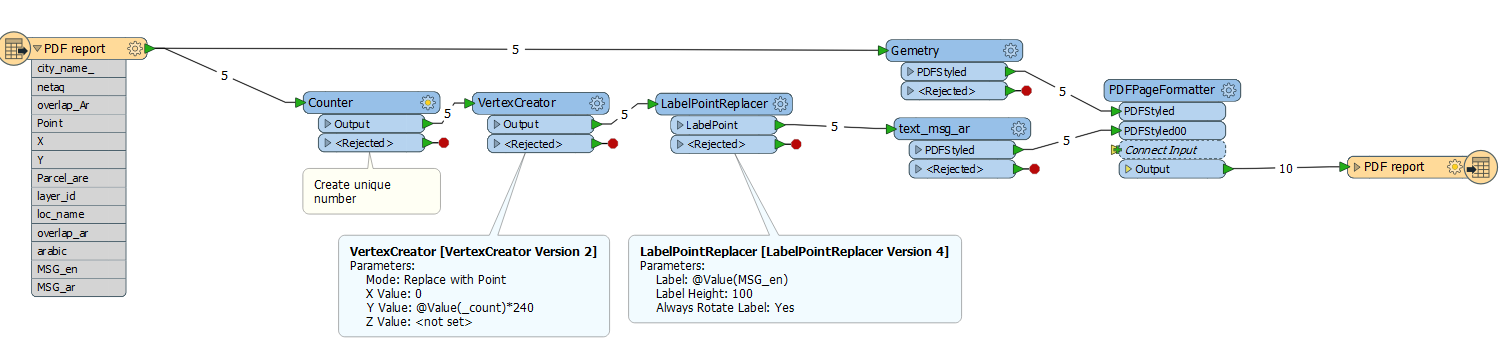
So create points for the labels you want to place, aligning them vertically and then using the LabelPointReplacer to place your label. After that it's styling and put it on the page.

write-to-pdf-rg.fmwt

On a side note, opinions vary but I am not a fan of renaming transformers in the interest of long-term maintainability of the workspace and making it easier for others to edit your workspace.


boubcher
Contributor
Forum|alt.badge.img+11
  • Author
  • Contributor
  • June 15, 2018

So create points for the labels you want to place, aligning them vertically and then using the LabelPointReplacer to place your label. After that it's styling and put it on the page.

write-to-pdf-rg.fmwt

On a side note, opinions vary but I am not a fan of renaming transformers in the interest of long-term maintainability of the workspace and making it easier for others to edit your workspace.

@redgeographics


Thanks so much for your help


just to understand the logic


the vertex will create a point x represents the start of the text and Y is interline between each text, the text height is defined in the PDF styler transformer


is this correct


I did play with the factor your added into the Y coordinate but didnt see any diffrence


boubcher
Contributor
Forum|alt.badge.img+11
  • Author
  • Contributor
  • June 15, 2018

So create points for the labels you want to place, aligning them vertically and then using the LabelPointReplacer to place your label. After that it's styling and put it on the page.

write-to-pdf-rg.fmwt

On a side note, opinions vary but I am not a fan of renaming transformers in the interest of long-term maintainability of the workspace and making it easier for others to edit your workspace.

if you change the msg_en by msg_ar , the arabic text , its not displaying on the PDF , I bleaive is an issue with the PDF writer ? any idea if there is any work around ?


Not the very thing you're looking for here, but why don't you mind of writing that data into the file after the process is ended? I can't claim it wouldn't have the further impact yet it will be easier for sure. Literally, just open the editor you have for such purposes (Acrobat, Phantom or else, from the cheap ones I use this one https://edit-pdf.pdffiller.com/ ) and put the parts were missing there. That doesn't solve the issue with the script, I see, but will come in use for time-saving purposes