
Question

How to add specific code to a kml balloon using KMLPropertySetter

  • December 3, 2019
  • 1 reply
  • 40 views

Hi everyone, I'm new on FME Desktop.

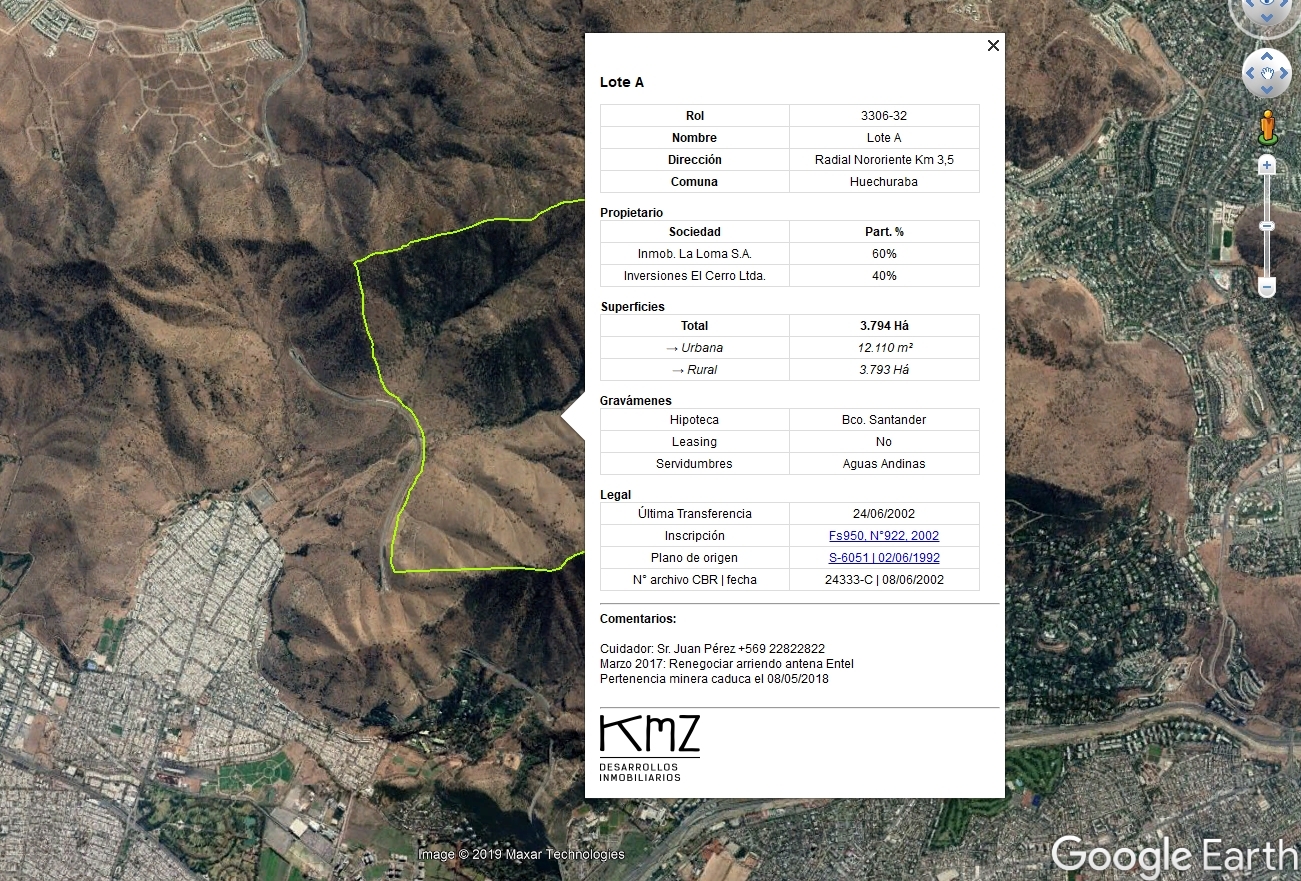
I need to create a kml from excel, with some specific format (see screenshot below)

I haven't been able to put the balloon code into KML PropertyFormatter transformation tool. Any help would be appreciated!

Please find the example kml file attached.

Thanks a lot!
This post is closed to further activity.
It may be an old question, an answered question, an implemented idea, or a notification-only post.
Please check post dates before relying on any information in a question or answer.
For follow-up or related questions, please post a new question or idea.
If there is a genuine update to be made, please contact us and request that the post is reopened.

1 reply

jdh
Contributor
Forum|alt.badge.img+40
  • Contributor
  • December 3, 2019

Since you want a custom layout,  you will need to create the html code.

On the KMLPropertySetter, set the Content Type  to HTML, Include Attribute Table to No.In the Content open the text editor and enter something like

<h1>{Lote A}</h1>
<table>
 <tr> 
  <th>Rol</th>
  <td>{3306-32</td>
</tr>
<tr>
 <th>Nombre</th>
 <td>{Lote A}</td>
</tr>
...
</table>
<h1>Propietario</h1>
<table>...</table>

with the values in {} coming from attributes in the excel file.



