Question

GDB Writer is 'not set', how come and how to prevent?

  • May 20, 2016
  • 3 replies
  • 61 views

fmelizard
Safer
Forum|alt.badge.img+21

I have a GDB with a road in it (themes are: road signs, traffic lights etc.). I have new measurements from the road in Shape (containing existing and new features). I have two GDB writers per theme: one to update the existing features, one to insert the new. The readers point to the same file and the writers point to the same copy of it.

After a while the Writers become '<not set>' in the Navigator pane:
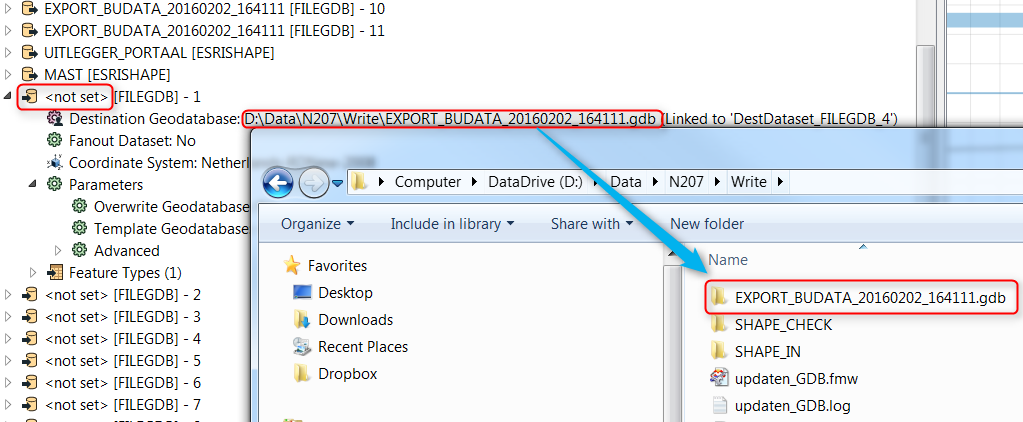
Along with some translation warnings:

Geodatabase Error (-2147024894): The system cannot find the file specified.

Could not open File Geodatabase dataset `D:\\Data\\N207\\EXPORT_BUDATA_20160202_164111.gdb' for reading

The issue is resoved when the writer is deleted and loaded again but after a while the issue returns.

FME version is 2016.1, 32 bit.

@nielsgerrits

This post is closed to further activity.
It may be an old question, an answered question, an implemented idea, or a notification-only post.
Please check post dates before relying on any information in a question or answer.
For follow-up or related questions, please post a new question or idea.
If there is a genuine update to be made, please contact us and request that the post is reopened.

3 replies

Forum|alt.badge.img
  • May 20, 2016

I have had the same issue with my work-spaces. Thanks for posting this.


mygis
Supporter
Forum|alt.badge.img+14
  • Supporter
  • July 4, 2016

Hi @camiel, could you try to use a different GDB for the reader and writer and see if this happens?


Forum|alt.badge.img+2

@camiel would you be able to send the workspace to support? What would be great would be if you could send a copy of the workspace before and after the problem occurred