


Question

excel writer

  • February 18, 2020
  • 1 reply
  • 14 views

simonhume
Contributor
Forum|alt.badge.img+2

Good morning

Can someone advise how i do the following

I have 1 excel spreadsheet (data.xlsx) and 1 empty excel spreadsheet (template.xlsc)

I want to write the contents of data.xlsx to template.xlsx and output it as result.xlsx

How do i write the map the columns from data.xlsx to the template? It does automatically write correctly, but i would like to know how to specifically write one column to another before i output


The contents of the data.xlsx file i've uploaded are only test, but i would like to know how to do this so i can do the task in the future using proper data


thanks

Simon Hume



This post is closed to further activity.
It may be an old question, an answered question, an implemented idea, or a notification-only post.
Please check post dates before relying on any information in a question or answer.
For follow-up or related questions, please post a new question or idea.
If there is a genuine update to be made, please contact us and request that the post is reopened.

1 reply

drc43
Contributor
Forum|alt.badge.img+13
  • Contributor
  • February 18, 2020

Hi Simon,


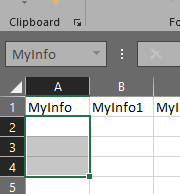
I've had the best results by setting up my template with named ranges for FME to write into. In your example template file, if you selected cells A2:A4 then gave them a name in the Name box, you can tell your writer to write to only that range of cells.

You then modify your writer to look something like this: SheetName/NamedRange. In this example, template/MyInfo
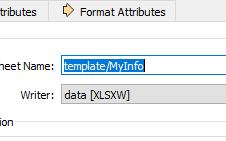
This will allow you to write data to only this part of your excel template. I'm sure there are other ways to accomplish what you're asking, but I've found this works quite well.