Solved

Excel color tab

  • June 25, 2019
  • 2 replies
  • 59 views

alc33
Contributor
Forum|alt.badge.img+13

Hello!

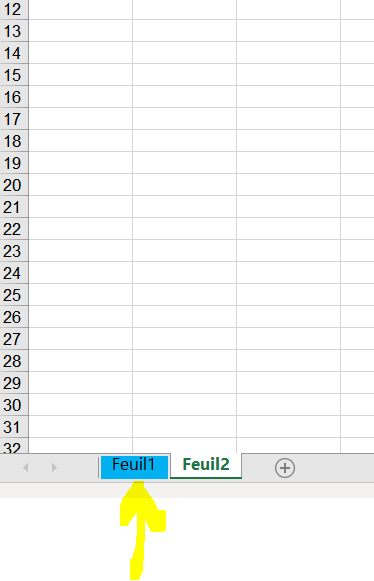
I would like to have a color in a tab when I write an excel file. I don't find the solution on the excel writer parameters, or excelstyler. I would prefer not use template file.

Thanks!
Best answer by danilo_fme

Hi @us - I suggest you try to use python script after you write your excel file.

Like this: transformer FeatureWriter to generate your excel file and after the transformer FeatureReader to extract the excel file generated before and use a PythonCaller to style your Excel file.


https://xlsxwriter.readthedocs.io/example_tab_colors.html


Thanks,

Danilo

This post is closed to further activity.
It may be an old question, an answered question, an implemented idea, or a notification-only post.
Please check post dates before relying on any information in a question or answer.
For follow-up or related questions, please post a new question or idea.
If there is a genuine update to be made, please contact us and request that the post is reopened.

2 replies

danilo_fme
Celebrity
Forum|alt.badge.img+52
  • Celebrity
  • Best Answer
  • June 26, 2019

Hi @us - I suggest you try to use python script after you write your excel file.

Like this: transformer FeatureWriter to generate your excel file and after the transformer FeatureReader to extract the excel file generated before and use a PythonCaller to style your Excel file.


https://xlsxwriter.readthedocs.io/example_tab_colors.html


Thanks,

Danilo


alc33
Contributor
Forum|alt.badge.img+13
  • Author
  • Contributor
  • July 8, 2019

Hi!

Thanks, I will look this solution.