Question

"directory and file path names" - source folder

  • June 8, 2018
  • 4 replies
  • 331 views

Hello,

I am at very early stages of incorporating FME into my work, and I am trying to figure out how to unzip all zip files in a folder (and all zip files in subfolders).

I was able to unzip files with the "directory and file path names" transformer (**/*.zip) by passing folder and file locations to ZipExtractor. However, That transformer asks me to provide a "source folder" before it can start running. Is there a way to define the source folder to the folder of my .fmw file?

I plan to use this same file with different folders and I would like users to be able to copy the .fmw file into another folder and run it there without providing a source folder location everytime.

Thanks!

This post is closed to further activity.
It may be an old question, an answered question, an implemented idea, or a notification-only post.
Please check post dates before relying on any information in a question or answer.
For follow-up or related questions, please post a new question or idea.
If there is a genuine update to be made, please contact us and request that the post is reopened.

4 replies

takashi
Celebrity
  • June 9, 2018

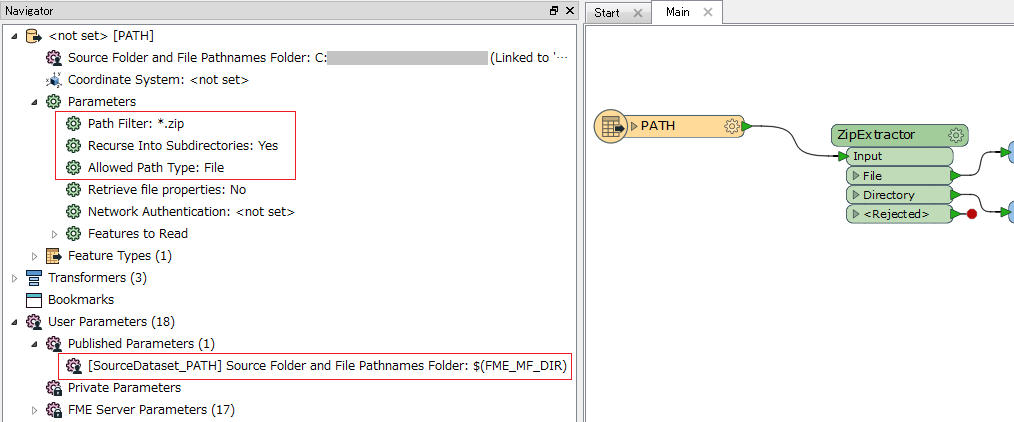
A built-in parameter called "FME_MF_DIR" stores the directory path to which the workspace file (*.fmw) is saved. I think you can set $(FME_MF_DIR) to the source folder parameter in the Directory and File Pathnames Reader.


  • Author
  • June 9, 2018

A built-in parameter called "FME_MF_DIR" stores the directory path to which the workspace file (*.fmw) is saved. I think you can set $(FME_MF_DIR) to the source folder parameter in the Directory and File Pathnames Reader.

The transformer wouldn’t accept that variable as source folder unfortunately. Is there a way around it?


takashi
Celebrity
  • June 9, 2018

A built-in parameter called "FME_MF_DIR" stores the directory path to which the workspace file (*.fmw) is saved. I think you can set $(FME_MF_DIR) to the source folder parameter in the Directory and File Pathnames Reader.

I assume that you are using the Director and File Pathnames reader (not a transformer), and I believe that it works fine to read every zip file path under the FME_MF_DIR, including its subfolders. Make sure that the reader parameters have been configured correctly.


  • Author
  • June 11, 2018
I assume that you are using the Director and File Pathnames reader (not a transformer), and I believe that it works fine to read every zip file path under the FME_MF_DIR, including its subfolders. Make sure that the reader parameters have been configured correctly.


Thanks! I was able to set the source folder to FME_MF_DIR from the navigator, I also moved it to private parameters so it wouldn't prompt to user.