


Question

In version 2025.0, does FME support output multiple worksheets within the same workbook using the same predesigned template

  • March 24, 2026
  • 3 replies
  • 61 views

ff320
Contributor
Forum|alt.badge.img+1

Hello Team,

I have an Excel template with a single worksheet that includes predefined colours, formatting, etc.

In version 2025.0, I’m trying to write my results into this template, but I want to output multiple worksheets within the same workbook using the same template. I’ve tried several approaches (both dynamic and manual), but they either fail or behave unexpectedly.

What I’m seeing is that only the first worksheet shows the designed template but no results, while the subsequent worksheets contain the results but lose the template formatting. Even when I set Remove Template Sheet if Unchanged to Yes, the first worksheet (the template sheet) is still present with no results filled in.

Does anyone know whether this is achievable in version 2025.0? If so, how should it be configured in the Excel Writer?

Kind regards

Thanks!

3 replies

debbiatsafe
Safer
Forum|alt.badge.img+22
  • Safer
  • March 26, 2026

Hello ​@ff320 ,

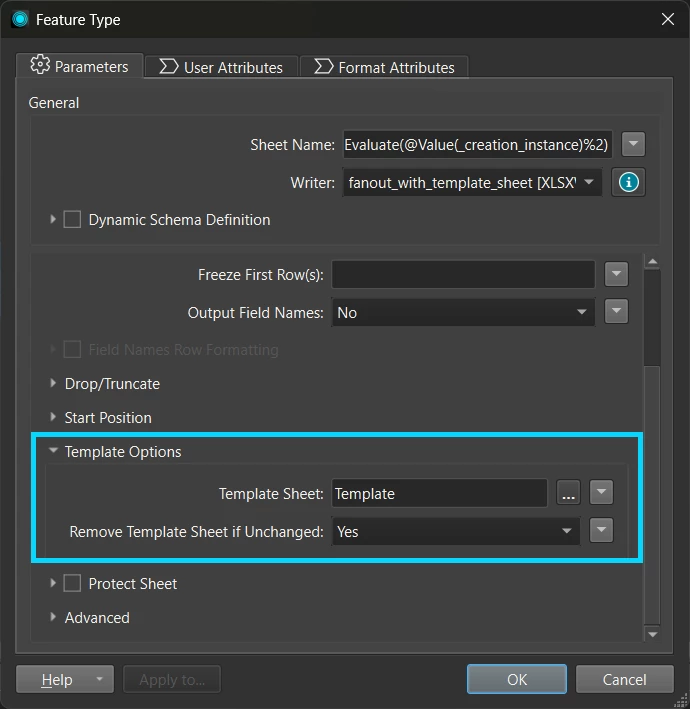
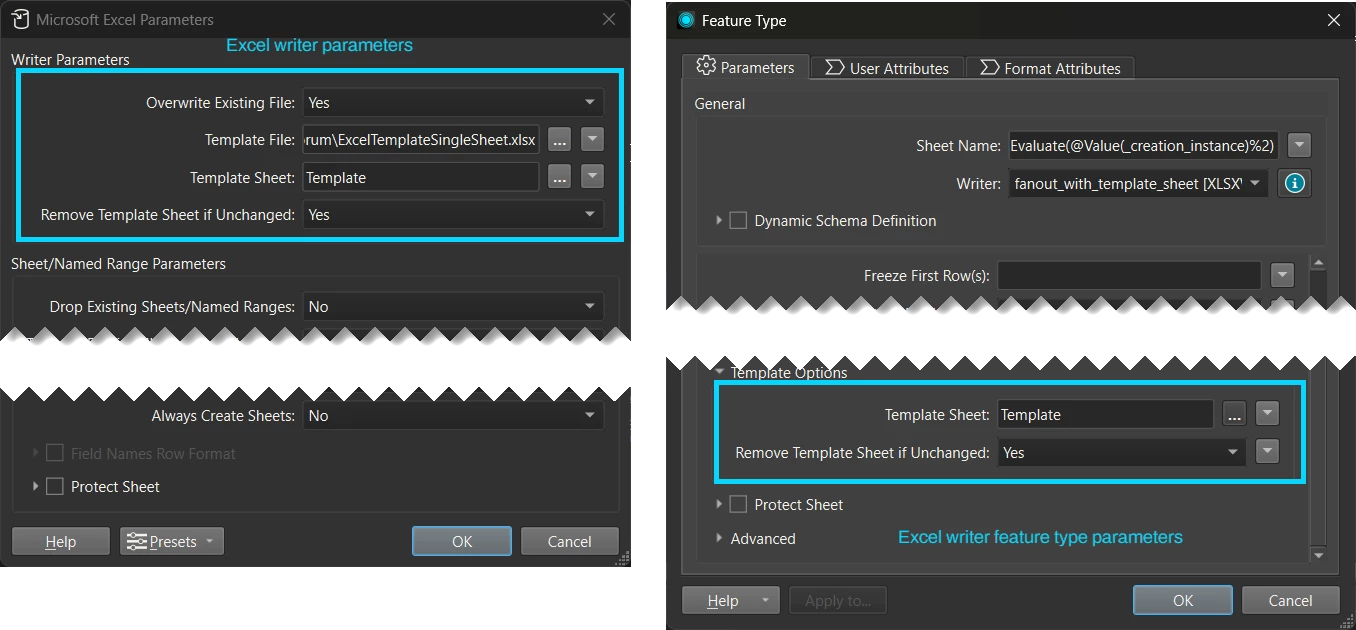
Are you able to check if the “Template Sheet” and the “Remove Template Sheet if Unchanged” parameter on the Excel writer feature type is set in your workspace?

If these two parameters set on the Excel writer feature type, I was able to write multiple Excel sheets from one template Excel sheet. However, just setting them on the writer parameter but not the feature type does causes the behaviour you are seeing.

I have attached my test workspace and data that creates an Excel file with multiple sheets based on one template Excel sheet. I hope this helps.


ff320
Contributor
Forum|alt.badge.img+1
  • Author
  • Contributor
  • March 26, 2026

Hello @debbiatsafe, much appreciated - thank you for your response.

I have set the Template Options exactly the same as yours, but it still doesn’t work. I’m assuming the template sheet refers to the worksheet name (the tab name?) within the workbook, rather than the workbook file name itself?

This might be due to a version difference. In my writer parameters, I only have two things can be set - Overwrite Existing Files: Yes and Source from Template File.


debbiatsafe
Safer
Forum|alt.badge.img+22
  • Safer
  • March 26, 2026

Hi ​@ff320

The screenshot and the example workspace uses Form 2025.0 (build 25237 win64) so you should see the same parameters as you have indicated you are using 2025.0. It is interesting that you’re seeing different parameters.

Are you able to add a new Excel writer and try writing the output Excel file from that new writer? If you’re using a workspace created in an older version of FME, it may be possible that you’re using an older version of the format that hasn’t been updated. Adding a new writer will ensure you are using the latest version of the format.

Here is an example of the parameters you should see regarding template options in the Excel writer.

Yes, the Template Sheet parameter should refer to the Excel worksheet or “tab” name. It should not refer to the workbook or Excel file name. The path to the template Excel file should be set in the writer’s “Template File” parameter.