


Question

FME Workbench – Generic schema inheriting empty attributes from other datasets

  • January 9, 2026
  • 5 replies
  • 76 views

francisco_1988
Contributor
Forum|alt.badge.img+5

I am using a generic/dynamic schema in FME Workbench, and I have a workspace that processes multiple different datasets through the same workflow.

At the end of the process, each dataset is written separately to the writer. However, I noticed that the outputs end up inheriting attributes from other datasets, which remain in the schema but with empty values, even though those attributes do not exist in the original source.

I would like to understand:

  • Why does FME keep attributes from other datasets when using a generic schema?

  • What is the best practice to prevent schemas from being mixed ?

Has anyone encountered this scenario or could suggest the correct approach to keep independent schemas for each dataset?


5 replies

jamatsafe
Safer
Forum|alt.badge.img+15
  • Safer
  • January 12, 2026

Hello ​@francisco_1988 ,

This is a common question that users often struggle with when working with dynamic workflows and it usually comes down to how the dynamic writer is configured to get its schema.

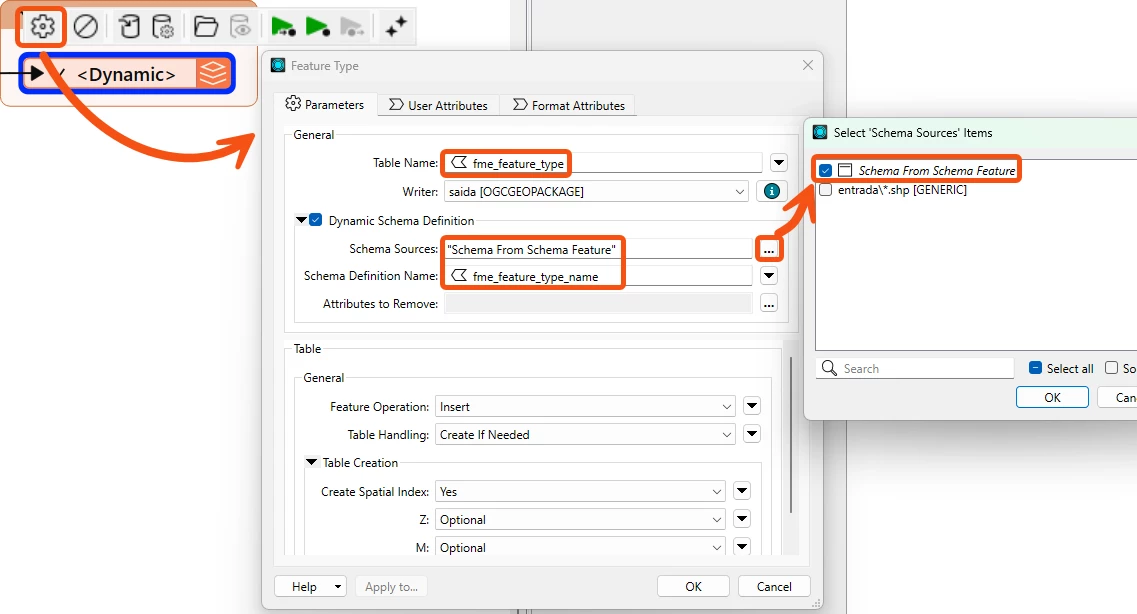
Within a generic/dynamic workspace, the dynamic writer typically defaults to using the merge schema from all your datasets. Since you've already correctly configured the dynamic writer's Table Name parameter to fme_feature_type, the next key thing to focus on is the Schema Source parameter. This field controls where the writer get its output schema, either from one or more input/destination sources, or from the schema as it’s been modified at runtime.

Since you modified the schema structure within your workspace, you will need to retrieve the updated runtime schema right before writing. To best approach this, you'll have to generate an updated schema definition:

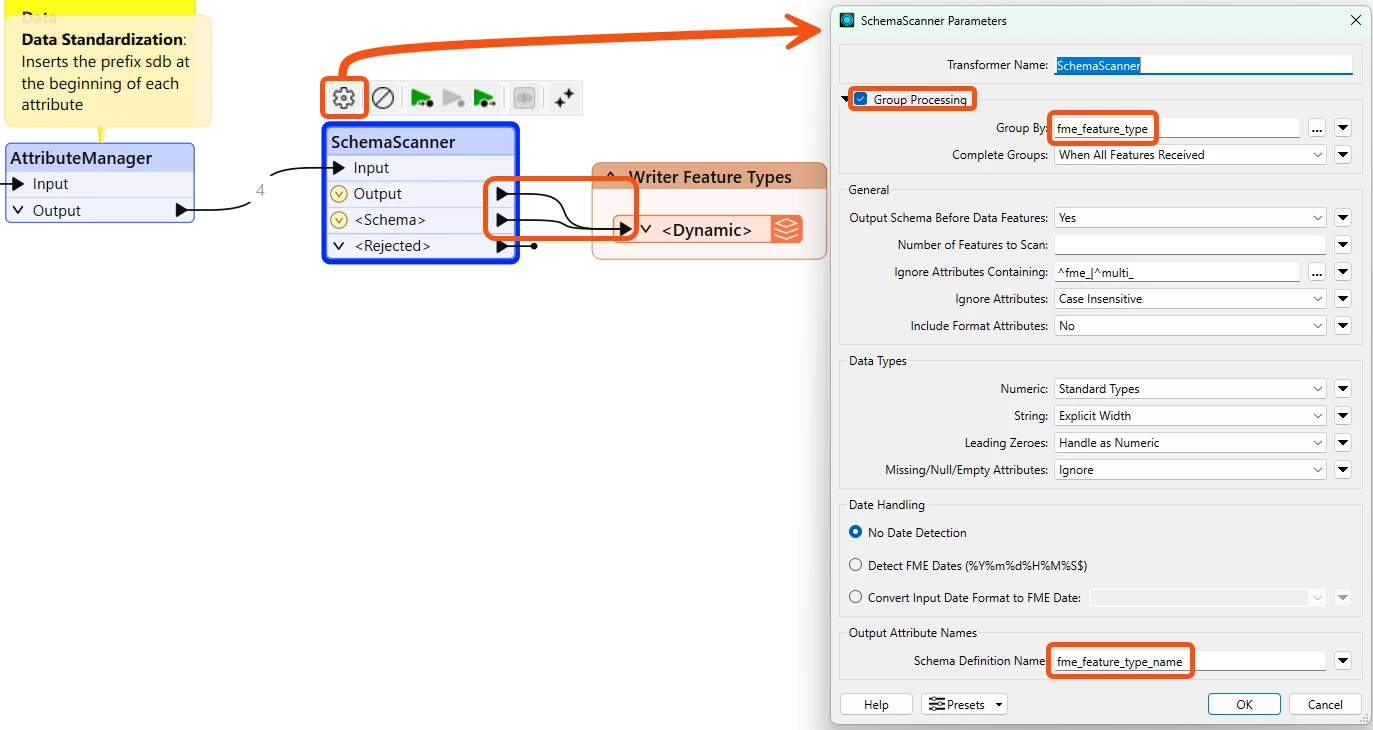
  • Add a SchemaScanner just before the writer to create a Schema Feature to be used as your schema source.
  • Connect both Schema Feature port and output features into the dynamic writer
  • Within the Dynamic Writer, set schema source to the Schema Feature only and schema definition name to fme_feature_type_name.


This will ensure the each dataset's output table is created from its own schema definition.

Other helpful resources:

Let me know if that helps!


francisco_1988
Contributor
Forum|alt.badge.img+5
  • Author
  • Contributor
  • January 14, 2026

Hello ​@francisco_1988 ,

This is a common question that users often struggle with when working with dynamic workflows and it usually comes down to how the dynamic writer is configured to get its schema.

Within a generic/dynamic workspace, the dynamic writer typically defaults to using the merge schema from all your datasets. Since you've already correctly configured the dynamic writer's Table Name parameter to fme_feature_type, the next key thing to focus on is the Schema Source parameter. This field controls where the writer get its output schema, either from one or more input/destination sources, or from the schema as it’s been modified at runtime.

Since you modified the schema structure within your workspace, you will need to retrieve the updated runtime schema right before writing. To best approach this, you'll have to generate an updated schema definition:

  • Add a SchemaScanner just before the writer to create a Schema Feature to be used as your schema source.
  • Connect both Schema Feature port and output features into the dynamic writer
  • Within the Dynamic Writer, set schema source to the Schema Feature only and schema definition name to fme_feature_type_name.


This will ensure the each dataset's output table is created from its own schema definition.

Other helpful resources:

Let me know if that helps!


Hi ​@jamatsafe 

I followed the step-by-step instructions you requested and received this error message. Please see the attached image.


jamatsafe
Safer
Forum|alt.badge.img+15
  • Safer
  • January 15, 2026

Hi ​@francisco_1988,

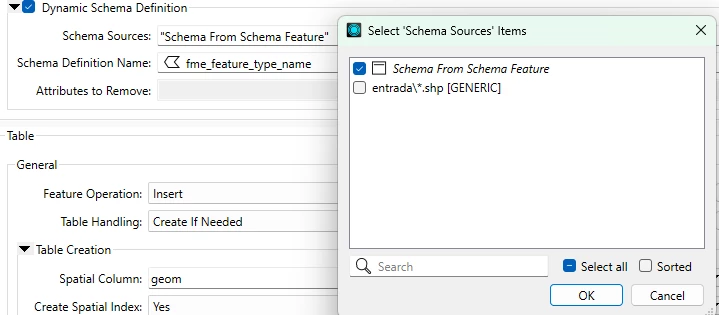
The error may still be pointing to the Schema Sources parameter in your dynamic writer feature type settings. Could you double check that it’s set to “Schema From Schema Feature” only?


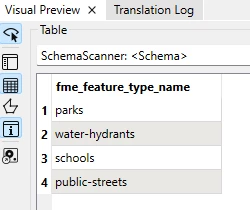
Please also inspect and verify the SchemaScanner’s <Schema> output matches all the feature types you are reading in. For example:

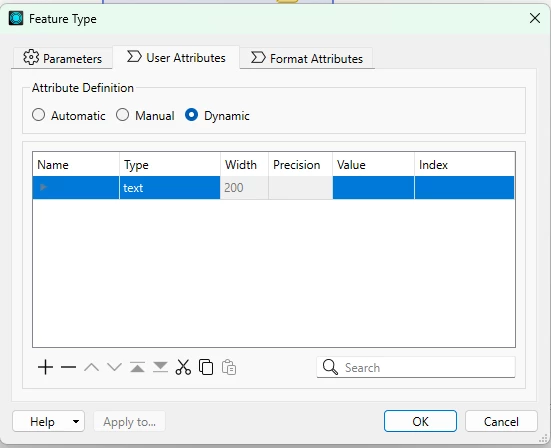
Another note: The User Attributes table in your dynamic writer feature type should be empty (Ctrl+A to select all > “-” button to remove rows). When you switched Attribute Definition mode from Automatic to Dynamic, leftover attributes are still written out to each feature type. Next time I would recommend creating a new dynamic writer instead.


I’ve attached an updated workspace with the changes above. If you still observe an error, try removing and re-adding the Generic Reader to refresh the schema/metadata. Hope this helps!


francisco_1988
Contributor
Forum|alt.badge.img+5
  • Author
  • Contributor
  • January 15, 2026

Hi ​@francisco_1988,

The error may still be pointing to the Schema Sources parameter in your dynamic writer feature type settings. Could you double check that it’s set to “Schema From Schema Feature” only?


Please also inspect and verify the SchemaScanner’s <Schema> output matches all the feature types you are reading in. For example:

Another note: The User Attributes table in your dynamic writer feature type should be empty (Ctrl+A to select all > “-” button to remove rows). When you switched Attribute Definition mode from Automatic to Dynamic, leftover attributes are still written out to each feature type. Next time I would recommend creating a new dynamic writer instead.


I’ve attached an updated workspace with the changes above. If you still observe an error, try removing and re-adding the Generic Reader to refresh the schema/metadata. Hope this helps!


Hi ​@jamatsafe 


The previous solution worked, thank you!

Currently, my workspace reads three .shp files from an input folder. The workspace was created and validated using these three shapefiles, and transformers such as AttributeManager, DuplicateFilter, AttributeTrimmer, AttributeEncoder, etc., correctly recognize the existing attributes.

The issue occurs when I add a new shapefile (.shp) to the same input folder that contains additional attributes not present in the original three files.
Even though these attributes exist in the data, the transformers mentioned above do not recognize (“see”) these new attributes.

From what I understand, in a dynamic workflow the schema (attributes) is defined at the time the workspace is analyzed / cached, and the AttributeManager does not automatically update when data with a different schema is introduced.

My questions are:

  • Is this behavior expected in FME?

  • Is there any cache-related or schema-refresh configuration that could address this?

  • What is the best practice for handling shapefiles with heterogeneous schemas in a dynamic workflow?

  • Is using AttributeExposer or transformers that support dynamic attributes the correct approach in this scenario?

Thank you in advance for any guidance or best practices.


jamatsafe
Safer
Forum|alt.badge.img+15
  • Safer
  • January 21, 2026

Hi ​@francisco_1988,

Glad it worked! To answer your question, yes this behavior is expected. FME caches a static schema definition when you initially add your generic reader to the workspace so you can configure your transformers. If a new attribute is introduced, the data is still read in but these new unknown attributes are unexposed and will not automatically appear in your transformer parameter lists until you refresh the reader. This maintains a stable authoring environment to ensure that inconsistent source data doesn’t automatically affect your already configured logic.

If your workflow design is hardcoded to transform only the existing attributes you know about (eg. with AttributeManager), the static workflow may not fully adapt to the new attributes. For unpredictable schemas, it's best to lean towards bulk/generic transformations to target all attributes or regex to target specific attributes. Unexposed attributes can still be modified through some of the generic transformations. In your case, I would suggest instead of using an AttributeManager, you could filter out data with a Tester's "Attribute Has a Value" or "Attribute is missing" operator, rename all other attributes with BulkAttributeRenamer, and merge the data streams back together afterwards.

To refresh schema, the current options are to manually update the reader via Navigator > Reader > Update Reader and Feature Types. If you’re using a FeatureReader, the Regenerate parameter can force scan schema but only if the parameter window is opened and reconfirmed.

Currently it's not possible to dynamically expose attributes at runtime but you may find other workarounds or ideas in the community such as using PythonCaller. On the other hand, you can use AttributeExposer or AttributeManager to manually import attributes from cache during authoring. Another possible option is within a FeatureReader, where you can map a User Parameter onto the Attributes To Expose parameter so that when the workspace runs, you'll be prompted each time to manually import a selection of generic datasets to list attributes for exposure but then it may just be easier to just refresh the reader to recognize the new attributes. Hope that helps clear it up!

I would also encourage you to upvote this idea to support automated exposure in future releases but also feel free to submit your own!

The following community post and videos may give you some inspiration and clarify some of your questions on dynamic workflows:

https://community.safe.com/general-10/question-of-the-week-dealing-with-an-unknown-or-dynamic-schema-18145

Ask Me Anything: Dynamic Workflows

Dynamic Workspaces Demystified: Your Path to Streamlined Data Management