




Best Answer

Using HTTPCaller with Body

  • August 2, 2021
  • 4 replies
  • 90 views

nedwaterman
Contributor
Forum|alt.badge.img+9

HI,


I've not used the HTTPCaller using a POST request and body attribution.

The API call constructed by the developer has been provided like this:

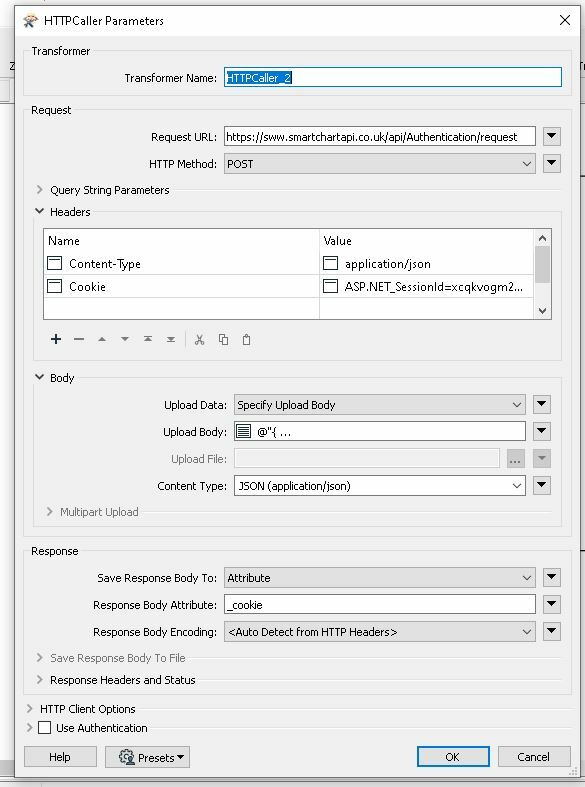
var client = new RestClient("https://sww.smartchartapi.co.uk/api/Authentication/request");

client.Timeout = -1;

var request = new RestRequest(Method.POST);

request.AddHeader("Content-Type", "application/json");

request.AddHeader("Cookie", "ASP.NET_SessionId=xcqkvogm2bp2yxshsgx1ncbg; AspxAutoDetectCookieSupport=1; __AntiXsrfToken=e680dfae824a472088c01d6672ba8471");

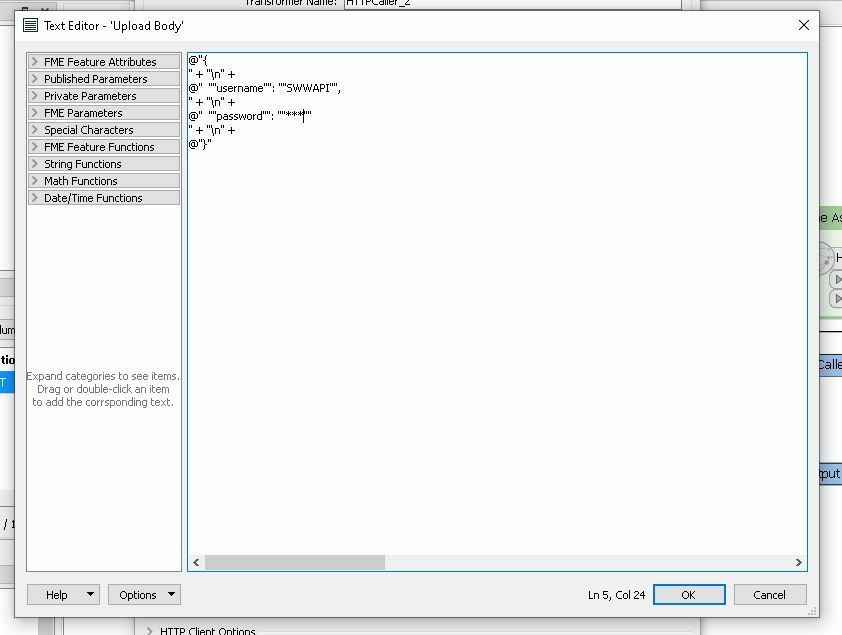
var body = @"{

" + "\\n" +

@"  ""username"": ""SWWAPI"",

" + "\\n" +

@"  ""password"": ""***""

" + "\\n" +

@"}";

request.AddParameter("application/json", body,  ParameterType.RequestBody);

IRestResponse response = client.Execute(request);

Console.WriteLine(response.Content);


I've set up the HTTP caller like this but am getting a bad result. Any ideas what I am doing wrong?
 

Capture2Capture

Best answer by sigtill

Might use the https://jsonlint.com/ service to try to create a valid Json for your body. For instance it seems it might be:


{

"username": "SWWAPI",

"password": "***"

}

This post is closed to further activity.
It may be an old question, an answered question, an implemented idea, or a notification-only post.
Please check post dates before relying on any information in a question or answer.
For follow-up or related questions, please post a new question or idea.
If there is a genuine update to be made, please contact us and request that the post is reopened.

4 replies

sigtill
Supporter
Forum|alt.badge.img+25
  • Supporter
  • August 2, 2021

Try to replace the BODY with one line withouth newlines:

{" + "\\n" + @"  ""username"": ""SWWAPI"", " + "\\n" + @"  ""password"": ""***"" " + "\\n" +@"}


what is the error message?


sigtill
Supporter
Forum|alt.badge.img+25
  • Supporter
  • Best Answer
  • August 2, 2021

Might use the https://jsonlint.com/ service to try to create a valid Json for your body. For instance it seems it might be:


{

"username": "SWWAPI",

"password": "***"

}


nedwaterman
Contributor
Forum|alt.badge.img+9
  • Author
  • Contributor
  • August 2, 2021

Might use the https://jsonlint.com/ service to try to create a valid Json for your body. For instance it seems it might be:


{

"username": "SWWAPI",

"password": "***"

}

I'm getting

HTTP/1.1 400 Bad Request - https://sww.smartchartapi.co.uk/api/Authentication/request


tried the one line for the body but no joy so I'll try constructing some JSON!


nedwaterman
Contributor
Forum|alt.badge.img+9
  • Author
  • Contributor
  • August 2, 2021

Might use the https://jsonlint.com/ service to try to create a valid Json for your body. For instance it seems it might be:


{

"username": "SWWAPI",

"password": "***"

}

Worked" Created valid JSON and passed it using the correct Content type. Thank you!



