




Best Answer

Naming zipped GDB with fanout on input filename

  • May 24, 2019
  • 2 replies
  • 35 views

eric_armitage
Contributor
Forum|alt.badge.img+10

I'm converting some DGN files to GDB and want to name the output files with the input filename. I have extracted the input file to an attibute called "_rootname" and done a fan out in the writer on the attribute name as shown here
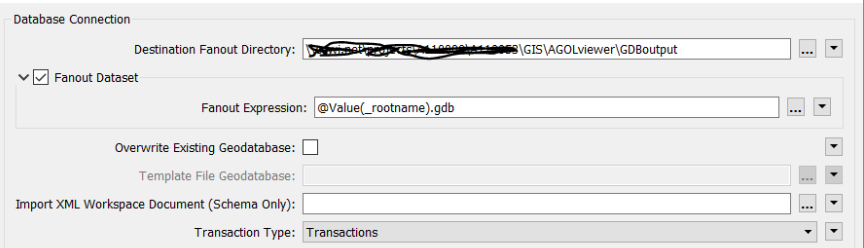
This works fine. But I want to zip the output file at the same time. What settings should I use? I've tried various things but can't get it to work.

 

Best answer by markatsafe

Adding .zip to the end of your fanout expression @Value(_rootname).gdb.zip should give you the zipped File Geodb - see the user documentation

For completeness, example workspace (2019): zipafilegeodb.fmw

This post is closed to further activity.
It may be an old question, an answered question, an implemented idea, or a notification-only post.
Please check post dates before relying on any information in a question or answer.
For follow-up or related questions, please post a new question or idea.
If there is a genuine update to be made, please contact us and request that the post is reopened.

2 replies

Forum|alt.badge.img+2
  • Best Answer
  • May 24, 2019

Adding .zip to the end of your fanout expression @Value(_rootname).gdb.zip should give you the zipped File Geodb - see the user documentation

For completeness, example workspace (2019): zipafilegeodb.fmw


eric_armitage
Contributor
Forum|alt.badge.img+10
  • Author
  • Contributor
  • May 27, 2019

Adding .zip to the end of your fanout expression @Value(_rootname).gdb.zip should give you the zipped File Geodb - see the user documentation

For completeness, example workspace (2019): zipafilegeodb.fmw

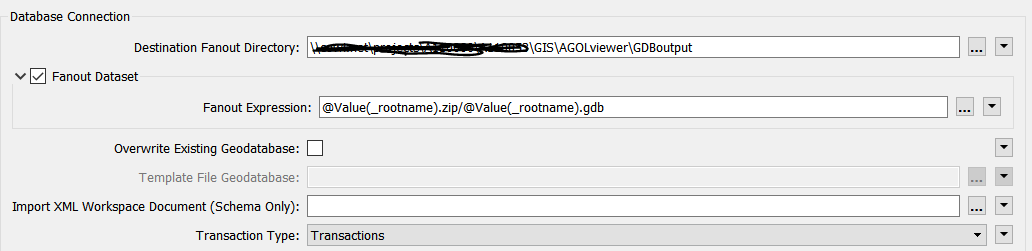
Hi Mark. Unfortunately that didn't work but this did. Now I just need to set up the workspace runner so it does the same for each DGN in a folder ....