Question

How to set username& password prompts for Database Connections in FME workflow ?

  • December 22, 2017
  • 5 replies
  • 134 views
This post is closed to further activity.
It may be an old question, an answered question, an implemented idea, or a notification-only post.
Please check post dates before relying on any information in a question or answer.
For follow-up or related questions, please post a new question or idea.
If there is a genuine update to be made, please contact us and request that the post is reopened.


5 replies

jeroen
Contributor
Forum|alt.badge.img+15
  • Contributor
  • December 22, 2017

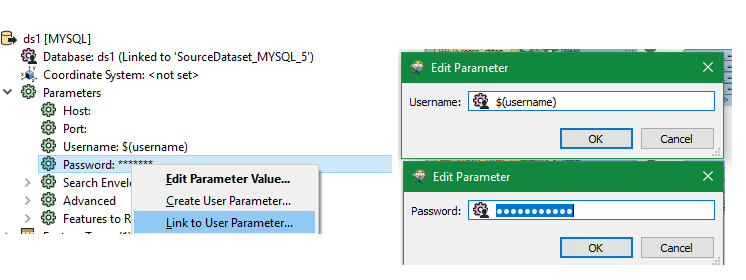
Is it not possible to change the values from this connection in the navigator to user parameters? Edit:


dilipsebastian
Forum|alt.badge.img

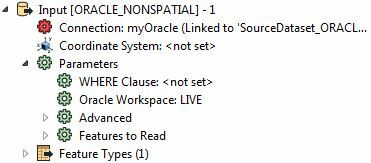
I did see few related articles mentioning this approach. Unfortunately, I don't see these Parameters options both in my reader as well as the Database Connection.

2.jpg


fmelizard
Safer
Forum|alt.badge.img+21
  • Safer
  • December 22, 2017

Hi @dilipsebastian, you should be able to create a private parameter for your Oracle connection string. In that parameter, you can reference 2 public parameters that prompt the user for a username and password. Ex- $(username)/$(password)@//<host>:<port>/<SID>

You can read more about concatenating published parameters here.


dilipsebastian
Forum|alt.badge.img

Thanks for your valuable inputs TiaAtSafe and JeroenR .

Meanwhile I figured out what went wrong. Previously while creating Database Connection using "Add Reader as Resource", I kept choosing "Add Database Connection" from the Dataset dropdown. This was the reason why I wasn't able to see username and password as parameters. This time I chose "Embed Connection parameters" as the dataset choice, and I can now see username and pwd listed as parameters. I went ahead and created published user parameters for both and used them in the readers and transformers in my workflow.

Thanks Again.


fmelizard
Safer
Forum|alt.badge.img+21
  • Safer
  • December 22, 2017

Thanks for your valuable inputs TiaAtSafe and JeroenR .

Meanwhile I figured out what went wrong. Previously while creating Database Connection using "Add Reader as Resource", I kept choosing "Add Database Connection" from the Dataset dropdown. This was the reason why I wasn't able to see username and password as parameters. This time I chose "Embed Connection parameters" as the dataset choice, and I can now see username and pwd listed as parameters. I went ahead and created published user parameters for both and used them in the readers and transformers in my workflow.

Thanks Again.

Yes! Embed connection will let you do this. I don't know how I forgot that, but I'm glad to read that you've got it working!