


Solved

How to create new dataset of overlapping areas?

  • Aug 2, 2023 5:59 AM UTC
  • 4 replies
  • 126 views

epro_admin
Contributor
Forum|alt.badge.img+7

I have one dataset that has overlapping polygons. I want to advise the data owner of this and ask guidance for what to do when I come across these overlapping areas.


I think the best way to do this is to show them all the overlapping areas. I was able to add on the overlap counts to each polygon (AreaOnAreaOverlayer) which is great, but what I really want is to create a new dataset with the overlapping areas.


I have had a look at the AreaOnAreaOverlayer and Clipper. Is anyone able to provide further guidance or point out if I should be using a different transformer combination?

Best answer by geomancer

Hi, then maybe my wording was poor ;)

I think with the procedure I described you get exactly the areas you need.

image

View original
This post is closed to further activity.
It may be an old question, an answered question, an implemented idea, or a notification-only post.
Please check post dates before relying on any information in a question or answer.
For follow-up or related questions, please post a new question or idea.
If there is a genuine update to be made, please contact us and request that the post is reopened.

4 replies

geomancer
Evangelist
Forum|alt.badge.img+69
  • Evangelist
  • Aug 2, 2023 6:53 AM UTC

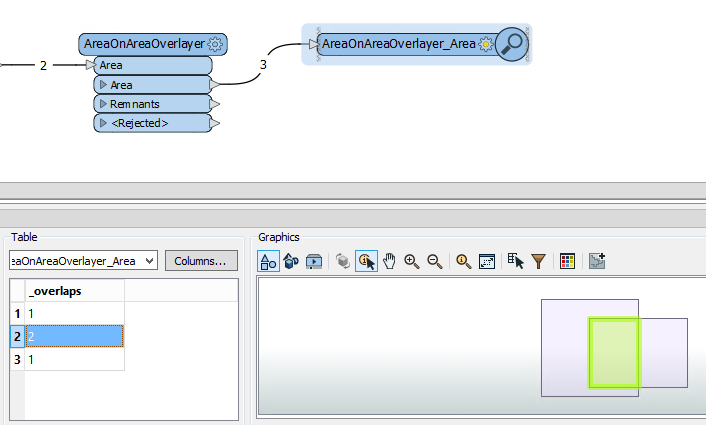
The AreaOnAreaOverlayer has a parameter Overlap Count Attribute (the default value is _overlaps).

Add a Tester or a TestFilter. When _overlaps > 1 there are overlapping areas at that location.


epro_admin
Contributor
Forum|alt.badge.img+7
  • Author
  • Contributor
  • Aug 2, 2023 12:50 PM UTC

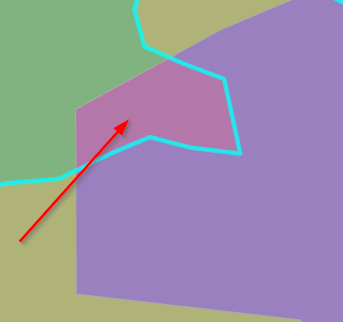
Hi @geomancer​ , Thanks for your reply. That was poorly worded on my part. I've attached a screenshot of what I mean. I want to extract into a new layer all the parts that overlap, not polygons that overlap.


Here the green and purple polygons overlap at the pink. The pink is what I want to extract into a new layer. Is there a way to do that through the AreaOnAreaOverlayer and/or does that involve clipping, but I the overlaps reside in one layer not two, and the Clipper requires two a clipper and candidate.


image


geomancer
Evangelist
Forum|alt.badge.img+69
  • Evangelist
  • Best Answer
  • Aug 2, 2023 12:55 PM UTC

Hi, then maybe my wording was poor ;)

I think with the procedure I described you get exactly the areas you need.

image


epro_admin
Contributor
Forum|alt.badge.img+7
  • Author
  • Contributor
  • Aug 3, 2023 12:12 AM UTC

@geomancer​ Oh gotchya! Thank you.