
Hello,
We OCRd an invoice and we want to split it into attributes for further analysis.
The input is:
Overzicht mobiele bundels Bundel Verbruik / Beschikbaar Eenheid 0498/00.00.00 Mobile Bis Pack 10 / 10000 Minutes Mobile Bis Pack 45 / 2048 Mega Bytes 0498/00.00.01 Mobile Bis Pack 64 / 10000 Minutes Mobile Bis Pack 25 I 10000 SMS Mobile Bis Pack 892 I 2048 Mega Bytes 0498/00.00.02 Mobile Bis Pack 81 I 10000 Minutes Mobile Bis Pack 32 I 10000 SMS Mobile Bis Pack 577 I 2048 Mega Bytes 0498/00.00.03 Mobile Bis Pack 38 / 10000 Minutes Mobile Bis Pack 53 / 10000 SMS Mobile Bis Pack 276 / 2048 Mega Bytes
What I try to achieve (first) then I can split them up further myself
Overzicht mobiele bundels Bundel Verbruik / Beschikbaar Eenheid 0498/00.00.00 Mobile Bis Pack 10 / 10000 Minutes 0498/00.00.00 Mobile Bis Pack 45 / 2048 Mega Bytes 0498/00.00.01 Mobile Bis Pack 64 / 10000 Minutes 0498/00.00.01 Mobile Bis Pack 25 I 10000 SMS 0498/00.00.01 Mobile Bis Pack 892 I 2048 Mega Bytes 0498/00.00.02 Mobile Bis Pack 81 I 10000 Minutes 0498/00.00.02 Mobile Bis Pack 32 I 10000 SMS 0498/00.00.02 Mobile Bis Pack 577 I 2048 Mega Bytes 0498/00.00.03 Mobile Bis Pack 38 / 10000 Minutes 0498/00.00.03 Mobile Bis Pack 53 / 10000 SMS 0498/00.00.03 Mobile Bis Pack 276 / 2048 Mega Bytes
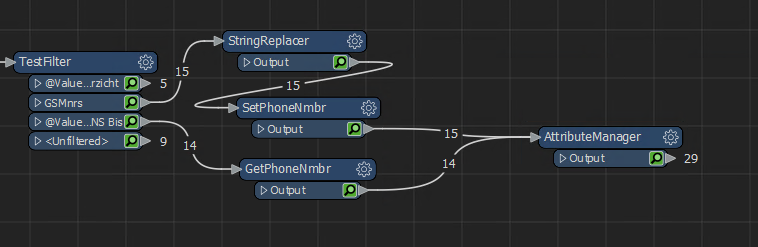
I use a testfilter to filter checking if the line starts with 0 or M, the rest is ignored.
Then a tester where I check if it starts with 0, if it is: VariableSetter = phonenumber
If it's not starting with 0, VariableRetriever to get that phonenumber but that doesn't work
but then I'm stuck.
Can anyone point me in the right direction please?
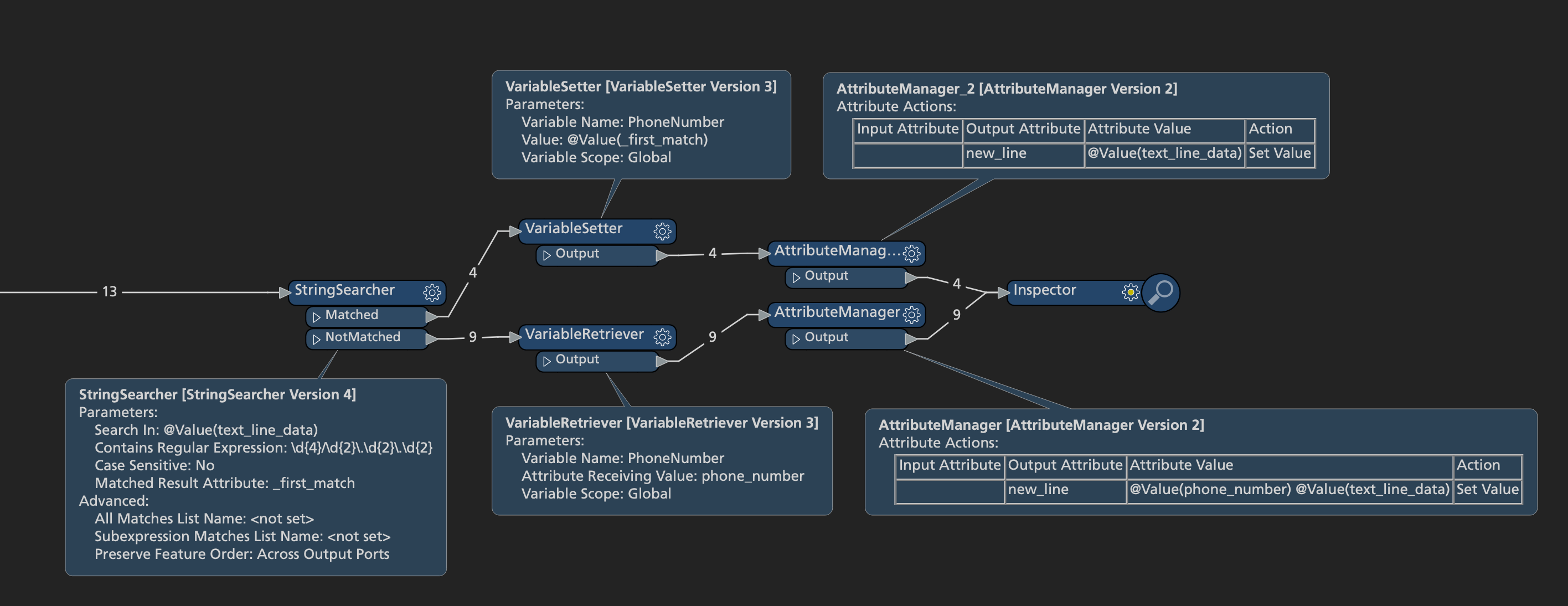 I've used a StringSearcher to look for the phone number, then set that as a variable and retrieve it on the features where there's no phone number found. If the order of features remains the same (and you can enforce that by setting that parameter on the StringSearcher it'll assign the correct phone numbers.