


Best Answer

Bulk Mapping Negative attributes to 0

  • March 30, 2020
  • 4 replies
  • 96 views

jacklonsdale
Contributor
Forum|alt.badge.img+5

Hi,

I have a set of 24 attributes each with a calculation which results in a numeric value. Is there a way to set a conditional statement across all of these in a similar way to how the NullAttributeMapper works?

I want to apply across all 24 attributes "If value <0, then map to 0" but i want to try and avoid 24 individual conditional statements within an AttributeManager.

Thanks,

Jack
Best answer by redgeographics

This kinda feels like cheating but...

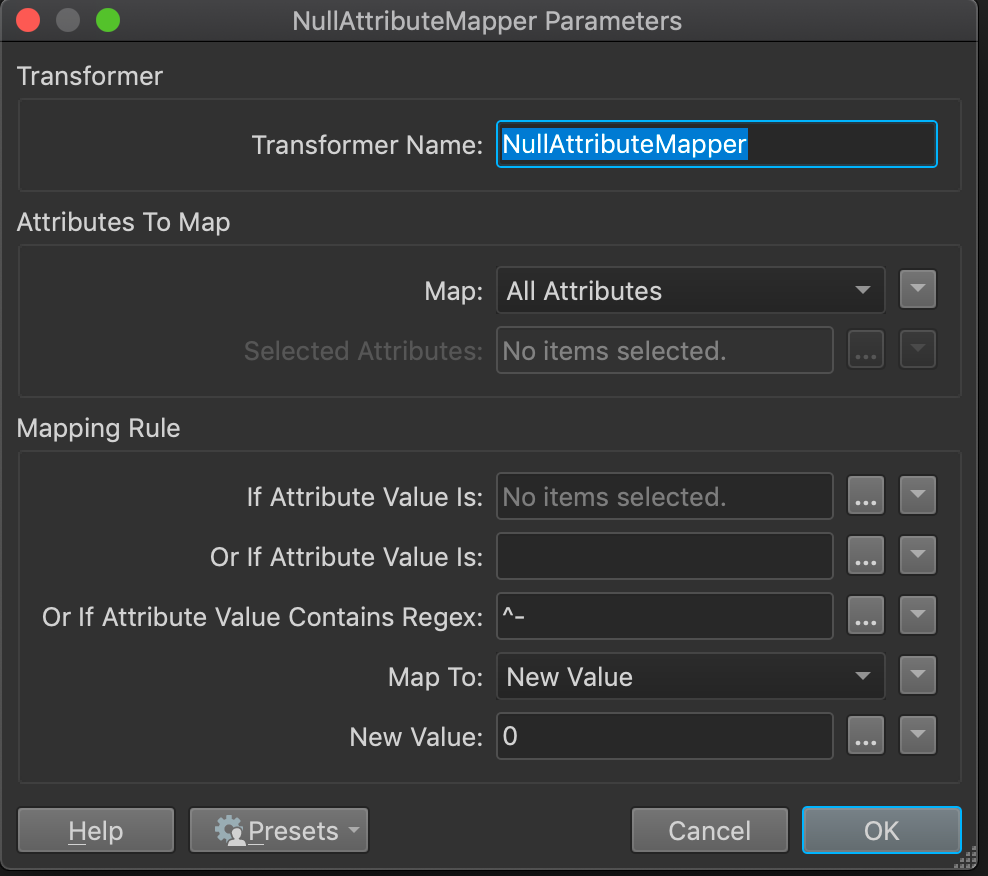
You can use a regex in the NullAttributeMapper:

The second option, "Or If Attribute Value Is:" only seems to accept specific values so this is probably the easiest workaround.

This post is closed to further activity.
It may be an old question, an answered question, an implemented idea, or a notification-only post.
Please check post dates before relying on any information in a question or answer.
For follow-up or related questions, please post a new question or idea.
If there is a genuine update to be made, please contact us and request that the post is reopened.

4 replies

redgeographics
Celebrity
Forum|alt.badge.img+62
  • Celebrity
  • Best Answer
  • March 30, 2020

This kinda feels like cheating but...

You can use a regex in the NullAttributeMapper:

The second option, "Or If Attribute Value Is:" only seems to accept specific values so this is probably the easiest workaround.


jacklonsdale
Contributor
Forum|alt.badge.img+5
  • Author
  • Contributor
  • March 30, 2020

This kinda feels like cheating but...

You can use a regex in the NullAttributeMapper:

The second option, "Or If Attribute Value Is:" only seems to accept specific values so this is probably the easiest workaround.

Don't mind a cheat! Thanks, worked perfectly.


takashi
Celebrity
  • March 30, 2020

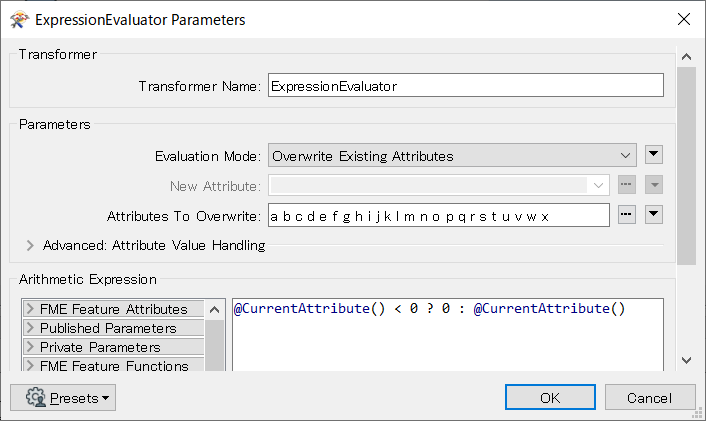
Hi @jacklonsdale, alternatively you can use the ExpressionEvaluator with the Overwrite Existing Attributes mode.

@CurrentAttribute() < 0 ? 0 : @CurrentAttribute()

0684Q00000ArKCSQA3.png


jdh
Contributor
Forum|alt.badge.img+40
  • Contributor
  • March 30, 2020

I would use an ExpressionEvaluator after the AttributeManager in Mode Overwrite Existing Attributes with the expression

@CurrentAttribute() < 0 ? 0 : @CurrentAttribute()

and select your 24 attributes to overwrite.