Solved

Upgrade Reader in FeatureReader?

  • November 5, 2025
  • 4 replies
  • 139 views

arnold_bijlsma
Enthusiast
Forum|alt.badge.img+15

When upgrading from one version of FME to the next, I can upgrade some upgradeable transformers, and I can also upgrade the readers and writers to the latest version. But what about the readers that are called by the FeatureReader (and writers by FeatureWriter)?

We just upgraded from 2024.1 to 2025.1, and I upgraded the FeatureReader transformer reading a geodatabase. Does upgrading the transformer, upgrade the GDB reader functionality? Or does it automatically call the latest GDB reader? Or does it stick with the old?

Best answer by crystalwang

Hi ​@arnold_bijlsma,

Thank you for posting your question on the FME Community and apologies for the delayed response.

For the FeatureReader, the version used is the most recent for that build of FME when editing the FeatureReader. Upgrading the transformer would update the UI, not the underlying reader.

If you’re looking for the ability to explicitly upgrade the reader version or to have the FeatureReader retain the original reader version it was created with, we are tracking this enhancement internally under FMEFORM-14413.

Hope this helps!

This post is closed to further activity.
It may be an old question, an answered question, an implemented idea, or a notification-only post.
Please check post dates before relying on any information in a question or answer.
For follow-up or related questions, please post a new question or idea.
If there is a genuine update to be made, please contact us and request that the post is reopened.


4 replies

salvaleonrp
Enthusiast
Forum|alt.badge.img+20
  • Enthusiast
  • November 6, 2025

There’s no upgrade path for formats. Each format reader or writer included with the install has its own version based on the FME Engine.

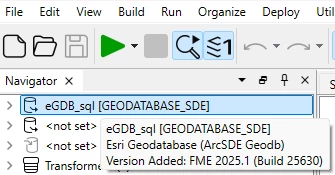
You can tell the version number of the format you have when you hover on format item on the Navigator pane below.


That’s one advantage of having formats deployed with FME Hub, e.g. the ESRI ArcGIS Package. Its still tied to an FME Engine but Workbench will inform you that its upgradable.


arnold_bijlsma
Enthusiast
Forum|alt.badge.img+15
  • Author
  • Enthusiast
  • November 7, 2025

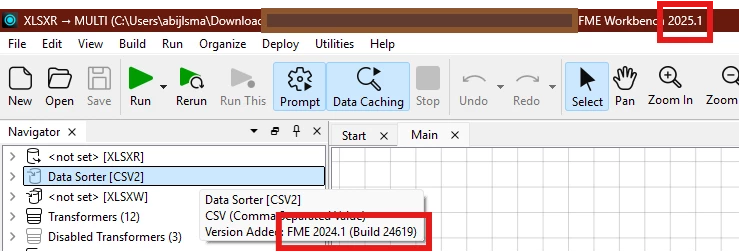
@salvaleonrp : That Reader version number is based on the version of FME you built it with, not the version you open it with.


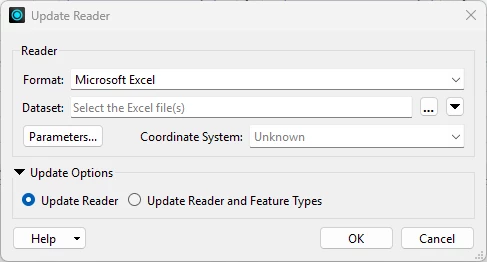
I can then right-click the Reader and choose Update Reader, which (I presume) upgrades the Reader’s functionality to the current version, i.e. from 24619 to 25609.


However, the question is how do I upgrade a Reader’s functionality if it is used in a FeatureReader. For example, I have an old 2024 workbench reading CSV data through a FeatureReader. I understand, under the bonnet, FME uses the same CSV functionality whether reading through a Reader or through a FeatureReader. How do I ensure, my FeatureReader now uses the 2025 CSV reader.

The main reason for asking is that I’m currently working on some workbenches that I wrote back around 2019. I can upgrade all the transformers and readers and writers, no problem. But what about the FeatureReader and FeatureWriter?


salvaleonrp
Enthusiast
Forum|alt.badge.img+20
  • Enthusiast
  • November 7, 2025

@salvaleonrp : That Reader version number is based on the version of FME you built it with, not the version you open it with.


I can then right-click the Reader and choose Update Reader, which (I presume) upgrades the Reader’s functionality to the current version, i.e. from 24619 to 25609.


However, the question is how do I upgrade a Reader’s functionality if it is used in a FeatureReader. For example, I have an old 2024 workbench reading CSV data through a FeatureReader. I understand, under the bonnet, FME uses the same CSV functionality whether reading through a Reader or through a FeatureReader. How do I ensure, my FeatureReader now uses the 2025 CSV reader.

The main reason for asking is that I’m currently working on some workbenches that I wrote back around 2019. I can upgrade all the transformers and readers and writers, no problem. But what about the FeatureReader and FeatureWriter?

You are correct and that’s what I meant, I just did not qualify what I said. 

I’m also wrong about the upgrade path.I did not realize that there’s an Update Reader and Updated Reader and FeatureType parameters on the context menu. I usually use just Add Writer to replace a new reader on an upgraded FME Form version.

To upgrade the Feature reader format version I don’t have an answer. Sorry.

I see the value of using the Feature Reader as a version upgrade mechanism. I would also assume that the reader format aligns with what comes installed with the current FME Form version you are using and not what was saved from another version. I guess the Save with Backup and Save without Backup dialog would do the change when opening the fmw file created with a previous version. We need a response from the Safers. 


crystalwang
Safer
Forum|alt.badge.img+17
  • Safer
  • Best Answer
  • December 2, 2025

Hi ​@arnold_bijlsma,

Thank you for posting your question on the FME Community and apologies for the delayed response.

For the FeatureReader, the version used is the most recent for that build of FME when editing the FeatureReader. Upgrading the transformer would update the UI, not the underlying reader.

If you’re looking for the ability to explicitly upgrade the reader version or to have the FeatureReader retain the original reader version it was created with, we are tracking this enhancement internally under FMEFORM-14413.

Hope this helps!