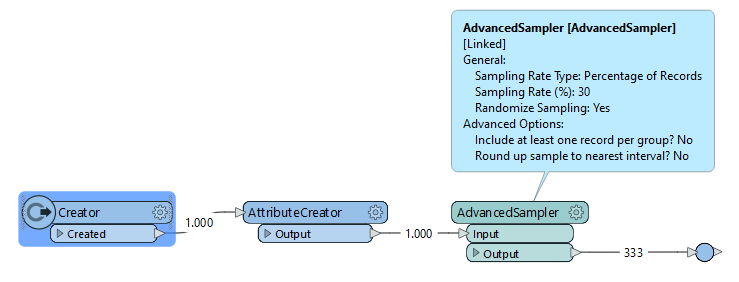
The sampler does indeed work. But if I create a user_parameter that specifies a percentage. If I then use an Expression Evaluator to determine how many surfaces there are, I cannot pass on the result of the expression evaluator to the sampler. It only accepts user_parameter or a number. How can I put a calculated value in the Sampling Rate (n)?
Can you use the AdvancedSampler from FME Hub, like @liamfez suggests? In this transformer you can define a percentage to select, and you can define the selection should be randomized.
If the AdvancedSampler does not work you can try the following:
A RandomNumberGenerator/Sorter combination to randomize the order of your features. Use a Counter to give your features a _count attribute. Using the total number of features (derived from e.g. joining the results of a StatisticsCalculator back to your input) you can calculate the number of features within your percentage. You can then use a Tester to check if feature's_count attribute is less than the number of features in your percentage.
You could probably do the latter part in a PythonCaller as well.
The advanced sampler does not accept attributes, only user_parameters. And in that respect it is the same as the regular sampler. Because the data comes from an Oracle table, the easiest solution is a SQL query in which "percentage" is a user_parameter.
This does the trick for me:
SELECT COL_1, COL_2, etc... FROM ( SELECT * FROM MY_TABLE where COL_1 = some value and ... ORDER BY DBMS_RANDOM.VALUE ) WHERE ROWNUM <= ( SELECT CEIL(COUNT(*) * $(Percentage)/100) FROM MY_TABLE where COL_1 = some value and ... )




 +6
+6