


Question

Return XY coordinate of certain Z value along polyline Z

  • November 19, 2016
  • 7 replies
  • 42 views

setld_solutions
Contributor
Forum|alt.badge.img+8

Return XY coordinate of certain Z value along polyline Z

This is not a measure along the line. Measure might be 11200', but z is 10900'. Also, vertices are every 100' or so -- not easy to interpolate to the exact Z via converting the line to vertices. I want to avoid going too complex with this solution -- is there an easy way that is escaping me?


This post is closed to further activity.
It may be an old question, an answered question, an implemented idea, or a notification-only post.
Please check post dates before relying on any information in a question or answer.
For follow-up or related questions, please post a new question or idea.
If there is a genuine update to be made, please contact us and request that the post is reopened.

7 replies

david_r
Celebrity
  • November 21, 2016

If you can, I think the easiest would be to set the Z-values as measures and use the linear referencing transformers from there.


redgeographics
Celebrity
Forum|alt.badge.img+62

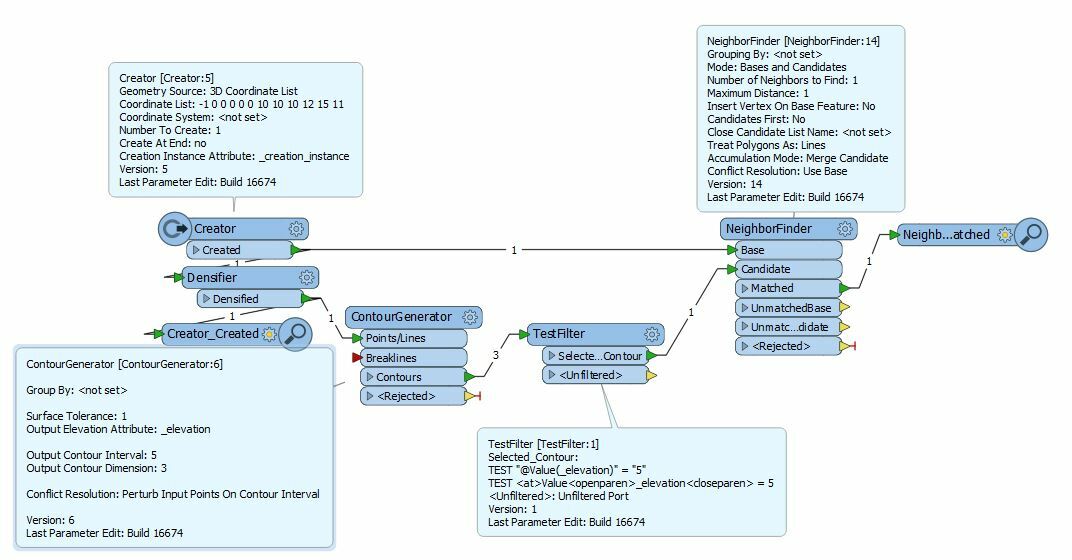
Close, but no cigar I think... I tried generating contours from the line, then selecting the contour at the Z-value I want and doing a NeighborFinder between that contour and the original line. But the coordinates would be a bit off compared to what I would expect in this case. I expect (5,5) and get (5.02,5.02)

Posting this anyway, maybe it helps.


setld_solutions
Contributor
Forum|alt.badge.img+8

Close, but no cigar I think... I tried generating contours from the line, then selecting the contour at the Z-value I want and doing a NeighborFinder between that contour and the original line. But the coordinates would be a bit off compared to what I would expect in this case. I expect (5,5) and get (5.02,5.02)

Posting this anyway, maybe it helps.

Thanks! Looks like the road I was about to travel.


mark2atsafe
Safer
Forum|alt.badge.img+59
  • Safer
  • November 21, 2016

Hi @setld_solutions

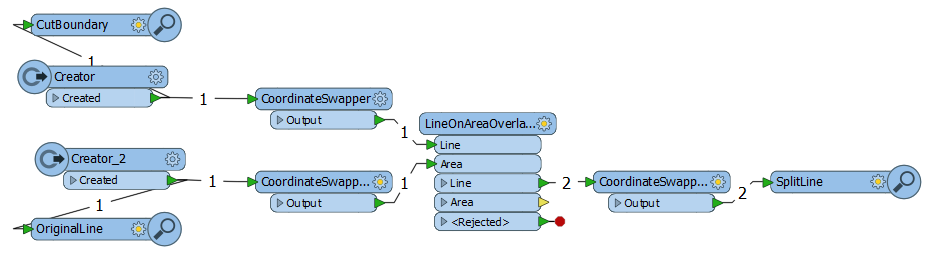
The other thought I had was to cut the line at the elevation that you want the XY of. So I did this:

Basically you have a Creator that creates a polygon covering the x/y area of interest. I made it with a Z value but you could create it with zero Z and use a 3DForcer (publishing the 3DForcer parameter so you get to choose each time where to cut)

The LineOnAreaOverlayer won't work in 3D mode. So... use CoordinateSwappers to swap the X and Z coordinates to get 2D. Do the overlay, switch the coordinates back.

Now I have two lines. The point at which they meet is the X/Y location of the chosen Z value.

If there was a transformer that did 3D intersection the CoordinateSwappers wouldn't be necessary. Sadly I couldn't find one. But it's still a fairly simple solution.

Hope that helps. An interesting problem. I like it.

Mark


setld_solutions
Contributor
Forum|alt.badge.img+8

Hi @setld_solutions

The other thought I had was to cut the line at the elevation that you want the XY of. So I did this:

Basically you have a Creator that creates a polygon covering the x/y area of interest. I made it with a Z value but you could create it with zero Z and use a 3DForcer (publishing the 3DForcer parameter so you get to choose each time where to cut)

The LineOnAreaOverlayer won't work in 3D mode. So... use CoordinateSwappers to swap the X and Z coordinates to get 2D. Do the overlay, switch the coordinates back.

Now I have two lines. The point at which they meet is the X/Y location of the chosen Z value.

If there was a transformer that did 3D intersection the CoordinateSwappers wouldn't be necessary. Sadly I couldn't find one. But it's still a fairly simple solution.

Hope that helps. An interesting problem. I like it.

Mark

Very nice, thank you Mark!


erik_jan
Contributor
Forum|alt.badge.img+26
  • Contributor
  • November 21, 2016

How about this:

Use a Chopper (number of vertices = 2) to create line segments.

Use two MeasureSetter transformers (for start and end point) and set a measure with value @ZValue().

The use the Snipper transfomer with mode Measure(value) to snip at the required Z value.

Finally use the CoordinateExtractor on the End point (index -1) of the Snipped line segment (if needed test for @ZValue = <required value>).


setld_solutions
Contributor
Forum|alt.badge.img+8

How about this:

Use a Chopper (number of vertices = 2) to create line segments.

Use two MeasureSetter transformers (for start and end point) and set a measure with value @ZValue().

The use the Snipper transfomer with mode Measure(value) to snip at the required Z value.

Finally use the CoordinateExtractor on the End point (index -1) of the Snipped line segment (if needed test for @ZValue = <required value>).

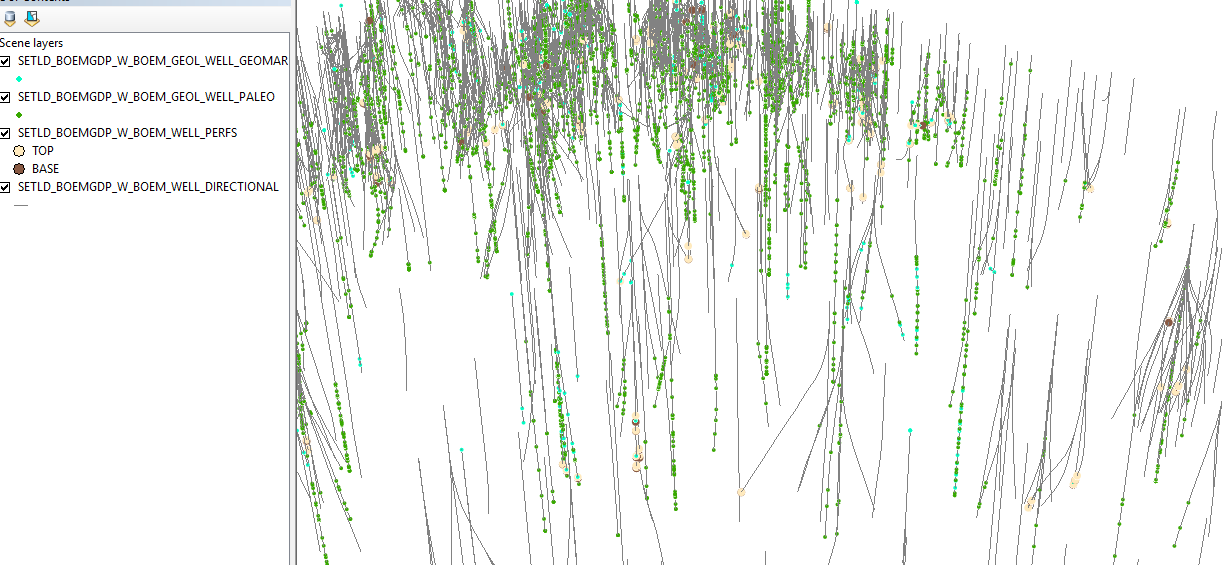
Thanks Eric. Here's a pic from ArcScene. The dots currently rendered are indeed done with Snipper as a measurement along line (it was provided). For another dataset, the source only provides TVD (a depth at which the item occurs). See pic.