Question

Microsoft SQL Spacial Table -> (Something) -> Google Maps Workflow Suggestions

  • August 14, 2017
  • 2 replies
  • 22 views

This is more of a workflow question, but using FME to do so.


New to FME, but basically I have a Microsoft SQL Spacial Table that has geometries/polygons in it that I want to display on a Google Map. These polygons represent land ownership, which is basically what Google Maps shows when you fully zoom in. (See the attached image below. i.e. For Crafton Tull you can see the 3d building and then the polygon around it that is the property boundary.)


What I want to do is automate the transfer of the Microsoft SQL Spacial Table geometries & associated data into a format that Google Maps can use. The simplest option seems to be to pull it into a Google Fusion Table, but I didn't know if others had recommendations.


I found this old FME blog post that talks about using Google Cloud SQL but that seems more complex. (Fusion tables are very easy to use... But the future support for them is unclear.)

https://blog.safe.com/2015/01/6-google-maps-engine-alternatives/

Any other / better suggestions? Thanks!!!

----

Example image with ownership boundaries.

This post is closed to further activity.
It may be an old question, an answered question, an implemented idea, or a notification-only post.
Please check post dates before relying on any information in a question or answer.
For follow-up or related questions, please post a new question or idea.
If there is a genuine update to be made, please contact us and request that the post is reopened.

2 replies

redgeographics
Celebrity
Forum|alt.badge.img+62

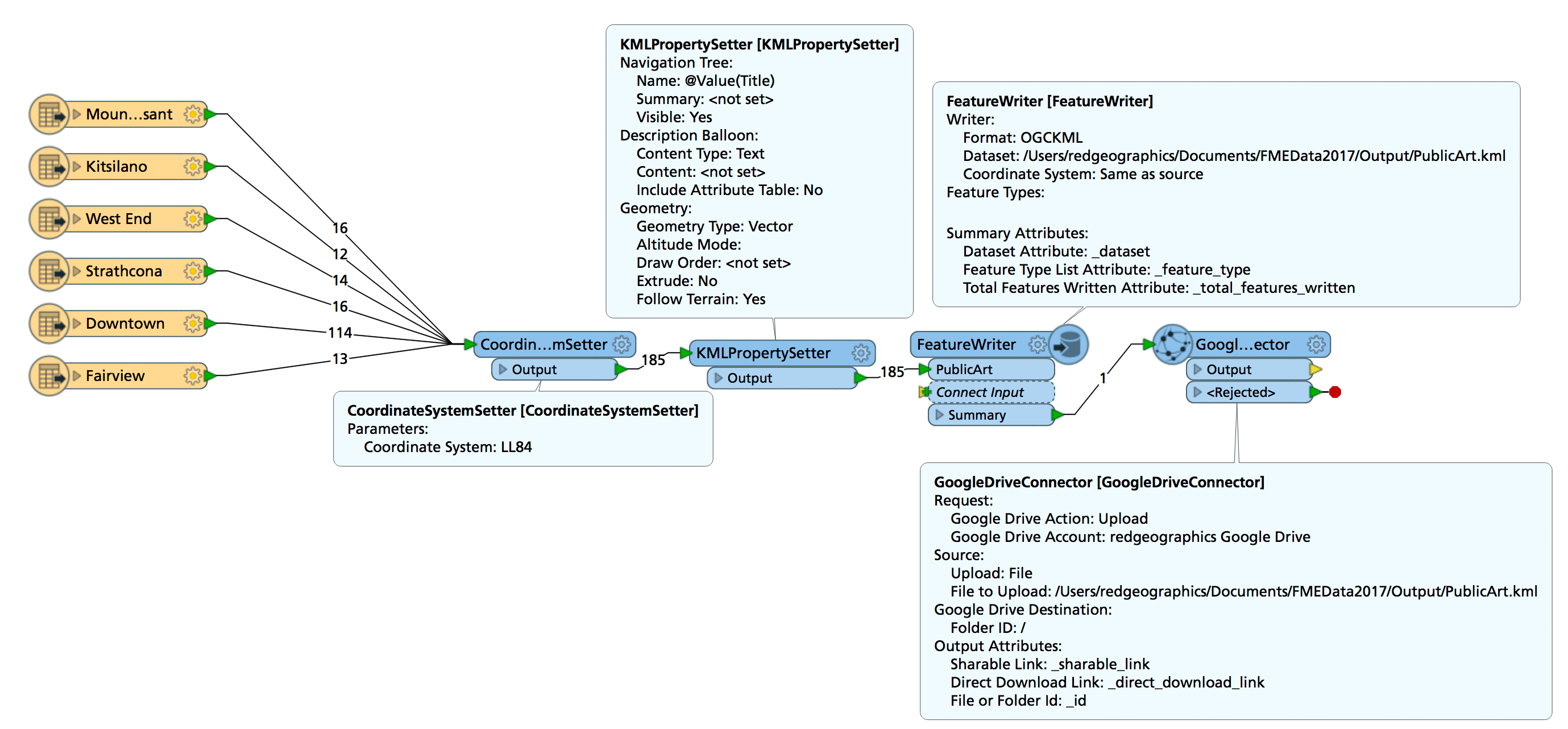
One thing that might work is write to a KML using a FeatureWriter, then a GoogleDriveConnector to upload that KML to a Google Drive account from which you can add it to a custom Google Map.

I've done a quick test (using Excel as input rather than MSSQL) and it seems to work ok.

Just can't seem to find a way to share the map...

Alternatively, if it doesn't have to be Google, there's a Wordpress plugin that can display markers on top of a Leaflet map: https://www.mapsmarker.com/, the data is stored in the Wordpress database, which is MySQL by default. I've written to that using FME, bit clunky but it works.


redgeographics
Celebrity
Forum|alt.badge.img+62

One thing that might work is write to a KML using a FeatureWriter, then a GoogleDriveConnector to upload that KML to a Google Drive account from which you can add it to a custom Google Map.

I've done a quick test (using Excel as input rather than MSSQL) and it seems to work ok.

Just can't seem to find a way to share the map...

Alternatively, if it doesn't have to be Google, there's a Wordpress plugin that can display markers on top of a Leaflet map: https://www.mapsmarker.com/, the data is stored in the Wordpress database, which is MySQL by default. I've written to that using FME, bit clunky but it works.

Oh wait... you have polygons... oops...


The KML option should still work, but the Leaflet plugin probably won't.