Solved

Is there a way to create polygonal viewport in autocad?

  • December 9, 2019
  • 6 replies
  • 84 views

I would like to create some viewports that are circular and also one shape like this
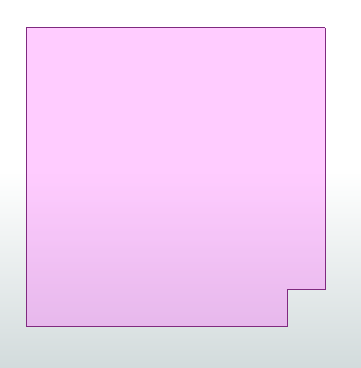


Is there an autocad attribute I can set to make viewports in irregular shapes?

Best answer by becchr

This was something on my ACAD-FME-todolist too, so I was intrigued by this question and started looking before I saw your answer @jovitaatsafe ...

After some puzzling with the format attributes of the viewport and the polygon, I managed to create a non-rectangular viewport! In addition to the do's and don'ts of this article, it comes down to specifying the handles (unique IDs or ACAD objects) of the viewport on the one hand and the 'clipping' polygon on the other and having them refer to each other using the attributes autocad_entity_handle, autocad_viewport_clipped_handle, autocad_viewport_non_rect_clip_handle. You must also indicate that there is a non-rectangular clip by setting the autocad_viewport_non_rect_clip attribute to Yes.

In the dwg writer you must also check the corresponding "format attributes" if necessary.
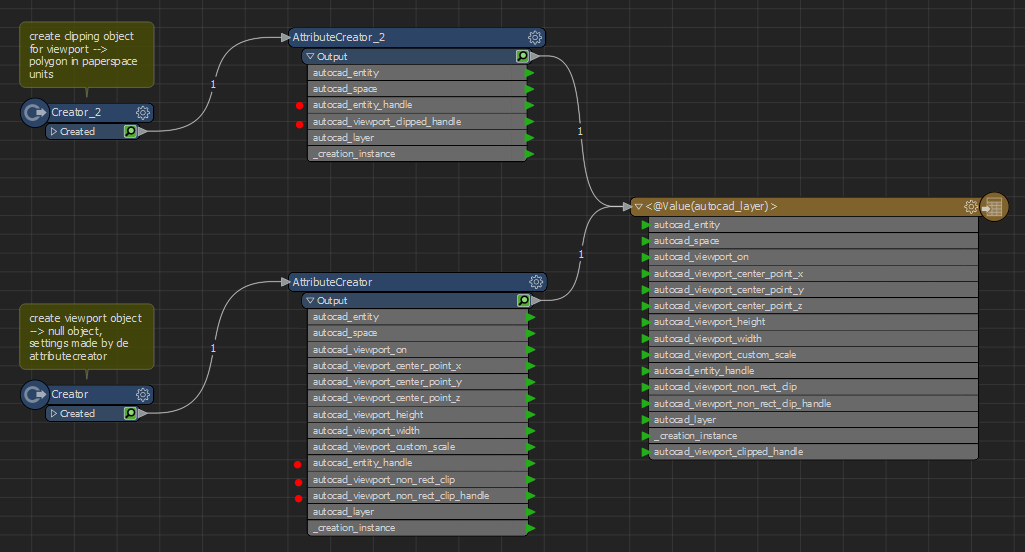
Handles are 64-bit integers, so displayed as hex strings they have a maximum of 16 digits. I’m not sure how handles are appointed to the objects by autocad, but it might be safer to choose handles at the end of the handle-spectrum… I just chose random values in this example that creates a non-rectangular viewport on layer ‘vp’ in Layout1 of the template dwg.

acad_PolygonVP.fmwt

Hope this helps @garydlester!

This post is closed to further activity.
It may be an old question, an answered question, an implemented idea, or a notification-only post.
Please check post dates before relying on any information in a question or answer.
For follow-up or related questions, please post a new question or idea.
If there is a genuine update to be made, please contact us and request that the post is reopened.

6 replies

jovitaatsafe
Safer
Forum|alt.badge.img+11

Hi @garydlester,

//To my knowledge, I think we only read/create rectangular viewports according to the AutoCAD Viewports doc. It might be worth posting a new idea here to inform development of your interest. It would also be helpful to add in your idea why you might want to have viewports of different shapes to give us a use case. Thanks!//


Edit: My mistake, please see @becchr's answer highlighted below (:

becchr
Influencer
Forum|alt.badge.img+33
  • Influencer
  • Best Answer
  • December 11, 2019

This was something on my ACAD-FME-todolist too, so I was intrigued by this question and started looking before I saw your answer @jovitaatsafe ...

After some puzzling with the format attributes of the viewport and the polygon, I managed to create a non-rectangular viewport! In addition to the do's and don'ts of this article, it comes down to specifying the handles (unique IDs or ACAD objects) of the viewport on the one hand and the 'clipping' polygon on the other and having them refer to each other using the attributes autocad_entity_handle, autocad_viewport_clipped_handle, autocad_viewport_non_rect_clip_handle. You must also indicate that there is a non-rectangular clip by setting the autocad_viewport_non_rect_clip attribute to Yes.

In the dwg writer you must also check the corresponding "format attributes" if necessary.

Handles are 64-bit integers, so displayed as hex strings they have a maximum of 16 digits. I’m not sure how handles are appointed to the objects by autocad, but it might be safer to choose handles at the end of the handle-spectrum… I just chose random values in this example that creates a non-rectangular viewport on layer ‘vp’ in Layout1 of the template dwg.

acad_PolygonVP.fmwt

Hope this helps @garydlester!


  • Author
  • December 11, 2019

This was something on my ACAD-FME-todolist too, so I was intrigued by this question and started looking before I saw your answer @jovitaatsafe ...

After some puzzling with the format attributes of the viewport and the polygon, I managed to create a non-rectangular viewport! In addition to the do's and don'ts of this article, it comes down to specifying the handles (unique IDs or ACAD objects) of the viewport on the one hand and the 'clipping' polygon on the other and having them refer to each other using the attributes autocad_entity_handle, autocad_viewport_clipped_handle, autocad_viewport_non_rect_clip_handle. You must also indicate that there is a non-rectangular clip by setting the autocad_viewport_non_rect_clip attribute to Yes.

In the dwg writer you must also check the corresponding "format attributes" if necessary.

Handles are 64-bit integers, so displayed as hex strings they have a maximum of 16 digits. I’m not sure how handles are appointed to the objects by autocad, but it might be safer to choose handles at the end of the handle-spectrum… I just chose random values in this example that creates a non-rectangular viewport on layer ‘vp’ in Layout1 of the template dwg.

acad_PolygonVP.fmwt

Hope this helps @garydlester!

@becchr This works perfect, thank you for showing an implement of autocad_entiity_handles, one more question, so if I want to do like a circular viewport I need like maybe 100 sided polygon? I tried to push an ellipse through and it failed, I will try with 100 side polygon later, thanks again!


becchr
Influencer
Forum|alt.badge.img+33
  • Influencer
  • December 11, 2019

@becchr This works perfect, thank you for showing an implement of autocad_entiity_handles, one more question, so if I want to do like a circular viewport I need like maybe 100 sided polygon? I tried to push an ellipse through and it failed, I will try with 100 side polygon later, thanks again!

hi @garydlester, glad it helps! indeed the circular viewport isn't working, while the autocad-settings seem to be the same, strange... Workaround could be indeed to use the ArcStroker transformer to make x-sided polygons from the circles.


sigtill
Supporter
Forum|alt.badge.img+25
  • Supporter
  • December 11, 2019

@becchr This works perfect, thank you for showing an implement of autocad_entiity_handles, one more question, so if I want to do like a circular viewport I need like maybe 100 sided polygon? I tried to push an ellipse through and it failed, I will try with 100 side polygon later, thanks again!

You can use the ArcStroker perhaps ? @garydlester


jovitaatsafe
Safer
Forum|alt.badge.img+11

This was something on my ACAD-FME-todolist too, so I was intrigued by this question and started looking before I saw your answer @jovitaatsafe ...

After some puzzling with the format attributes of the viewport and the polygon, I managed to create a non-rectangular viewport! In addition to the do's and don'ts of this article, it comes down to specifying the handles (unique IDs or ACAD objects) of the viewport on the one hand and the 'clipping' polygon on the other and having them refer to each other using the attributes autocad_entity_handle, autocad_viewport_clipped_handle, autocad_viewport_non_rect_clip_handle. You must also indicate that there is a non-rectangular clip by setting the autocad_viewport_non_rect_clip attribute to Yes.

In the dwg writer you must also check the corresponding "format attributes" if necessary.

Handles are 64-bit integers, so displayed as hex strings they have a maximum of 16 digits. I’m not sure how handles are appointed to the objects by autocad, but it might be safer to choose handles at the end of the handle-spectrum… I just chose random values in this example that creates a non-rectangular viewport on layer ‘vp’ in Layout1 of the template dwg.

acad_PolygonVP.fmwt

Hope this helps @garydlester!

@becchr, nice work! I learned something new today! My apologies for the misinformation @garydlester, I'll update the comment to make it less confusing for any new readers coming by.