



Solved

How to remove elevation from BIM file?

  • January 29, 2021
  • 2 replies
  • 49 views

oscard
Influencer
Forum|alt.badge.img+22

Good morning.


I'm putting together a workspace to transform a Revit file into Cesium 3D tiles. Overall, it is a pretty straightforward process, but I'm facing an issue with the elevation.


The building stored in the Cesium 3D tiles is floating, so I need to offset the Z to put it in floor level over a 2D basemap. I've been using the Offsetter transformer with lots of trial and errors until getting it right, but I would like to know if there is a better way.


So the question is: Is it possible with FME to make that "elevation removal" automatic?
Best answer by chrisatsafe

Hi @oscard​ ,

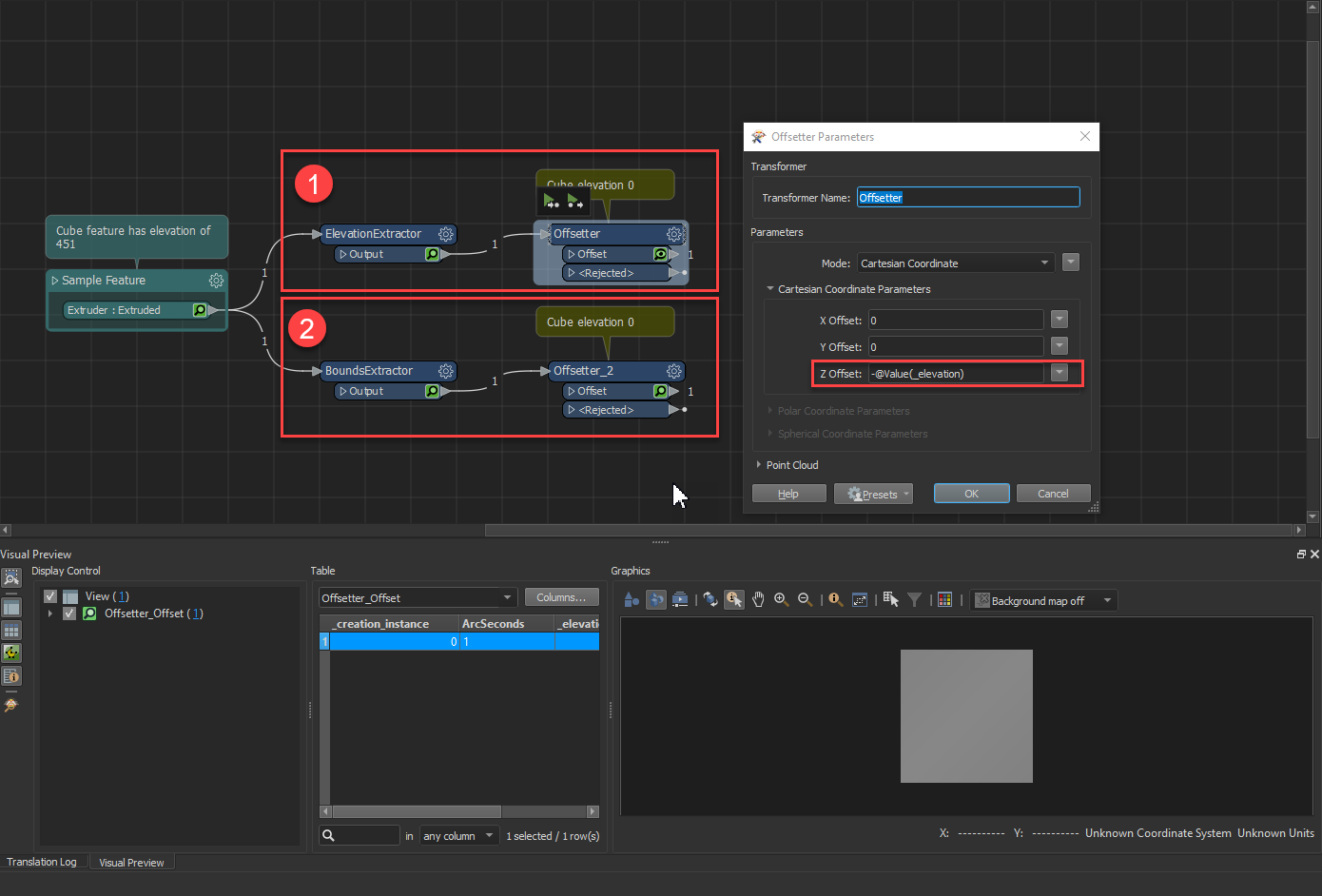
If you have floating features you can use an ElevationExtractor (1 in the image)or BoundsExtractor (2 in the image) to get the z value, then set the Offset Z value to negative @Value(_elevation) or @Value(_zmin). This extract the elevation to an attribute (either _elevation or _zmin depending on the transformer you use) which can then be used to offset in the Offsetter. 2021-02-02_14-13-54

This post is closed to further activity.
It may be an old question, an answered question, an implemented idea, or a notification-only post.
Please check post dates before relying on any information in a question or answer.
For follow-up or related questions, please post a new question or idea.
If there is a genuine update to be made, please contact us and request that the post is reopened.

2 replies

chrisatsafe
Contributor
Forum|alt.badge.img+2
  • Contributor
  • Best Answer
  • February 2, 2021

Hi @oscard​ ,

If you have floating features you can use an ElevationExtractor (1 in the image)or BoundsExtractor (2 in the image) to get the z value, then set the Offset Z value to negative @Value(_elevation) or @Value(_zmin). This extract the elevation to an attribute (either _elevation or _zmin depending on the transformer you use) which can then be used to offset in the Offsetter. 2021-02-02_14-13-54


oscard
Influencer
Forum|alt.badge.img+22
  • Author
  • Influencer
  • February 3, 2021

Hi @oscard​ ,

If you have floating features you can use an ElevationExtractor (1 in the image)or BoundsExtractor (2 in the image) to get the z value, then set the Offset Z value to negative @Value(_elevation) or @Value(_zmin). This extract the elevation to an attribute (either _elevation or _zmin depending on the transformer you use) which can then be used to offset in the Offsetter. 2021-02-02_14-13-54

Hi! Thanks for the answer!

That worked.


I have to aggregate the geometries first and then apply the ElevationExtractor, otherwise all the buildings floors are pushed to the ground.