Question

How to fix polygon - small lines in shp

  • May 3, 2018
  • 4 replies
  • 27 views

Forum|alt.badge.img

Hi,

I have many polygons in my file, that have these random lines which are preventing me from processing the polygon further. I was able to identify which polygons have the issue using the geometry validator, but I don't know how to fix the issue.

Attached is a screenshot and a sample data.

Anyone experienced the same problem and know how to resolve it?

Thank you!

This post is closed to further activity.
It may be an old question, an answered question, an implemented idea, or a notification-only post.
Please check post dates before relying on any information in a question or answer.
For follow-up or related questions, please post a new question or idea.
If there is a genuine update to be made, please contact us and request that the post is reopened.

4 replies

erik_jan
Contributor
Forum|alt.badge.img+26
  • Contributor
  • May 3, 2018

I would try the SpikeRemover transformer.


Forum|alt.badge.img
  • Author
  • May 3, 2018

I would try the SpikeRemover transformer.

Hi @erik_jan I did try that, following the tutorial by Mark2@safe and it didn't work. I tried changing the settings a bit from what he recommended in the tutorial too, but nothing.


erik_jan
Contributor
Forum|alt.badge.img+26
  • Contributor
  • May 3, 2018

I would try the SpikeRemover transformer.

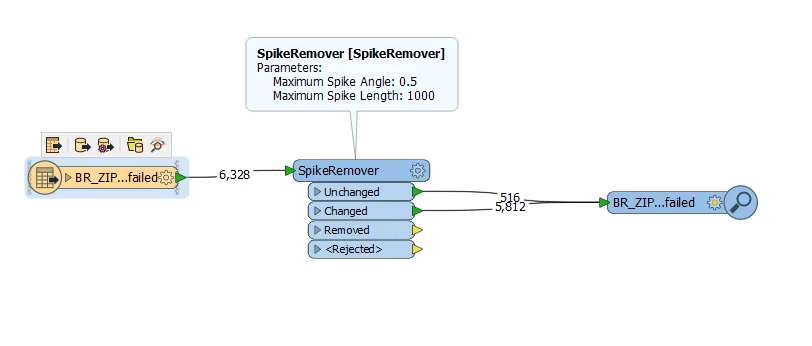
With these settings it seems to solve about 90% of the issues:


Forum|alt.badge.img
  • Author
  • May 3, 2018
With these settings it seems to solve about 90% of the issues:


Thank you @erik_jan!!!