


Question

how to connect points from two different datasets with lines?

  • April 26, 2022
  • 8 replies
  • 382 views

a_ericsson
Contributor
Forum|alt.badge.img+3

Hi! 

I'm trying to connect points to each other using lines. The points are in two seperate postGIS datasets, but have an ID-value in common. So I would need help to join points based on a common field / attribute. Does anyone know how to do this?


I have successfully done this in QGIS using the Hublines tool.

https://docs.qgis.org/testing/en/docs/user_manual/processing_algs/qgis/vectoranalysis.html#qgishublines

8 replies

redgeographics
Celebrity
Forum|alt.badge.img+62

There's a couple ways of doing this. One would be to use a CoordinateExtractor on one of the two sets to store the coordinates of the points in attributes. Then a FeatureMerger with that set as the Supplier and the other set as the Requestors. Join on the ID they have in common and have it merge attributes only. So you'll end up with the points from the Requestor set that have received the attributes with coordinates from the Supplier set.


Then run them through a VertexCreator, set its mode to Add Point and the X/Y (and Z) values taken from the attributes.


nielsgerrits
VIP
Forum|alt.badge.img+64

Another way to do this is to feed both tables to a LineBuilder transformer. Set it to group by the common id attribute.


a_ericsson
Contributor
Forum|alt.badge.img+3
  • Author
  • Contributor
  • April 26, 2022

There's a couple ways of doing this. One would be to use a CoordinateExtractor on one of the two sets to store the coordinates of the points in attributes. Then a FeatureMerger with that set as the Supplier and the other set as the Requestors. Join on the ID they have in common and have it merge attributes only. So you'll end up with the points from the Requestor set that have received the attributes with coordinates from the Supplier set.


Then run them through a VertexCreator, set its mode to Add Point and the X/Y (and Z) values taken from the attributes.

Thanks! The result I'm after is a new dataset consisting of lines, connecting points from the different datasets. The VertexCreator returns a dataset of points, but how do I use these points to generate a line between them?


redgeographics
Celebrity
Forum|alt.badge.img+62

Thanks! The result I'm after is a new dataset consisting of lines, connecting points from the different datasets. The VertexCreator returns a dataset of points, but how do I use these points to generate a line between them?

If you set the mode of the VertexCreator to "Add point" rather than the default "Replace with point" it should create a line from the original point to the one specified in the coordinate attributes.


Forum|alt.badge.img+2

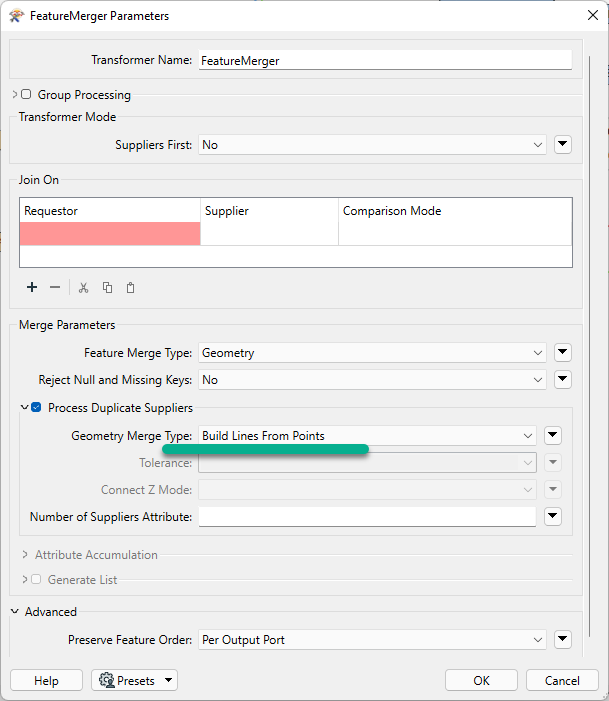
@a_ericsson​ FeatureMerger has a little know (or used) function that will allow you to build the line from points.image


a_ericsson
Contributor
Forum|alt.badge.img+3
  • Author
  • Contributor
  • April 27, 2022

Thanks! The result I'm after is a new dataset consisting of lines, connecting points from the different datasets. The VertexCreator returns a dataset of points, but how do I use these points to generate a line between them?

Great, thanks!


a_ericsson
Contributor
Forum|alt.badge.img+3
  • Author
  • Contributor
  • April 27, 2022

@a_ericsson​ FeatureMerger has a little know (or used) function that will allow you to build the line from points.image

Cool, thanks a lot! :)


a_ericsson
Contributor
Forum|alt.badge.img+3
  • Author
  • Contributor
  • April 27, 2022

Another way to do this is to feed both tables to a LineBuilder transformer. Set it to group by the common id attribute.

Thanks!