Solved

How to avoid AttributeExploder to add unwanted 'values'


Forum|alt.badge.img

I'm using the AttributeExploder to prepare a two line table for an HTML report, the header as 'name' column and the value line has another.


How to avoid unwanted 'values' or hide them?

It adds those two:

fme_geometry fme_undefined

fme_type fme_no_geom


Or is there a way to filter out value before using in the HTML report transformer?

Best answer by itsmatt

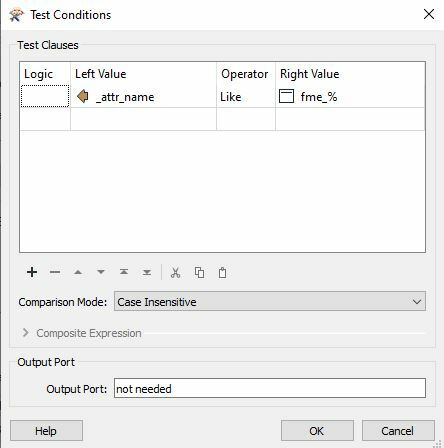
If you can't find a solution that makes the result clean you can just use a tester after the AttributeExploder that tests if the names are like 'fme_%' (without the quote marks), that should catch all of these.

View original
This post is closed to further activity.
It may be an old question, an answered question, an implemented idea, or a notification-only post.
Please check post dates before relying on any information in a question or answer.
For follow-up or related questions, please post a new question or idea.
If there is a genuine update to be made, please contact us and request that the post is reopened.

4 replies

philipwhitten
Supporter
Forum|alt.badge.img+15

Have you got the "Keep Geometry" parameter set to "No" for the AttributeExploder?


itsmatt
Celebrity
Forum|alt.badge.img+48
  • Celebrity
  • Best Answer
  • August 9, 2021

If you can't find a solution that makes the result clean you can just use a tester after the AttributeExploder that tests if the names are like 'fme_%' (without the quote marks), that should catch all of these.


Forum|alt.badge.img
  • Author
  • August 9, 2021

Have you got the "Keep Geometry" parameter set to "No" for the AttributeExploder?

I do


Forum|alt.badge.img
  • Author
  • August 9, 2021

If you can't find a solution that makes the result clean you can just use a tester after the AttributeExploder that tests if the names are like 'fme_%' (without the quote marks), that should catch all of these.

Thank you! that's a great trick!

If that can help someone in the future:filter fme_