Solved

How can I create a PGW file instead of a WLD file during conversion from GEOTIFF to PNG?

  • October 15, 2019
  • 12 replies
  • 168 views

I want to read a GEOTFF, add an alpha channel and then write a png with a pgw rasterfile.

My Workbench works but only creates wld-files with png.

How can I create pgw-files?

 

Best answer by ebygomm

You'll have to either use a filecopy writer or a system caller to create the pgw. I'd recommend swapping the writer for a feature writer, you can then use the output to trigger a systemcaller or send to a file copy writer

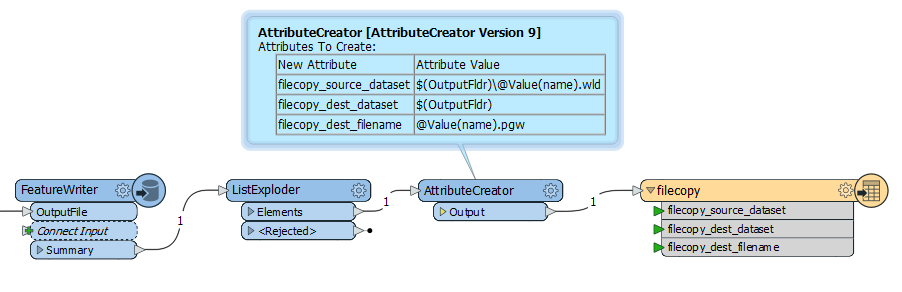
Create with filecopywriter (original wld file remains)
 

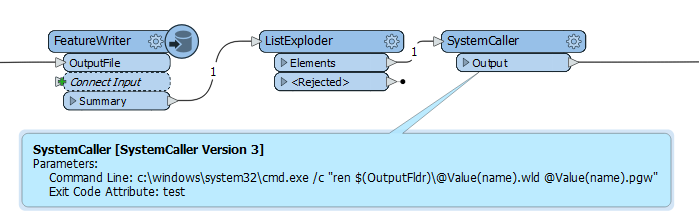
Rename with system caller - wld file renamed
This post is closed to further activity.
It may be an old question, an answered question, an implemented idea, or a notification-only post.
Please check post dates before relying on any information in a question or answer.
For follow-up or related questions, please post a new question or idea.
If there is a genuine update to be made, please contact us and request that the post is reopened.

12 replies

jdh
Contributor
Forum|alt.badge.img+40
  • Contributor
  • October 15, 2019

The pgw file is just a wld file with a different extension.


Renaming the file should work.

  • Author
  • October 16, 2019

The pgw file is just a wld file with a different extension.


Renaming the file should work.

Thank you!

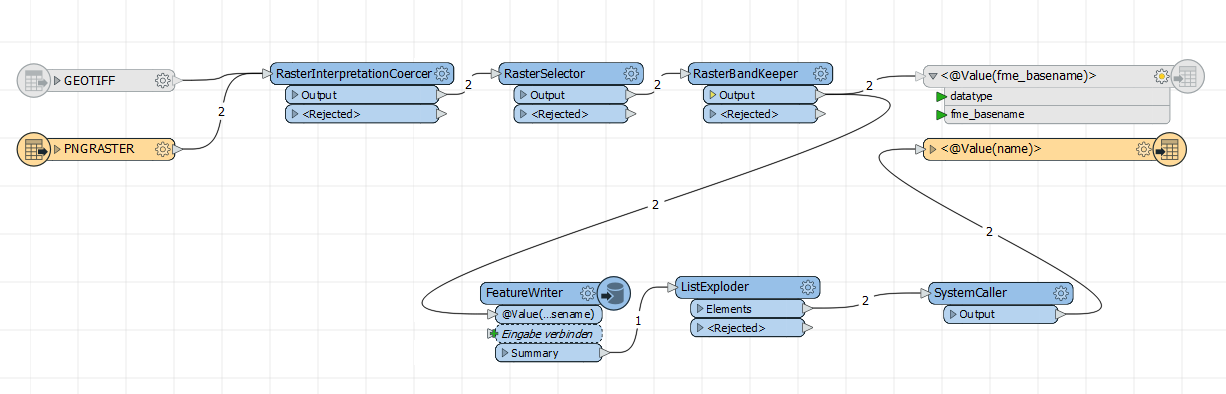
Is it possible to rename the files during the process in the picture?


ebygomm
Influencer
Forum|alt.badge.img+46
  • Influencer
  • Best Answer
  • October 16, 2019

You'll have to either use a filecopy writer or a system caller to create the pgw. I'd recommend swapping the writer for a feature writer, you can then use the output to trigger a systemcaller or send to a file copy writer

Create with filecopywriter (original wld file remains)


Rename with system caller - wld file renamed


  • Author
  • October 16, 2019

You'll have to either use a filecopy writer or a system caller to create the pgw. I'd recommend swapping the writer for a feature writer, you can then use the output to trigger a systemcaller or send to a file copy writer

Create with filecopywriter (original wld file remains)


Rename with system caller - wld file renamed

Thank you!


For what is the ListExploder?

ebygomm
Influencer
Forum|alt.badge.img+46
  • Influencer
  • October 16, 2019

Thank you!


For what is the ListExploder?

If you are writing several png's at once, the names of them are returned in a list from the summary port of the FeatureWriter, this needs to be exploded so that you rename the wld file for each output png


  • Author
  • October 16, 2019

If you are writing several png's at once, the names of them are returned in a list from the summary port of the FeatureWriter, this needs to be exploded so that you rename the wld file for each output png

Thank you! It nearly worked.


I used the the systemcaller to rename the files with this command line:

C:\\Windows\\system32\\cmd.exe /c "ren "OutputFldr\\*.wld" "*.pgw""

I got the desired PNG+PGW files.

BUT I always get an fatal error that the PNGRASTER writer failed to obtain raster from feature. "Only features with raster geometry are expected"

I can't find the problem...


ebygomm
Influencer
Forum|alt.badge.img+46
  • Influencer
  • October 16, 2019

Thank you! It nearly worked.


I used the the systemcaller to rename the files with this command line:

C:\\Windows\\system32\\cmd.exe /c "ren "OutputFldr\\*.wld" "*.pgw""

I got the desired PNG+PGW files.

BUT I always get an fatal error that the PNGRASTER writer failed to obtain raster from feature. "Only features with raster geometry are expected"

I can't find the problem...


Can you share a screen print of your workflow, it sounds like you're sending a non raster feature to the png writer


Edit: you've already written the file with the featurewriter, there is no need for the original writer after the system caller. You are sending a non raster feature into that writer, hence the message.


  • Author
  • October 16, 2019

Can you share a screen print of your workflow, it sounds like you're sending a non raster feature to the png writer


Edit: you've already written the file with the featurewriter, there is no need for the original writer after the system caller. You are sending a non raster feature into that writer, hence the message.

Thank you so much! It works!


ebygomm
Influencer
Forum|alt.badge.img+46
  • Influencer
  • October 16, 2019

Thank you so much! It works!

If you're using the rename statement posted above, you don't actually need to explode the list, you can just go straight to the systemcaller


  • Author
  • October 16, 2019

If you're using the rename statement posted above, you don't actually need to explode the list, you can just go straight to the systemcaller

Do you mean that one?:

C:\\Windows\\system32\\cmd.exe /c "ren "OutputFldr\\*.wld" "*.pgw""


ebygomm
Influencer
Forum|alt.badge.img+46
  • Influencer
  • October 16, 2019

Do you mean that one?:

C:\\Windows\\system32\\cmd.exe /c "ren "OutputFldr\\*.wld" "*.pgw""

Yes, that will rename all files with extension wld to pgw. So you only need to call it once, not once per png


  • Author
  • October 16, 2019

Yes, that will rename all files with extension wld to pgw. So you only need to call it once, not once per png

Ah I understand...

Thanks a lot!