


Question

handle XML and their elements

  • July 15, 2013
  • 10 replies
  • 38 views

gpt_geoinfo
Contributor
Forum|alt.badge.img+2
Hi community,


although I'm not new to FME I am quite inexperienced in FME+XML and I would be happy if someone could help me.


I already watched the corresponding webinars and read the manuals, but unfortunately I can't get the problem solved.


Input-XML:


The XML is quite complex. I made a screenshot and hope you can read it. The main section is <SymbolInstance> with <SimpleSymbolDefinition> and <ParameterOverrides> in it. There you can find the variable "COLORBYLAYER0" in the Path-section which is referenced (indicated by %). The concrete value can be found in <ParameterOverrides>.<Override>.<ParameterIdentifier> resp. <ParameterValue>.


Output:


My aim is to replace the variable with its value.


Is that an issue I can handle with FME?


Thanks in advance,


Maria

 

This post is closed to further activity.
It may be an old question, an answered question, an implemented idea, or a notification-only post.
Please check post dates before relying on any information in a question or answer.
For follow-up or related questions, please post a new question or idea.
If there is a genuine update to be made, please contact us and request that the post is reopened.

10 replies

fmelizard
Safer
Forum|alt.badge.img+21
  • Safer
  • July 15, 2013
Hi Maria,


This is a typical case for the XMLUpdater where a value can be replaced/deleted/renamed etc.

gpt_geoinfo
Contributor
Forum|alt.badge.img+2
  • Author
  • Contributor
  • July 16, 2013

Hi Itay,


thanks for the keyword. XMLUpdater seems to meet my needs.


But when I'm trying to replace an element's content it fails. I already tried with a simple XML:


Input:


<data>


    <root>


        <element>HeyYou</element>


    </root>


</data>


XMLUpdater:


Update Type: Replace Contents


XML Path: /data/root/element


Value Type: Plain Text


Value: HelloWorld


Output:


unchanged Input.


What am I doing wrong here?


When I use an XML Path of /data/root the output is


<data>


    <root>HelloWorld</root>


</data>


fmelizard
Safer
Forum|alt.badge.img+21
  • Safer
  • July 16, 2013
Hi Maria,


The XML updater can be a bit confusing to use.


I have uploaded a demo ws that demonstrates how to replce tags (based on your example)


takashi
Celebrity
  • July 16, 2013
Hi Maria,


I tested the XMLUpdater with your "Hallo World" document, I confirmed that it works expectedly.  As an additional information: although the XMLUpdater is a good solution, the XQueryUpdater transformer also can be used, and might be more flexible if the XML document can have multiple "SymbolInstance" elements with different parameter override definitions.


Takashi

gpt_geoinfo
Contributor
Forum|alt.badge.img+2
  • Author
  • Contributor
  • July 24, 2013
Hi there,


I found the bug: FME 2012. In version 2013 everything runs as expected. Actually I didn't want to install the latest version, but there's no getting around it.


Now my next question:


How to replace the element-contents with their belonging value?


A simple example:


<data>


    <root>


        <element>%abc%</element>


        <element>%xyz%</element>


    </root>


    <leave>


        <param>abc</param>


        <value>HelloWorld</value>


    </leave>


    <leave>


        <param>xyz</param>


        <value>HelloFME</value>


    </leave>


</data>


The result should be:


<data>


    <root>


        <element>HelloWorld</element>


        <element>HelloFME</element>


    </root>


    <leave>


        <param>abc</param>


        <value>HelloWorld</value>


    </leave>


    <leave>


        <param>xyz</param>


        <value>HelloFME</value>


    </leave>


</data>


When using XMLUpdater with the XML-Path "/data/root/element" and the XQuery "data(/data/leave/value)" I receive


<data>


    <root>


        <element>HelloWorld HelloFME</element>


        <element>HelloWorld HelloFME</element>


    </root>


    <leave>


        <param>abc</param>


        <value>HelloWorld</value>


    </leave>


    <leave>


        <param>xyz</param>


        <value>HelloFME</value>


    </leave>


</data>


Can you give me some hints? I'm quite new to XQuery and just need some hints to manage it.


-Maria

takashi
Celebrity
  • July 25, 2013
Hi Maria,


  I'm not sure whether the XMLUpdater can be used in such a case, but, for example,  the XQueryUpdater with the following XQuery expression would work:   -----   for $elem in //element   let $param := fn:replace($elem, "^%(.+)%$", "$1"),     $value := for $lv in //leave where $lv/param = $param return $lv/value   return replace value of node $elem with $value   -----       ... it's not easy to explain this expression, sorry. Try this first, then see these sites:   XQuery 1.0: An XML Query Language XQuery 1.0 and XPath 2.0 Functions and Operators


Takashi


[2017-05-01 Update] XMLXQueryUpdater with this expression may be more elegant.


for $x in //root/element
let $p := fn:replace($x/text(), '^%(.*)%$', '$1')
return replace value of node $x with //leave[param = $p]/value
or


for $x in //root/element
return replace value of node $x with //leave['%'||param||'%' = $x]/value

takashi
Celebrity
  • July 25, 2013
P.S. If you need to continue discussion about this subject, please post a new question having a link to this thread. Maybe there are XQuery / XPath experts in the Community, but they perhaps don't check old questions.

gpt_geoinfo
Contributor
Forum|alt.badge.img+2
  • Author
  • Contributor
  • July 25, 2013
Hi Takashi,


thanks a lot for your response!


It helps me so much. Indeed I found XQueryUpdater and a solution as well, but mine has 3 times more lines.


Now I can go on.


Thanks again!


-Maria

gpt_geoinfo
Contributor
Forum|alt.badge.img+2
  • Author
  • Contributor
  • August 12, 2013
XMLUpdater is exactly what I need, but unfortunatly it doesn't work fine in version 2012. So I upgraded to 2013. Everything works now.


Thanks for all your help!

lau
Forum|alt.badge.img+3
  • March 14, 2016

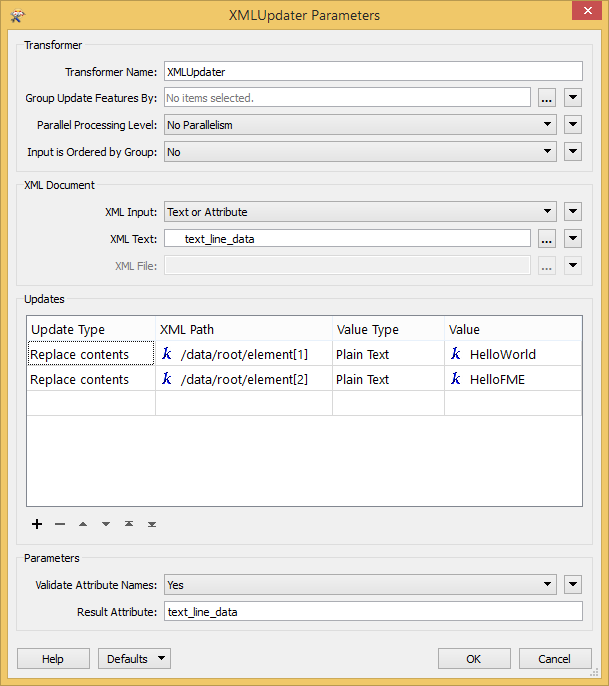
I hope you found the solution :) For those who are interested, you can use [] to access to the different elements of your XML.