sixtyfourtest.py
import sys
sys.path.append(r"C:\Program Files\FME\fmeobjects\python27")


import fmeobjects
import fnmatch
import xlrd
import arcpy
import datetime
import os

##dictionary to hold the day of week value generated by the statusRunDateNum
##variable. the first
##number in the dictionary entery is the day of the week as a number. The other
##two numbers are the column numbers where we will find our project status values
datColumnDict={1:[2,3],2:[5,6],3:[8,9],4:[11,12],5:[14,15]}
qcWorkspace=r"C:\Users\YouDoWellItDoesGood\Downloads\Anadarko_QC_Tool.fmwt"
#will return a number depending what day it is.
statusRunDateNum=datetime.datetime.today().isoweekday()

# location of the status report/ will be turned into a variable.
PSL=r"C:\Users\YouDoWellItDoesGood\Downloads\Project%20Status%20Worksheet%203_20%20to%203_24.xlsx"
pjStatus=xlrd.open_workbook(PSL)
pjSheet=pjStatus.sheet_by_index(0)
pjList=[]
for row_index in range(1,pjSheet.nrows):
    statusColumn=str(pjSheet.cell(row_index,datColumnDict[statusRunDateNum][1]))
    statusColumnNoColon=statusColumn.split(":")[1]
    projColumn=str(pjSheet.cell(row_index,datColumnDict[statusRunDateNum][0]))
    projColumnNoDec=projColumn.split(".")[0]
    projColumnNoColon=projColumnNoDec.split(":")[1]
    if "QC" in str(statusColumn):
        pjList.append(projColumnNoColon)
        print statusColumnNoColon
print pjList
pjDir=r"F:\Projects\ANADARKO-DELAWARE BASIN"
pjDirList=os.listdir(pjDir)
wrkspc=[]

for x in range(len(pjList)):

    #create string from TGS proj number
    match=str(pjList[x])+"*"
    #declare feature list


    for f in pjDirList:
        if fnmatch.fnmatch(f,match):
##            print match[:-1]


            gisPath=os.path.join(pjDir,f,"GIS")

            for gf in os.listdir(gisPath):

                if gf.startswith("DB_") or gf.startswith("ID") and gf.endswith(".gdb"):
                    wrkspc.append(os.path.join(gisPath,gf))


print wrkspc
for w in wrkspc:
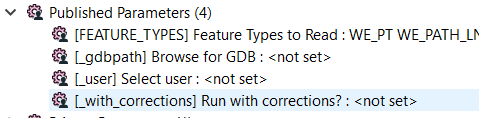
    parameters={}
    parameters['_gdbpath']=w
    parameters['_user']="test"
    parameters['_with_corrections']='False'
    parameters['FEATURE_TYPES']="WE_PT WE_PATH_LN WE_PAD_POLY WD_PT WD_POLY WD_LN VG_PT VG_POLY VG_LN VG_BUFFER_POLY TR_TRANS_OTHER_PT TR_TRANS_OTHER_POLY TR_TRANS_OTHER_LN TR_RUNWAY_POLY TR_ROAD_LOW_WATER_PT TR_ROAD_CENTER_LN TR_RAILROAD_PT TR_RAILROAD_POLY TR_RAILROAD_LN TR_LANDING_ZONE_PT TR_LANDING_ZONE_POLY TR_EDGE_OF_PAVEMENT_LN ST_OTHER_PT ST_OTHER_POLY ST_OTHER_LN SI_FACILITY_PERIMETER_POLY SI_FACILITY_OTHER_POLY RC_WETLANDS_POLY RC_SOILBED_PREPARATION_POLY RC_SOIL_SAMPLE_PT RC_SOIL_AMENDMENT_POLY RC_SEEDBED_PREPARATION_POLY RC_RECLAMATION_OTHER_PT RC_RECLAMATION_OTHER_POLY RC_RECLAMATION_OTHER_LN RC_MULCH_POLY RC_HYDROMULCH_POLY RC_BORROW_PIT_POLY PL_VENT_PIPE_PT PL_TRENCH_BREAKER_LN PL_TEST_LEAD_PT PL_TEE_PT PL_TAP_PT PL_SLEEVE_LN PL_ROUTING_NOTE_PT PL_ROCK_SHIELD_LN PL_REDUCER_PT PL_PUMP_STATION_PT PL_PIPELINE_LN PL_PIPE_BEND_LN PL_PIG_SIGNAL_PT PL_PI_EXCAVATION_PT PL_NAT_GROUND_PT PL_METER_STATION_PT PL_JOIN_PT PL_INJECTOR_PT PL_GIRTH_WELD_PT PL_FLANGE_PT PL_ELBOW_PT PL_DRIP_PT PL_DEPTH_OF_COVER_PT PL_COMPRESSOR_STATION_PT"

    wrkRunner=fmeobjects.FMEWorkspaceRunner()
    wrkRunner.runWithParameters(qcWorkspace,parameters)

    print w
    print parameters







