
Question

Filter polygons and multipolygons

  • August 10, 2015
  • 5 replies
  • 515 views

Hi people,


I need to filter polygons, polygons with holes and multipolygons from GML source set. I tried GeometryFilter and MultipleGeometryFilter but it seems not working as I want.
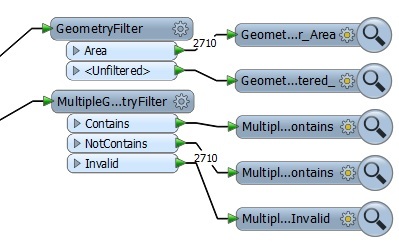
 

In 2710 features I know that two are multies for sure. But, as you see, all of them are sent to only one port.

How to achieve this?

This post is closed to further activity.
It may be an old question, an answered question, an implemented idea, or a notification-only post.
Please check post dates before relying on any information in a question or answer.
For follow-up or related questions, please post a new question or idea.
If there is a genuine update to be made, please contact us and request that the post is reopened.

5 replies

takashi
Celebrity
  • August 10, 2015
Hi,


Consider using the AggregateFilter to separate single-part polygons and multi-part polygons, and also the HoleCounter+Tester to filter polygons having hole(s).


Takashi

  • Author
  • August 10, 2015
Thanks Takashi.

  • Author
  • August 10, 2015

Takashi,


I have problem with this. All features go on aggregate port.

For making this GML file I aggregate polygons based on one attribute to create multies. But just few of them are multies for real. Why does all features go on aggregate port if they are single polygons?

Thanks in advance!


takashi
Celebrity
  • August 10, 2015
Possibly the polygons are multi-part polygons having just one part.


Check the number of parts with the PartCounter. You can then transform the one-part aggregate polygons into "real" single-part (non-aggregate) polygons with the Deaggregator.

  • Author
  • August 10, 2015
Works perfectly! Thanks.

