

Question

Extract information from Text File

  • March 3, 2016
  • 4 replies
  • 185 views

Forum|alt.badge.img

Hi Experts,

I have a text file and I want to extract the below information from it. PFA the text file.
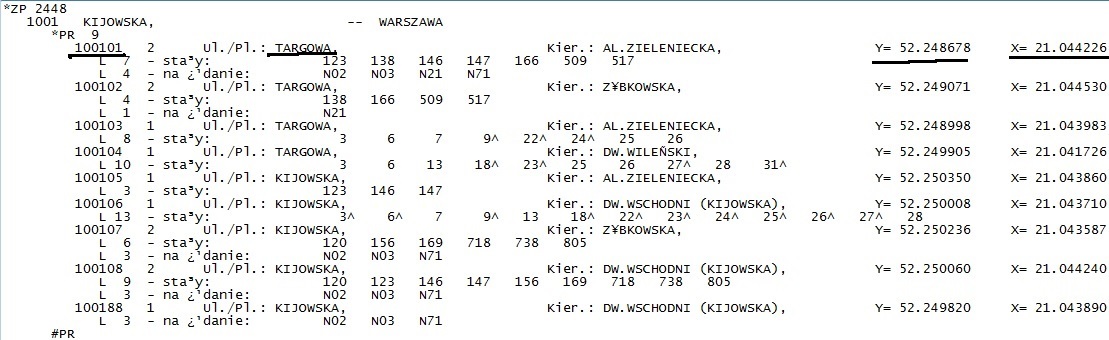
At first, I want to extract the unique code 100101(which is for section 1001 (second line)), the name for that code (might not be unique) and the Lat/Long (Y,X coordinates). I want to save the output in a text file with one space/comma (delimiter).

Is it possible with FME? From my side, I tried using Text file reader with substring extractor yet I am not getting what I exactly want to do.


This post is closed to further activity.
It may be an old question, an answered question, an implemented idea, or a notification-only post.
Please check post dates before relying on any information in a question or answer.
For follow-up or related questions, please post a new question or idea.
If there is a genuine update to be made, please contact us and request that the post is reopened.

4 replies

takashi
Celebrity
  • March 3, 2016

Hi @dewan, the StringSearcher can be used to extract required parts from a text line. This regex could help you if I understood the requirement correctly.

^\s*(\d+).+Pl\.:\s*([^,]+).+Y=\s*(\d+\.\d+)\s*X=\s*(\d+\.\d+)

The transformer stores the parts that match the sub expression surrounded by brackets into a list attribute. Then, you can concatenate elements of the list with the ListConcatenator.


Forum|alt.badge.img
  • Author
  • March 3, 2016

Hi @dewan, the StringSearcher can be used to extract required parts from a text line. This regex could help you if I understood the requirement correctly.

^\s*(\d+).+Pl\.:\s*([^,]+).+Y=\s*(\d+\.\d+)\s*X=\s*(\d+\.\d+)

The transformer stores the parts that match the sub expression surrounded by brackets into a list attribute. Then, you can concatenate elements of the list with the ListConcatenator.

Hi @takashi. It works perfect. Just perfect. But I am not good at Regular Expressions and neither would I be able to learn it in a day or two and I really need to work on a lot of data. Are there any other methods to do that? So that I could apply the same logic for every file. Thanks for the quick response.


takashi
Celebrity
  • March 3, 2016

Hi @takashi. It works perfect. Just perfect. But I am not good at Regular Expressions and neither would I be able to learn it in a day or two and I really need to work on a lot of data. Are there any other methods to do that? So that I could apply the same logic for every file. Thanks for the quick response.

@dewan, if widths of required columns are fixed, the CAT (Column Aligned Text) reader may be helpful to read the source text file. You can set the column widths as the reader parameter when you add the CAT reader.


mark2atsafe
Safer
Forum|alt.badge.img+59

@dewan, if widths of required columns are fixed, the CAT (Column Aligned Text) reader may be helpful to read the source text file. You can set the column widths as the reader parameter when you add the CAT reader.

This old post on the blog about the CAT reader may be of help. The X and Y columns appear to line up in your data so I would certainly start with this format.

http://blog.safe.com/2011/11/fmeevangelist90/




