Question

detect touching lines

  • May 9, 2018
  • 12 replies
  • 243 views

Forum|alt.badge.img

Hello,


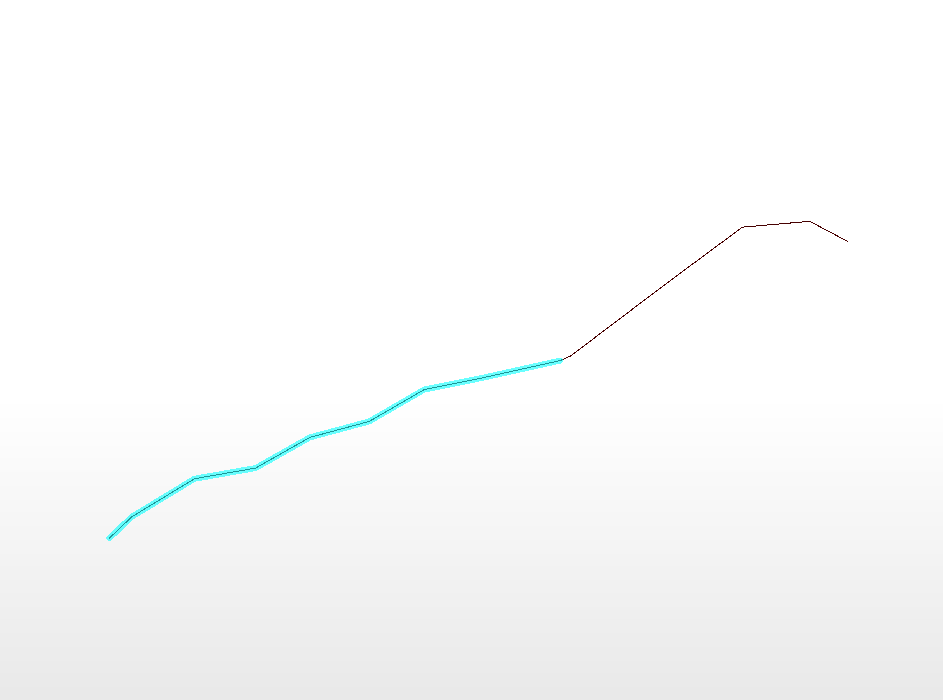
I have a network of lines where I wanna detect and aggregate touching lines just as in the case shown below (lines that touches each other at the end or start node)


can someone help me with this, please ?

thank you

This post is closed to further activity.
It may be an old question, an answered question, an implemented idea, or a notification-only post.
Please check post dates before relying on any information in a question or answer.
For follow-up or related questions, please post a new question or idea.
If there is a genuine update to be made, please contact us and request that the post is reopened.

12 replies

takashi
Celebrity
  • May 9, 2018

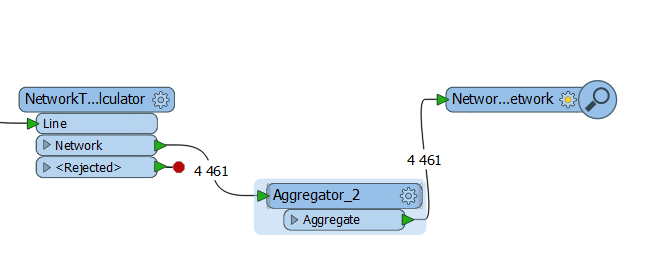
Hi @lianaolianov, the NetworkTopologyCalculator might help you. This transformer adds the same ID (Network ID Attribute) to all input lines belonging to the same connected network. You can then aggregate output lines using the Network ID as Group By attribute.


Forum|alt.badge.img

Hi @lianaolianov, the NetworkTopologyCalculator might help you. This transformer adds the same ID (Network ID Attribute) to all input lines belonging to the same connected network. You can then aggregate output lines using the Network ID as Group By attribute.

Hello,


I have tried but it seems that there is somthing not working


The NetworkTopologyCalculator gives different IDs to connected lines in my case


takashi
Celebrity
  • May 9, 2018

Hi @lianaolianov, the NetworkTopologyCalculator might help you. This transformer adds the same ID (Network ID Attribute) to all input lines belonging to the same connected network. You can then aggregate output lines using the Network ID as Group By attribute.

Do the lines exactly touch each other at their start/end nodes?


Forum|alt.badge.img
Do the lines exactly touch each other at their start/end nodes?


Yes, they exactly do


Here is another case


takashi
Celebrity
  • May 9, 2018
Do the lines exactly touch each other at their start/end nodes?


Not sure. The transformer requires exact match on end nodes to determine that the lines form a connected network. If you check the coordinate values with Feature Information window in FME Data Inspector, do the values exactly match in full precision?


takashi
Celebrity
  • May 9, 2018
Do the lines exactly touch each other at their start/end nodes?


To quick check, try sending the lines to the TopologyBuilder (set Yes to the Assume Clean Data parameter). If the lines belong to a connected network, point features would be output from the Node port for every start/end node of input lines.


Forum|alt.badge.img
Not sure. The transformer requires exact match on end nodes to determine that the lines form a connected network. If you check the coordinate values with Feature Information window in FME Data Inspector, do the values exactly match in full precision?


I checked with the Data Inspector and apparently there is some 10e-8 dismathching


I think this was also the reason why, after using a LineCombiner transformer before, not all lines have been joined although they apparently seem perfectly connected.


How to deal with this issue please ?


Forum|alt.badge.img
To quick check, try sending the lines to the TopologyBuilder (set Yes to the Assume Clean Data parameter). If the lines belong to a connected network, point features would be output from the Node port for every start/end node of input lines.


I used the snapper with end point snapping and a very small tolerance and then the LineCombiner and that worked great !


Hower the NetworkTopologyCalculator still gives the same problem, is that normal ?


Thank you very much for the help, really appreciated.


takashi
Celebrity
  • May 9, 2018
To quick check, try sending the lines to the TopologyBuilder (set Yes to the Assume Clean Data parameter). If the lines belong to a connected network, point features would be output from the Node port for every start/end node of input lines.


After applying the Snapper and the NetworkTopologyCalculator, is the number of features output from the Aggregator still 4461 as the same as before, or is there some change?


Forum|alt.badge.img

After applying the snapper and the LineCombiner, NetworkTopologyCalculator is supposed to give the same ID to every set of connected lines, however, there was connected lines with different ID


jdh
Contributor
Forum|alt.badge.img+40
  • Contributor
  • May 9, 2018

After applying the snapper and the LineCombiner, NetworkTopologyCalculator is supposed to give the same ID to every set of connected lines, however, there was connected lines with different ID

Are the lines that have a different ID in the NetworkTopologyCalculator properly noded? A line could touch another one, but if there isn't a node (not just a vertex) on both lines then they won't be connected in the same network.

Forum|alt.badge.img
Are the lines that have a different ID in the NetworkTopologyCalculator properly noded? A line could touch another one, but if there isn't a node (not just a vertex) on both lines then they won't be connected in the same network.
I don't think it's the case, touching points have the same coordinates which means that there are two overlapping points and not just one.