


Question

Count length of JSON array in non-blocking way ?

  • February 5, 2026
  • 9 replies
  • 58 views

lifalin2016
Supporter
Forum|alt.badge.img+40

Hi.

This is either a no-brainer that I haven’t figured out, or not doable, I think. But it’s a simple task.

I need to count the items in a JSON array, but I need to do it in a looping custom transformer, so it needs to be non-blocking.

In a custom transformer, I use a HttpCaller to get a JSON response, which includes an array of items. I may have to issue more http calls within the custom transformer, so it contains a loop back to its input.

JSONFragmenter can easily find the array items, but as features, not in a list format, so I need to use a blocking transformer like Aggregator to count them. This is no-go.

So either I need to extract the JSON array items into a list, and use ListElementCounter to find the length, or count the JSON array items in a different non-blocking way.

Does anyone have a solution for either of these tasks ?

Cheers.

9 replies

ebygomm
Influencer
Forum|alt.badge.img+46
  • Influencer
  • February 5, 2026

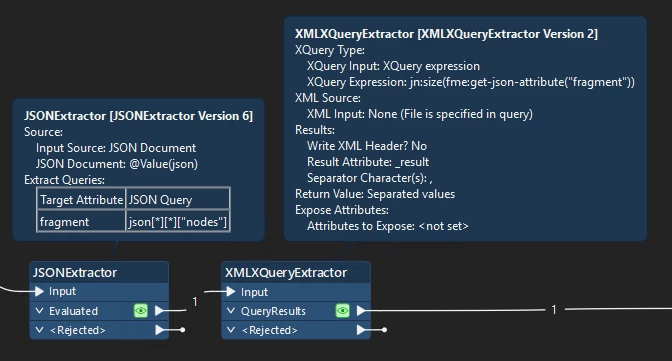
You can do this in an XMLXQueryExtractor which I think is non blocking

e.g. if your json looks like this

{
"id" : 1,
"data" : [
{"x" : 1},
{"x" : 2},
{"x" : 3},
{"x" : 4}
]
}

You can do something like this to get the size of the array

jn:size(fme:get-json-attribute("json")("data"))


lifalin2016
Supporter
Forum|alt.badge.img+40
  • Author
  • Supporter
  • February 5, 2026

You can do this in an XMLXQueryExtractor which I think is non blocking


Thanks ​@ebygomm 

It looks promising.

My array JSON query is: json[*][*][“nodes”]

How would that be expressed in XQuery ?


alexbiz
Influencer
Forum|alt.badge.img+32
  • Influencer
  • February 5, 2026

You could use a JSONFlattener on your JSON response. The JSON list would convert to an FME List attribute. Then you could use a ListElementCounter !


ebygomm
Influencer
Forum|alt.badge.img+46
  • Influencer
  • February 5, 2026

Are you able to share some example json?


lifalin2016
Supporter
Forum|alt.badge.img+40
  • Author
  • Supporter
  • February 5, 2026

You could use a JSONFlattener on your JSON response. The JSON list would convert to an FME List attribute. Then you could use a ListElementCounter !


This is a good attempt.

I thought it would be messy, but not really.

However, one of the obstacles I have here is that the hierarchial path to the nodes array in the response has a variable name embedded within it, so exposing the array by name in JSONFlattener (or AttributeExposer) isn’t possible.

It’s basically “data.$(SERVICE_NAME).nodes{}” where SERVICE_NAME is a variable parameter value.

E.g. “data.GEODKV_Kommuneomraade.nodes{}”. I have no say in problematic naming.

So I’m stuck with an unexposed array, which I cannot get ListElementCounter to process :-(

Any thoughts on how to remedy this ?

Cheers.


lifalin2016
Supporter
Forum|alt.badge.img+40
  • Author
  • Supporter
  • February 5, 2026

Are you able to share some example json?

Of course. Here’s a small sample:

{
"data": {
"GEODKV_Kommuneomraade": {
"pageInfo": {
"endCursor": "TVRJd01ERTROVFExTURJd01qRXdNekV5TVRneE5ESXpOemM9",
"hasNextPage": true
},
"nodes": [
{
"kommunekode": "0787"
},
{
"kommunekode": "0787"
}
]
}
}
}

But beware, the “GEODKV_Kommuneomraade” part is not static, but a variable service name, depending on which service I query. And I need to build a generic handling that works on all services.

This is a reponse from a GraphQL query.


ebygomm
Influencer
Forum|alt.badge.img+46
  • Influencer
  • February 5, 2026

Would this sort of approach work?


tva
Contributor
Forum|alt.badge.img+13
  • Contributor
  • February 5, 2026

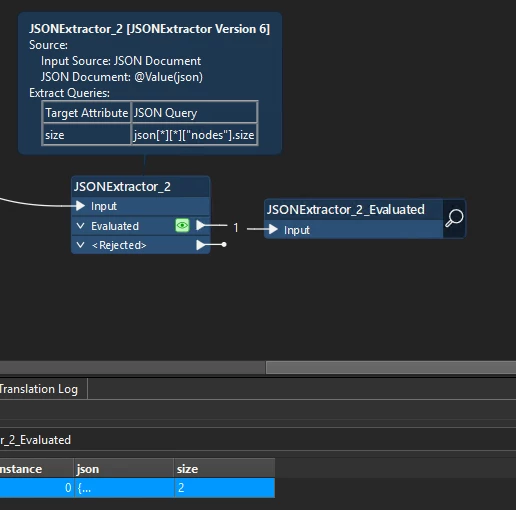
Can you try it in the json extractor/fragmentor with .size? Like this : json[*][*][“nodes”].size

I found this in the json query section of the fragmenter:

JSON Property Expressions

A property expression is a structure expression as described above, followed by a . (dot) operator and a property name. Currently, the only supported properties are type and size. The type property returns the type of the JSON value referred to by the JSON structure expression. For example, if the outermost JSON element is an array, and the first element of the array is a string, then the expression json[0].type would have a value of string. The size property, which can only be applied to an array, returns the number of elements in the array.


So the .size sounds like what you need.


ebygomm
Influencer
Forum|alt.badge.img+46
  • Influencer
  • February 5, 2026

Can you try it in the json extractor/fragmentor with .size? Like this : json[*][*][“nodes”].size

I found this in the json query section of the fragmenter:

JSON Property Expressions

A property expression is a structure expression as described above, followed by a . (dot) operator and a property name. Currently, the only supported properties are type and size. The type property returns the type of the JSON value referred to by the JSON structure expression. For example, if the outermost JSON element is an array, and the first element of the array is a string, then the expression json[0].type would have a value of string. The size property, which can only be applied to an array, returns the number of elements in the array.


So the .size sounds like what you need.


Nice!