I’m trying to convert those attribute values whichever has comma into an array.
Attribute A has values - "ABC" and "ABC","DEF" and "ABC","DEF","GHI".
Desired output -
“ABC”
["ABC", "DEF"]
["ABC", "DEF",”GHI”]
Any inputs are appreciated. Thanks very much!
Tagging @danilo_fme , @david_r
Best answer by daveatsafe
Hi @fmeuser_gc,
Please use a Tester to test if Attribute A contains a comma. Route the Passed output to a StringConcatenator to add the square brackets to the beginning and end of the attribute value.
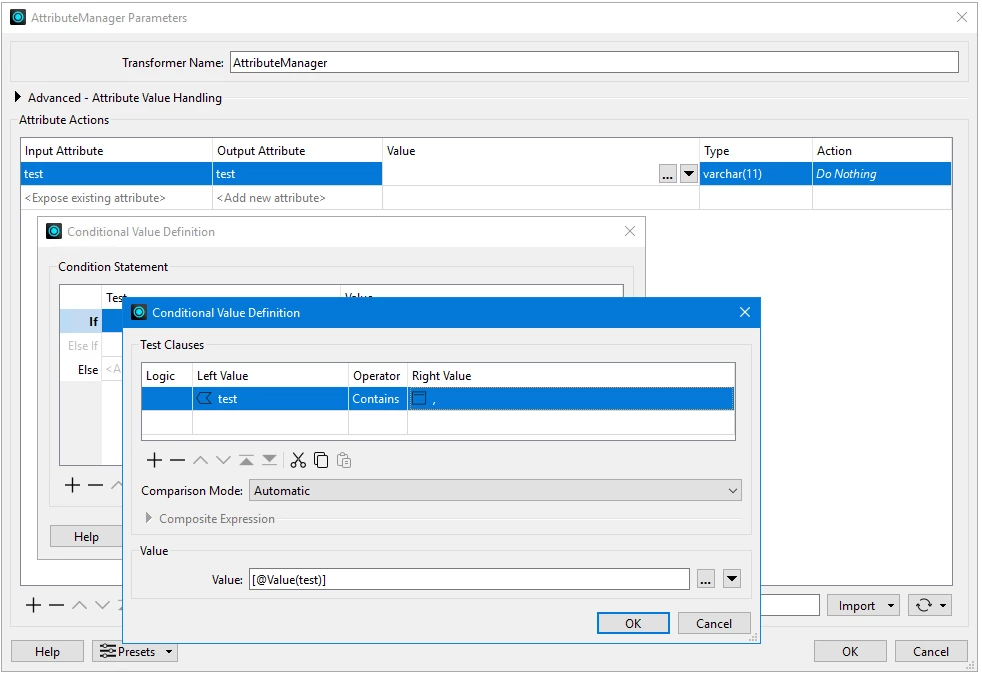
You could also do the same operation using a conditional operation in an AttributeManager:
This post is closed to further activity.
It may be an old question, an answered question, an implemented idea, or a notification-only post.
Please check post dates before relying on any information in a question or answer.
For follow-up or related questions, please post a new question or idea.
If there is a genuine update to be made, please contact us and request that the post is reopened.
Please use a Tester to test if Attribute A contains a comma. Route the Passed output to a StringConcatenator to add the square brackets to the beginning and end of the attribute value.
You could also do the same operation using a conditional operation in an AttributeManager: