Question

Clipping 3D City model by polygon

  • April 24, 2019
  • 7 replies
  • 186 views

Forum|alt.badge.img

I have 3D building model (in *.ffs and cityGML format) and I would like to clip of them by 2D polygon. I tried Clipper transformer, Extruder 2D polygon and SpatialRelator ("Requestor is Within Supplier"), and I tried also a CSGBuilder. But all of them don't give me appropriate result.

When I use a spatial relator, my result is in Rejected port, and Total Features Written is 0.

When I use a Clipper Transformer, I receive an error: "Clipping is not supported for IFMEBRepSolid geometry"

Someone has any idea to solution of my problem?

Thanks in advance.

This post is closed to further activity.
It may be an old question, an answered question, an implemented idea, or a notification-only post.
Please check post dates before relying on any information in a question or answer.
For follow-up or related questions, please post a new question or idea.
If there is a genuine update to be made, please contact us and request that the post is reopened.

7 replies

whkarto
Contributor
Forum|alt.badge.img+14
  • Contributor
  • April 25, 2019

Hi @borko_k,


FME is not able to perform clipping operations on meshes. When you load CityGML data into FME, your solid or thematic surfaces (depends on how your CityGML is composed) are imported as such a data type.

To be able to clip the geometry you'll have to force polygon geometry type. This can be done by Deaggregator and GeometryCoercer transformer. Enable option "Split Composites" and route deaggregated features through GeometryCoercer with GeometryType set to "fme_polygon". If your input data is read as geometry type "IFMEMesh" you'lll have to use another GeometryCoercer before deaggregator runs, with GeometryType set to "fme_composite_surface".

Be aware that coercing surface geometry to polygons will eliminate all appearance information! You'll lose every kind of texture by this method! After clipping it's also very likely that you'll have to adjust sematic structure of your CityGML, assuming that the clipping should lead to new Buildings oder BuildingParts. The writer can't do the trick for you, it's up to the workspace author to model the data structure correctly.


Forum|alt.badge.img
  • Author
  • April 25, 2019

Hi @borko_k,


FME is not able to perform clipping operations on meshes. When you load CityGML data into FME, your solid or thematic surfaces (depends on how your CityGML is composed) are imported as such a data type.

To be able to clip the geometry you'll have to force polygon geometry type. This can be done by Deaggregator and GeometryCoercer transformer. Enable option "Split Composites" and route deaggregated features through GeometryCoercer with GeometryType set to "fme_polygon". If your input data is read as geometry type "IFMEMesh" you'lll have to use another GeometryCoercer before deaggregator runs, with GeometryType set to "fme_composite_surface".

Be aware that coercing surface geometry to polygons will eliminate all appearance information! You'll lose every kind of texture by this method! After clipping it's also very likely that you'll have to adjust sematic structure of your CityGML, assuming that the clipping should lead to new Buildings oder BuildingParts. The writer can't do the trick for you, it's up to the workspace author to model the data structure correctly.

Thanks for your advance.

In my company, we find a different way to solution to my problem - with using a 2DForcer and FeatureMerger with oryginal data. In this way, Clipper transformer is sufficient.


  • June 18, 2019

Thanks for your advance.

In my company, we find a different way to solution to my problem - with using a 2DForcer and FeatureMerger with oryginal data. In this way, Clipper transformer is sufficient.

Hello @borko_k, Could u provide image of ur workflow using mentioned above or explain it further? I am struggling with figuring it out.


reservoirdog
Supporter
Forum|alt.badge.img+12

Hello @borko_k, Could u provide image of ur workflow using mentioned above or explain it further? I am struggling with figuring it out.

Seconded!


Please reup the screen (better up the whole Workspace, if you don't mind)

daveatsafe
Safer
Forum|alt.badge.img+20
  • Safer
  • April 3, 2020

You can clip solids by another solid in the Clipper, so you could try extruding your clipping polygons with an Extruder transformer. However, solid clipping is quite slow. Alternatively, you could coerce the solids to composite surfaces using a GeometryCoercer, then clip with the FME Hub SurfaceClipper transformer, which will keep all texturing intact.


FMEHello,

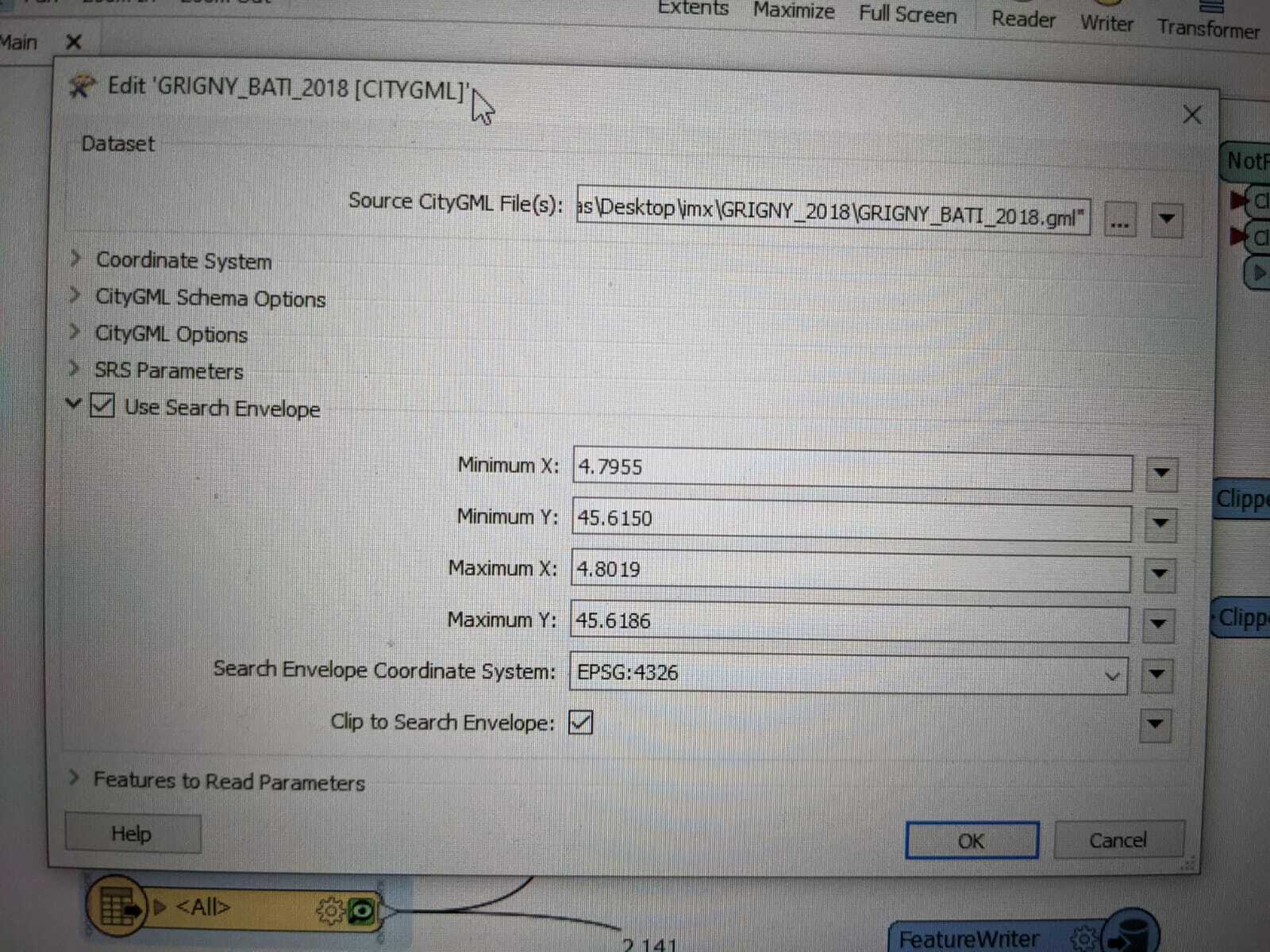
I encountered the same challenge and solved it using the "clip to search envelope" parameters straight in the import CityGML file in FME. Worked like a charm for me !


reservoirdog
Supporter
Forum|alt.badge.img+12
  • Supporter
  • February 9, 2021

FMEHello,

I encountered the same challenge and solved it using the "clip to search envelope" parameters straight in the import CityGML file in FME. Worked like a charm for me !

Hey Frank, good to know!

Problem is clipping by polygon (e.g. a city surrounding) which usually isn't perfectly squared 😄