



Best Answer

Startup Python Script - How to make python input() work?

  • January 8, 2018
  • 5 replies
  • 92 views

robertr
Contributor
Forum|alt.badge.img+6

Hello,


I was initially running a python script outside FME to prompt a user for a said city to download data for.


I would like to integrate that script as a "Python Startup Script", in FME 2017.1. 

I am stuck right at the beginning where I want the user to mention the city but the input caller stops the progress of the translation and the console log is waiting for something I am not sure how to enter. It would be even cooler if I could present him a dropdown list to chose from.

county_name = input('City Name: ').title()

The log window shows the following:

FME_BEGIN_PYTHON: evaluating python script from string...
Enter the City Name:

...aaand I cannot do anything here. Or I am not aware of the input place.

Any advice on how to overcome this?
Best answer by mark_f

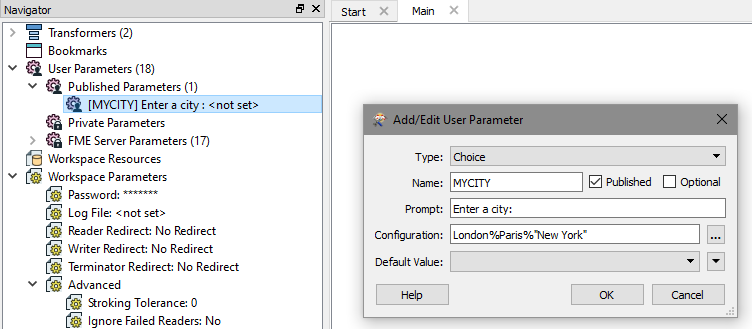
Hi - you need to use a Published Parameter - create one in the navigator panel. Then at runtime you can supply a value. Fetch this value into the startup script using

value = FME_MacroValues['MYCITY']

or

import fme
value = fme.macroValues['MYCITY']

where MYCITY is the name of the parameter created.

So you can create a Published Parameter as free text entry, but also create picklist and any other types of parameters.

0684Q00000ArLH8QAN.png

This post is closed to further activity.
It may be an old question, an answered question, an implemented idea, or a notification-only post.
Please check post dates before relying on any information in a question or answer.
For follow-up or related questions, please post a new question or idea.
If there is a genuine update to be made, please contact us and request that the post is reopened.

5 replies

Forum|alt.badge.img+2
  • Best Answer
  • January 8, 2018

Hi - you need to use a Published Parameter - create one in the navigator panel. Then at runtime you can supply a value. Fetch this value into the startup script using

value = FME_MacroValues['MYCITY']

or

import fme
value = fme.macroValues['MYCITY']

where MYCITY is the name of the parameter created.

So you can create a Published Parameter as free text entry, but also create picklist and any other types of parameters.

0684Q00000ArLH8QAN.png


robertr
Contributor
Forum|alt.badge.img+6
  • Author
  • Contributor
  • January 8, 2018

Hi - you need to use a Published Parameter - create one in the navigator panel. Then at runtime you can supply a value. Fetch this value into the startup script using

value = FME_MacroValues['MYCITY']

or

import fme
value = fme.macroValues['MYCITY']

where MYCITY is the name of the parameter created.

So you can create a Published Parameter as free text entry, but also create picklist and any other types of parameters.

0684Q00000ArLH8QAN.png

uuuhhh... I seeeee. Thanks @mark_1spatial!


There is huge potential in mastering this part. I will start looking in more depth into published and private parameters + link-ing them to this or that.


Do you happen to know a place where all these Python related features from FME are located? Here I mean all the stuff that comes when importing FME in python (like FME_MacroValues)


Is there anything else that you found helpful except this page: linktoDocumentation?


Forum|alt.badge.img+2
  • January 8, 2018

Hi - you need to use a Published Parameter - create one in the navigator panel. Then at runtime you can supply a value. Fetch this value into the startup script using

value = FME_MacroValues['MYCITY']

or

import fme
value = fme.macroValues['MYCITY']

where MYCITY is the name of the parameter created.

So you can create a Published Parameter as free text entry, but also create picklist and any other types of parameters.

0684Q00000ArLH8QAN.png

Some good examples here:


https://knowledge.safe.com/articles/706/python-and-fme-basics.html


there is online help included for Python also. There are a number of members on this forum who are FME Python Jedi ;)


robertr
Contributor
Forum|alt.badge.img+6
  • Author
  • Contributor
  • January 8, 2018
Some good examples here:


https://knowledge.safe.com/articles/706/python-and-fme-basics.html


there is online help included for Python also. There are a number of members on this forum who are FME Python Jedi ;)


Good to hear!


One more question. I noticed that $MYCITY remains set to the option I selected in the 1st place.


When reopening the workspace, it does not prompt anymore although I did not select anything for "default" value. I always want it to prompt.


Laster Edit: convert to private and select "Prompt Before Running Workspace".

Forum|alt.badge.img+2
  • January 9, 2018

Hi - you need to use a Published Parameter - create one in the navigator panel. Then at runtime you can supply a value. Fetch this value into the startup script using

value = FME_MacroValues['MYCITY']

or

import fme
value = fme.macroValues['MYCITY']

where MYCITY is the name of the parameter created.

So you can create a Published Parameter as free text entry, but also create picklist and any other types of parameters.

0684Q00000ArLH8QAN.png


Unfortunately that’s not possible and something that bugs me too! I raised this idea asking for this to be changed so feel free to go and vote for it at this link ;)r


https://knowledge.safe.com/idea/45682/published-parameter-no-default-value.html