Question

Read multiple Oracle Spatial geometry columns in FME

  • June 26, 2013
  • 5 replies
  • 135 views

Hi,


I have 5 SDO_GEOMETRY columns in an Oracle Spatial table. I am trying to read multiple geometry columns from the single table in Oracle Spatial.


However it is reading only the first geometry every time.


How can I read all the 5 geometry columns in FME within one transaction flow?


Regards,


Ananda

This post is closed to further activity.
It may be an old question, an answered question, an implemented idea, or a notification-only post.
Please check post dates before relying on any information in a question or answer.
For follow-up or related questions, please post a new question or idea.
If there is a genuine update to be made, please contact us and request that the post is reopened.

5 replies

ca
Participant
Forum|alt.badge.img+1
  • Participant
  • June 26, 2013
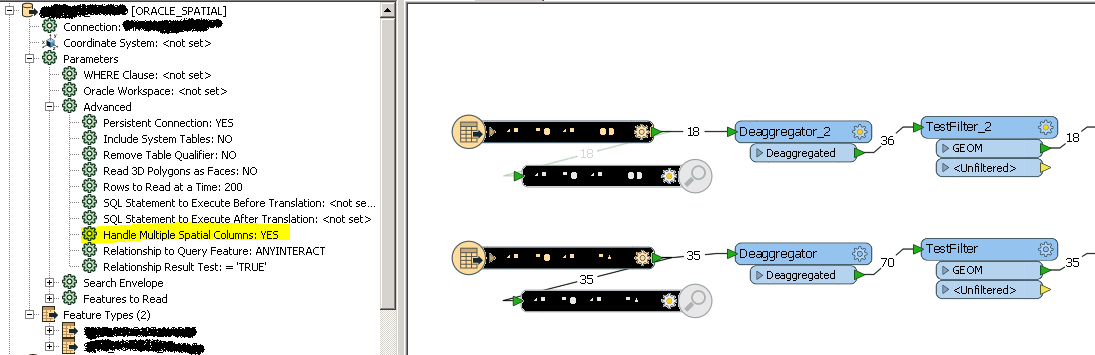
The Oracle Spatial reader has a parameter called Handle Multiple Spatial Columns which you need to set to Yes.


Search this document for HANDLE_MULTIPLE_SPATIAL_COLUMNS for the detalks


http://docs.safe.com/fme/reader_writerPDF/oracle8i.pdf


CA


  • Author
  • June 27, 2013
Followed the approach. Now I can see the name of the geometry columns in the logger,


Name(fme-system): 'GEOM1'


Name(fme-system): 'GEOM2'


Name(fme-system): 'GEOM3'


However I can't see the name in the attributes. I want to filter out the geometries based on the attribute name and retrieve the co-ordinates. GeometryFilter does not work. MultipleGeometryFilter doesn't allow me to specify the name.


Regards,


Ananda


ca
Participant
Forum|alt.badge.img+1
  • Participant
  • June 27, 2013
How about using an AttributeExposer transformer to expose the geometry columns. Does that solve the problem?


CA

verdoodtdries
Supporter
Forum|alt.badge.img+23

Hi anandak and ca,

After you set Oracle Reader parameter "Handle Multiple Spatial Columns" to 'yes', you retrieve aggregate geometry.


Next step is to use the Deaggregator transformer to split both geometries.

Finally you can expose the desired geometry column name (if necessary) and filter the correct geometry with a Tester/TestFilter.


erik_jan
Contributor
Forum|alt.badge.img+26
  • Contributor
  • January 19, 2017

You can use the GeometryPropertyExtractor transformer to retrieve the name of the geometries after using the DeAggregator. That will store the name in an attribute.