Question

filter and count attributes in shapefile

  • April 3, 2017
  • 6 replies
  • 93 views

Forum|alt.badge.img

Hi there,

I've been struggling for a while now to generate stats in the way I want to for a few specific Shape files I have. I've tried toying around with the statistic calculator for a while, but not getting exactly what I need.

So, as a representation of my shapefile's contents, here's an example of what I have:

TypeColorSizeShapeMetersARedSMLTRI11ARedSMLRND15ARedMEDRND10BRedMEDRND20BRedLRGRND13BBlueLRGRND16CBlueSMLSQR14CBlueSMLSQR19CGreenMEDTRI17


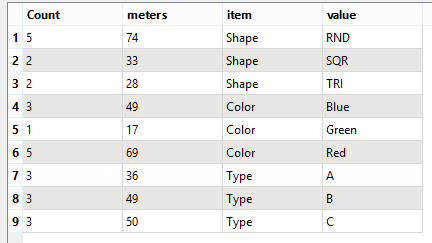
And here's what I'd like to have as an output (aiming for a plain excel sheet):ItemValueMetersCountTypeA363TypeB493TypeC503ColorRed695ColorBlue493ColorGreen171SizeSML494SizeMED473SizeLRG292ShapeTRI282ShapeRND745ShapeSQR332

Basically I just want the counts and total measurements (I already have the METERS attribute in my source) for each unique value for specified attributes (like Color, or Value etc..)

Realistically speaking I'd probably do a fanout on "Item" to make the sheet less clunky, but that I already know how to do.

Please feel free to ask if there's anything else I need to explain in more detail.

Thanks in advance,
This post is closed to further activity.
It may be an old question, an answered question, an implemented idea, or a notification-only post.
Please check post dates before relying on any information in a question or answer.
For follow-up or related questions, please post a new question or idea.
If there is a genuine update to be made, please contact us and request that the post is reopened.

6 replies

Forum|alt.badge.img+7

Hi

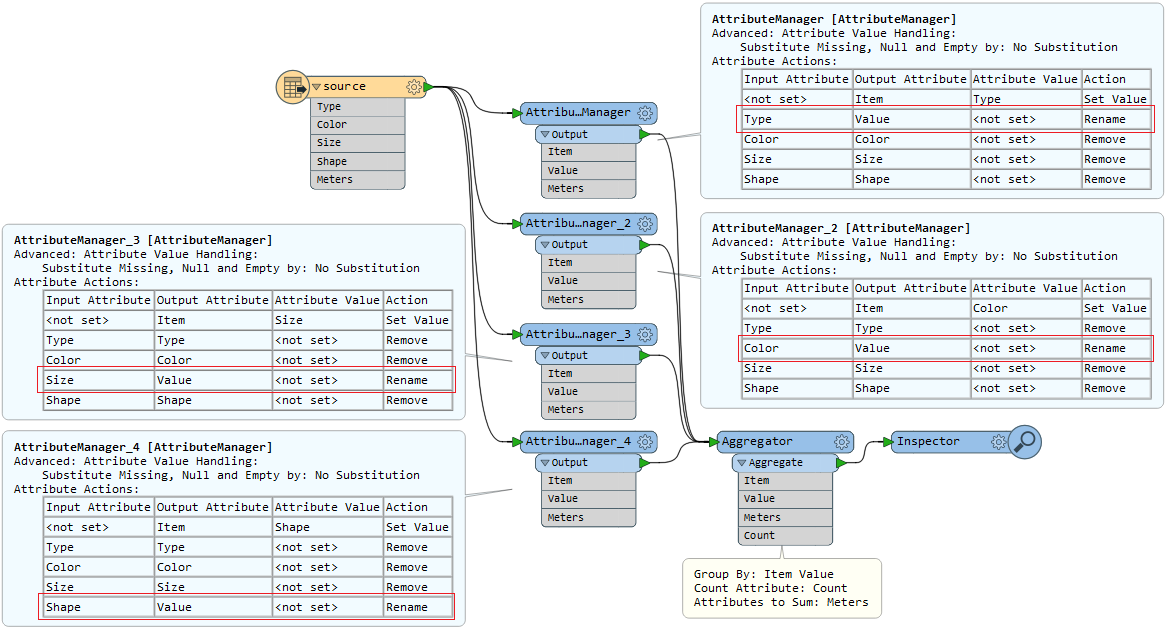
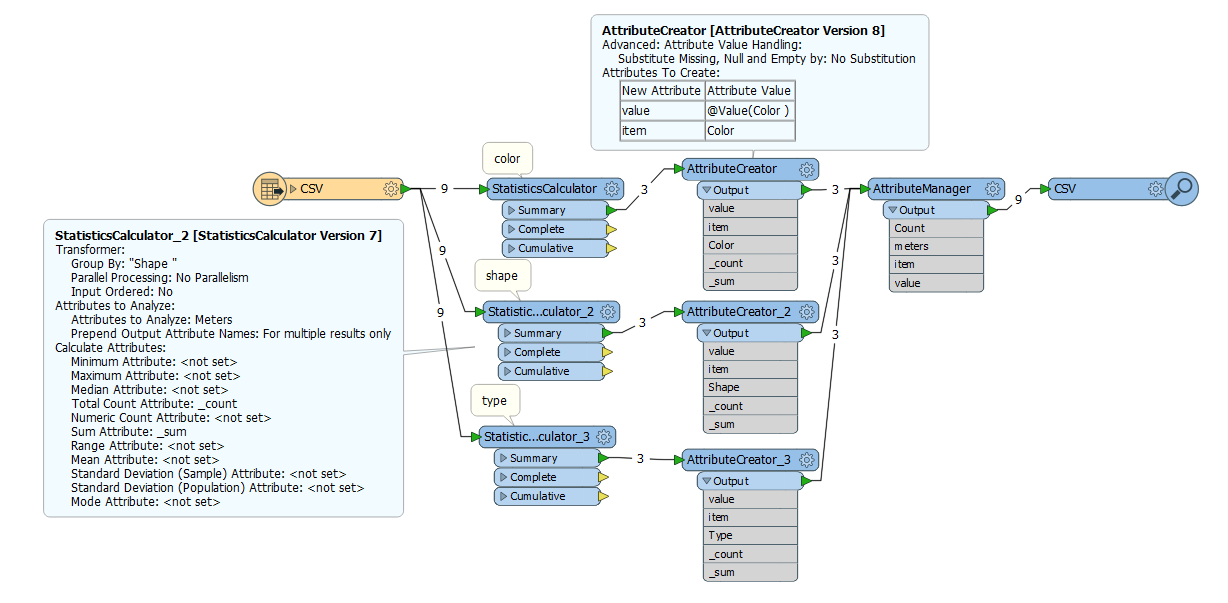
I think I found the solution with a couple of StatisticsCalculators:


Forum|alt.badge.img

Hi jeroenstiers,

Thanks, this really works brilliantly and gives me exactly what I wanted, except one issue:


My meters attribute does not pass through the Stats calculator. It seems like that transformer removes the attribute, so when I add it to the output writer, it shows a red arrow, and running the workspace, meters remain blank.

Any idea what may be the cause of this?


itay
Supporter
Forum|alt.badge.img+18
  • Supporter
  • April 3, 2017

Probably because the result is meters and not Meters, you need to map meters to Meters for your output.


takashi
Celebrity
  • April 3, 2017

Hi @robbie_botha, the features output via the Summary port of the StatisticsCalculator don't have the "Meters" attribute, but they should have the sum of the value of "Meters" for each group. I guess that the sum attribute has been renamed to "meters" with the AttributeManager in @jeroenstiers' example.

This is another approach. FYI.


Forum|alt.badge.img

Ahh thanks @takashi, I missed the Meters becoming _sum part, it works perfectly now.

Thanks to you and @jeroenstiers, really appreciate the swift help.

Cheer,


takashi
Celebrity
  • April 3, 2017

Hi @robbie_botha, the features output via the Summary port of the StatisticsCalculator don't have the "Meters" attribute, but they should have the sum of the value of "Meters" for each group. I guess that the sum attribute has been renamed to "meters" with the AttributeManager in @jeroenstiers' example.

This is another approach. FYI.

0684Q00000ArKkyQAF.png

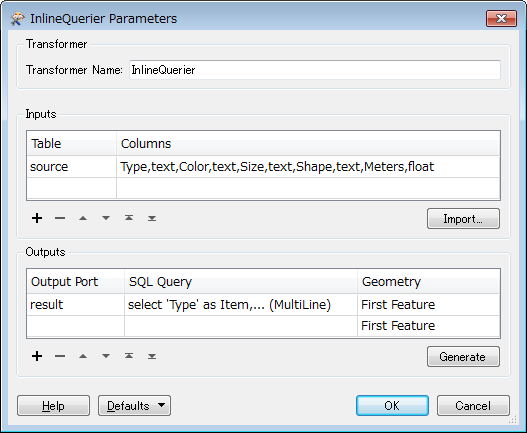
For what it's worth, an InlineQuerier with this SQL statement could work as well.


select
    'Type'      as Item,
    Type        as Value,
    sum(Meters) as Meters,
    count(*)    as Count
    from source group by Type
union all select 'Color', Color, sum(Meters), count(*)
    from source group by Color
union all select 'Size',  Size,  sum(Meters), count(*)
    from source group by Size
union all select 'Shape', Shape, sum(Meters), count(*)
    from source group by Shape
0684Q00000ArMYrQAN.png