


Question

Group Line based on spatial location and limit it by max number of ID in individual group

  • July 5, 2017
  • 7 replies
  • 45 views

gis2020
Contributor
Forum|alt.badge.img+5

Hi All,

I have line network where in i want to create a group of line based on there spatial location. But in this i want to limit the number of line in each group if the line number exceed than the defined value (i am using feature_ID for defining my line criterion )then it should go for regrouping.For this i have used the buffering and then i am using a tester to check the number of feature in each group. I am able to separate the feature but i am not sure how i can re-group those feature in new group based on my criterion.


This post is closed to further activity.
It may be an old question, an answered question, an implemented idea, or a notification-only post.
Please check post dates before relying on any information in a question or answer.
For follow-up or related questions, please post a new question or idea.
If there is a genuine update to be made, please contact us and request that the post is reopened.

7 replies

takashi
Celebrity
  • July 5, 2017
What kind of spatial relations are the basis to make groups? For example, two lines that touch each other should belong to the same group?


gis2020
Contributor
Forum|alt.badge.img+5
  • Author
  • Contributor
  • July 5, 2017
What kind of spatial relations are the basis to make groups? For example, two lines that touch each other should belong to the same group?


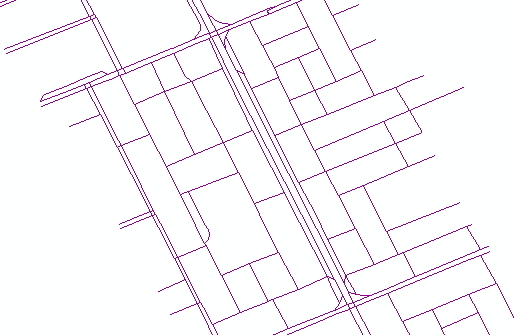
yes i am grouping connected lines in one group. IN the image i had given the network sample which i have.For selection criterion i am using the feature_ID if the count of feature_ID in one grp is more than 40 then go for regrouping


jdh
Contributor
Forum|alt.badge.img+40
  • Contributor
  • July 5, 2017

If the number of touching lines is greater than 40, how do you want to subdivide the group?


As a first pass I would use the networkTopologyCalculator to assign each touching line a common _network_id. I would then use either the Aggregator or StatisticsCalculator to get the count of the number of features in each network.


If that number is greater than 40, you have a couple of choices for subdivision.


You can divide them into groups of 40 by counting the features


You can use a random sampler to separate them into groups

You can tile the data (possibly iteratively) so that each tile contains a maximum of 40 features.


gis2020
Contributor
Forum|alt.badge.img+5
  • Author
  • Contributor
  • July 6, 2017

If the number of touching lines is greater than 40, how do you want to subdivide the group?


As a first pass I would use the networkTopologyCalculator to assign each touching line a common _network_id. I would then use either the Aggregator or StatisticsCalculator to get the count of the number of features in each network.


If that number is greater than 40, you have a couple of choices for subdivision.


You can divide them into groups of 40 by counting the features


You can use a random sampler to separate them into groups

You can tile the data (possibly iteratively) so that each tile contains a maximum of 40 features.

Hi,


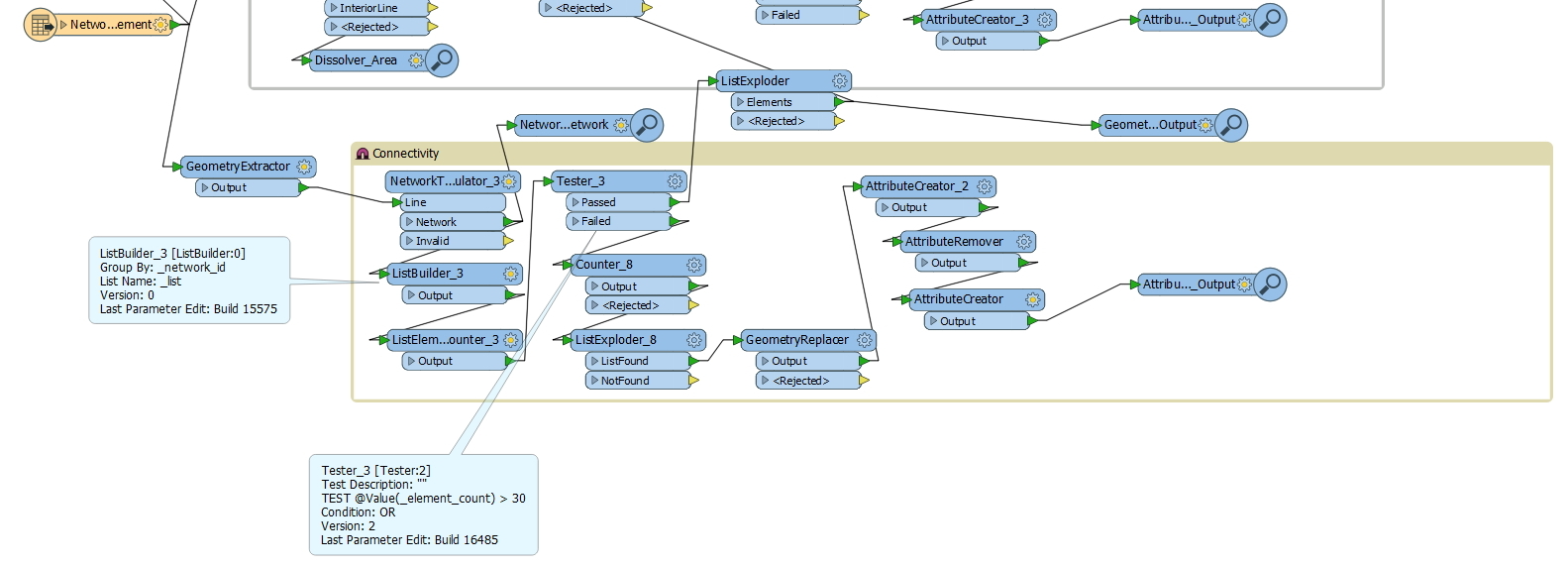
I have tried this approach also but i am not getting the results as per my need . So i had decided to of or simple approach of using buffer. In below WB i am using tester to test my condition and then feature which passes test condition >30 goes for regrouping . for regrouping i am using 2nd criterion as for grouping as i am creating the area of network and then using spatial relator to grp the feature. but things are not working in this case .


i so i want to use buffer and then something which will create small groups bases on my test conditions but not sure how i can do this.


gis2020
Contributor
Forum|alt.badge.img+5
  • Author
  • Contributor
  • July 6, 2017

If the number of touching lines is greater than 40, how do you want to subdivide the group?


As a first pass I would use the networkTopologyCalculator to assign each touching line a common _network_id. I would then use either the Aggregator or StatisticsCalculator to get the count of the number of features in each network.


If that number is greater than 40, you have a couple of choices for subdivision.


You can divide them into groups of 40 by counting the features


You can use a random sampler to separate them into groups

You can tile the data (possibly iteratively) so that each tile contains a maximum of 40 features.


HI Jdn ,


could you please elaborate more on subdivision part.


Thank you in advance.

gis2020
Contributor
Forum|alt.badge.img+5
  • Author
  • Contributor
  • July 6, 2017
What kind of spatial relations are the basis to make groups? For example, two lines that touch each other should belong to the same group?


Hi @takashi


In this case i am creating the buffer of 1 m around each road and then dissolving it . then i am giving number to each area using counter. Finally i am using line on area overlay get the line in each buffer area. these line area getting number from these area. now i want to check if the number of line in each area. if that is more than 30 then renaming line in that group should should get different group ID. it is very important to group line bases on there spatial location . that is why i am using simplest method go buffer. please suggest how i can go for sudivision in each group.?Thank you in advance.


gis2020
Contributor
Forum|alt.badge.img+5
  • Author
  • Contributor
  • July 18, 2017

Hi,

@ jdh and @takashi i am still not finding the right way to do create sub groups in groups .